---
title: .NET agent configuration
source: https://docs.newrelic.com/docs/apm/agents/net-agent/configuration/net-agent-configuration
---
You'll be able to configure our .NET agent to suit your environment after you [create a New Relic account](https://newrelic.com/signup) (it's free, forever) and [install the .NET agent](/install/dotnet).
## Configuration overview [#config-overview]
APM agent configuration options allow you to control some aspects of how the agent behaves. Some of these config options are part of the basic install process (like setting your license key and app name), but most are more advanced settings, such as setting a log level, setting up proxy host access, excluding certain attributes, and enabling distributed tracing.
The .NET agent gets its configuration from the `newrelic.config` file, which is generated as part of the [install process](https://docs.newrelic.com/docs/agents/net-agent/installation/install/dotnet). By default, only a global `newrelic.config` file is created, but you can also create app-local `newrelic.config` files for finer control over a multi-app system. Other ways to set config options include: using environment variables, or setting server-side configuration from the UI. For more on the various config options and what overrides what, see [Config settings precedence](https://docs.newrelic.com/docs/agents/net-agent/configuration/net-agent-configuration#config-options-precedence).
Support for both .NET Framework and .NET Core use the same configuration options and have the same APM features, unless otherwise stated.
If you make changes to the config file and want to validate that it's in the right format, you can check it against the XSD file (for example, at `C:\ProgramData\New Relic\.NET Agent\newrelic.xsd` for Windows) with any XSD validator.
> #### ⚠️ IMPORTANT
>
> **For IIS**: after you change your `newrelic.config` or `app.config` file, perform an `IISRESET` from an administrative command prompt. Log level adjustments do not require a reset.
## Configuration methods and precedence levels [#config-options-precedence]
Upon installation, the .NET agent's configuration file (`newrelic.config`) applies to all monitored applications, but you can configure the agent in other ways. Here's a diagram showing how different configuration options take precedence over one another:
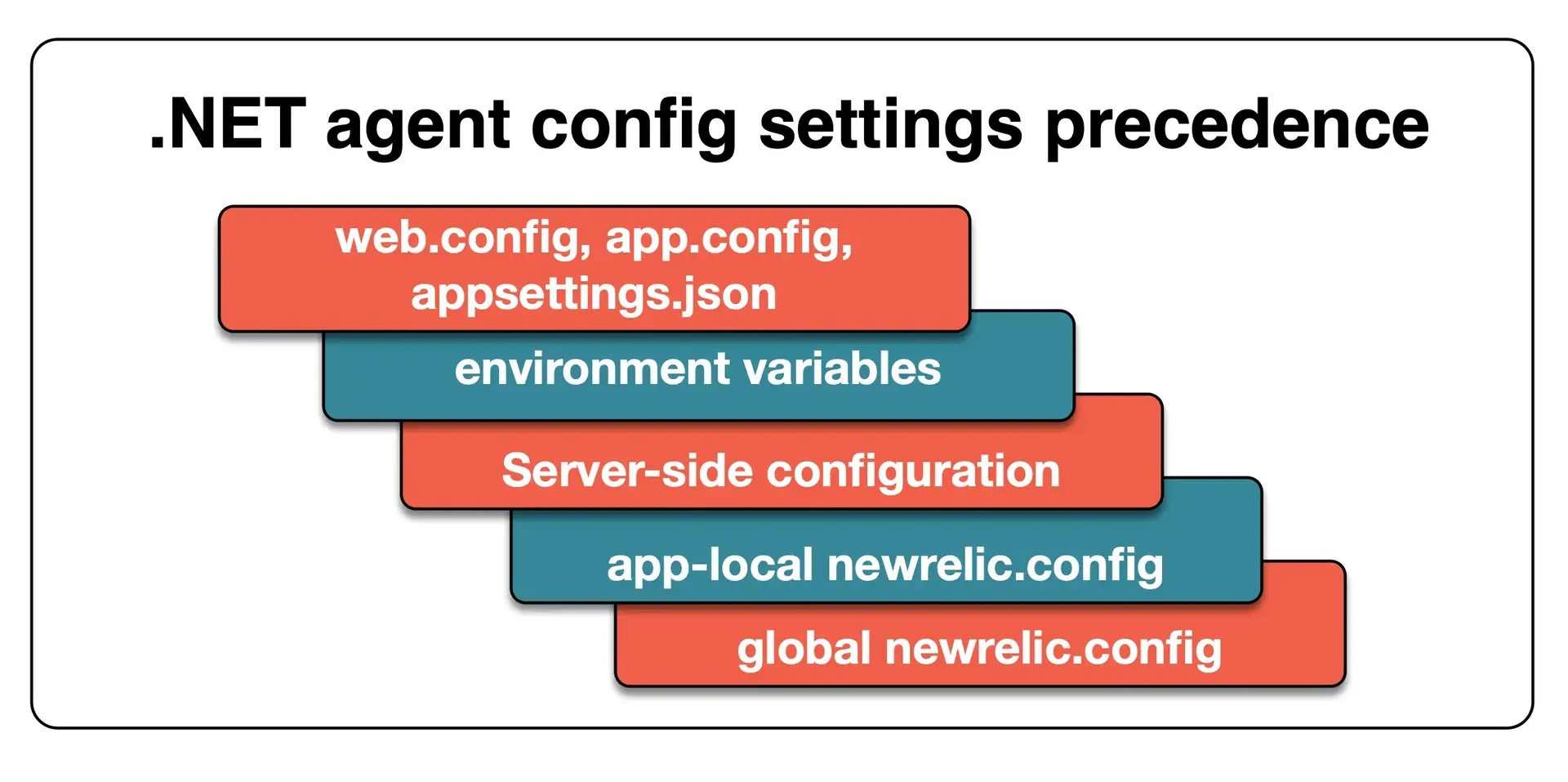
This diagram explains the order of precedence for different ways you might configure the .NET agent.
Here are details about the configuration methods shown in the diagram, and their precedence levels:
| **.NET configuration** | **Details and precedence** |
| -------------------------------------------------- | ------------------------------------------------------------------------------------------------------------------------------------------------------------------------------------------------------------------------------------------------------------------------------------------------------------------------------------------------------------------------------------------------------------------------------------------------------------------------------------------------------------------------------------------------------------------------------------------------------------------------------------------------------------------------------------------------------------------------------- |
| `web.config` or `app.config` or `appsettings.json` | Configuration settings set in these files take highest precedence. If the agent is disabled in the local or global `newrelic.config`: - The `NewRelic.AgentEnabled` settings in `appsettings.json` **will enable the agent**. - The `NewRelic.AgentEnabled` settings in a `web.config` or `app.config` file **will be ignored**. |
| Environment variables | Second-highest precedence. For more about these, see [.NET environment variables](#environment-variables). |
| Server-side configuration | Third-highest precedence. A limited number of [server-side configuration](https://docs.newrelic.com/docs/agents/manage-apm-agents/configuration/server-side-agent-configuration) settings are available; the other settings will come from other configuration sources. |
| App-local `newrelic.config` | Fourth-highest precedence. You can create app-local `newrelic.config` files to configure individual apps on a multi-app system. These local configuration files override settings in the global `newrelic.config` file. The agent looks for app-local config files in the following directories, in this order: - A directory specified in your `web.config` or `app.config` file with the `NewRelic.ConfigFile` property - The web app's root directory (with the `app.config` or `web.config`) - The directory containing your app's executable file Note that the app-local config file must be complete and validate against the XSD file (for example, at `C:\ProgramData\New Relic\.NET Agent\newrelic.xsd` for Windows). |
| Default (global) `newrelic.config` | Default source and the lowest precedence. Will configure all applications on a host in the absence of other config files. The global config file is located in the New Relic agent home directory: `%PROGRAMDATA%\New Relic\.NET Agent` |
## Required environment variables [#environment-variables]
Our .NET agent relies on environment variables to tell the .NET Common Language Runtime (CLR) to attach New Relic to your processes. Some [.NET agent install procedures](https://docs.newrelic.com/docs/agents/net-agent/installation/new-relic-net-agent-install-introduction) (like the MSI installer) will automatically set these variables for you; some procedures will require you to manually set them.
> #### ⚠️ CAUTION
>
> Security recommendation: You should consider what users can set system environment variables. You should also secure the accounts under which your applications execute to prevent user environment variables overriding system environment variables
**.NET Framework environment variables**
For .NET Framework, the following variables are required:
````ini
COR_ENABLE_PROFILING=1
COR_PROFILER={71DA0A04-7777-4EC6-9643-7D28B46A8A41}
NEWRELIC_INSTALL_PATH="INSERT_THE_PATH_TO_THE_AGENT_DIRECTORY"
```
The Windows .NET agent installer (.msi) will add these to IIS by default, or as system-wide environment variables when enabling `Instrument All`.
When using the Windows .NET agent installer, ensure that `NEWRELIC_INSTALL_PATH` is set to `C:\Program Files\New Relic\.NET Agent\`. This is where the agent DLLs are placed on the system.
For more details on these variables, as well as correct values for other installation scenarios, please see [understanding .NET agent environment variables](/docs/apm/agents/net-agent/other-installation/understanding-net-agent-environment-variables/).
When installing the agent via the Nuget package, the agent requires [a different set of environment variables](/docs/apm/agents/net-agent/install-guides/install-net-agent-using-nuget/#nuget-framework).
````
**.NET Core environment variables**
For .NET Core, the following variables are required:
**Linux:**
````ini
CORECLR_ENABLE_PROFILING=1
CORECLR_PROFILER={36032161-FFC0-4B61-B559-F6C5D41BAE5A}
CORECLR_NEWRELIC_HOME=path/to/agent/directory
CORECLR_PROFILER_PATH="${CORECLR_NEWRELIC_HOME}/libNewRelicProfiler.so"
```
**Windows (MSI Installer):**
```ini
CORECLR_ENABLE_PROFILING=1
CORECLR_PROFILER={36032161-FFC0-4B61-B559-F6C5D41BAE5A}
NEWRELIC_INSTALL_PATH=C:\Program Files\New Relic\.NET Agent\
CORECLR_NEWRELIC_HOME=C:\ProgramData\New Relic\.NET Agent\
```
The Windows .NET agent installer will add these to IIS by default, or as system-wide environment variables when enabling `Instrument All`. Exception: `CORECLR_ENABLE_PROFILING` needs to be set manually in order to instrument non-IIS hosted .NET Core applications. See [Compatibility and requirements for .NET Framework](/docs/apm/agents/net-agent/configuration/net-agent-configuration/) for .NET Framework applications.
For more details on these variables, as well as correct values for other installation scenarios, please see [understanding .NET agent environment variables](/docs/apm/agents/net-agent/other-installation/understanding-net-agent-environment-variables/).
When installing the agent via the Nuget package in Windows, the agent requires a [different set of environment variables](/docs/apm/agents/net-agent/install-guides/install-net-agent-using-nuget/#nuget-windows).
````
If your system has previously used monitoring services (non-New Relic), you may have a "profiler conflict" when trying to install and use the New Relic agent. More details:
**Profiler conflict explanation**
New Relic's .NET agents rely on environment variables to tell the .NET Common Language Runtime (CLR) to load New Relic into your processes. The install-related environment variables are Microsoft variables, not New Relic variables. They can be used by other .NET profilers, and only one profiler can be attached to a process at a time. For this reason, if you have used previous application monitoring products, you may have [profiler conflicts](https://docs.newrelic.com/docs/agents/net-agent/troubleshooting/profiler-conflicts).
For specific install instructions, see the [.NET agent install documentation](https://docs.newrelic.com/docs/agents/net-agent/installation/new-relic-net-agent-install-introduction).
## Optional environment variables [#optional-environment-variables]
Some configuration options in New Relic's .NET agent can be set via environment variables as an alternative to setting them in a config file. Below is a list of environment variables recognized by the .NET agent with example values.
```ini
NEW_RELIC_LICENSE_KEY=YOUR_LICENSE_KEY
NEW_RELIC_APP_NAME=Descriptive Name
MAX_TRANSACTION_SAMPLES_STORED=500
MAX_EVENT_SAMPLES_STORED=500
NEW_RELIC_DISTRIBUTED_TRACING_ENABLED=true
NEW_RELIC_SPAN_EVENTS_ENABLED=false
NEW_RELIC_SPAN_EVENTS_MAX_SAMPLES_STORED=2000
NEW_RELIC_INFINITE_TRACING_TRACE_OBSERVER_HOST=myhost.infinitetracing.com
NEW_RELIC_LABELS="foo:bar;zip:zap"
NEW_RELIC_PROCESS_HOST_DISPLAY_NAME=Custom Name
NEW_RELIC_HOST=gov-collector.newrelic.com
NEW_RELIC_PROXY_HOST=hostname
NEW_RELIC_PROXY_URI_PATH=path/to/something.aspx
NEW_RELIC_PROXY_PORT=5000
NEW_RELIC_PROXY_USER=YOUR_USER_NAME
NEW_RELIC_PROXY_PASS=YOUR_PROXY_PASSWORD
NEW_RELIC_PROXY_DOMAIN=mydomain.com
NEW_RELIC_PROXY_PASS_OBFUSCATED=YOUR_OBFUSCATED_PROXY_PASSWORD
NEW_RELIC_CONFIG_OBSCURING_KEY=YOUR_OBSCURING_KEY
NEW_RELIC_SEND_DATA_ON_EXIT=true
NEW_RELIC_SEND_DATA_ON_EXIT_THRESHOLD_MS=2000
NEW_RELIC_HIGH_SECURITY=true
NEW_RELIC_DISABLE_SAMPLERS=true
NEW_RELIC_LOG=MyApp.log
NEW_RELIC_LOG_ENABLED=true
NEWRELIC_LOG_LEVEL=info
NEW_RELIC_LOG_CONSOLE=true
NEWRELIC_PROFILER_LOG_DIRECTORY=path\to\a\directory # not configurable via config file
NEWRELIC_LOG_DIRECTORY=path\to\a\directory # Insert a directory where you want to put the agent and profiler logs. You can't set this directory for both agent and profiler logs in the configuration file.
NEW_RELIC_LOG_ROLLING_STRATEGY=day
NEW_RELIC_LOG_MAX_FILE_SIZE_MB=100
NEW_RELIC_LOG_MAX_FILES=2
NEW_RELIC_ERROR_COLLECTOR_IGNORE_ERROR_CODES=401, 403.18
NEW_RELIC_ERROR_COLLECTOR_EXPECTED_ERROR_CODES=401, 501-503
NEW_RELIC_APPLICATION_LOGGING_ENABLED=true
NEW_RELIC_APPLICATION_LOGGING_METRICS_ENABLED=true
NEW_RELIC_APPLICATION_LOGGING_FORWARDING_ENABLED=true
NEW_RELIC_APPLICATION_LOGGING_FORWARDING_CONTEXT_DATA_ENABLED=true
NEW_RELIC_APPLICATION_LOGGING_FORWARDING_CONTEXT_DATA_INCLUDE="myCustomAttribute1, myOtherCustomAttribute*"
NEW_RELIC_APPLICATION_LOGGING_FORWARDING_CONTEXT_DATA_EXCLUDE="myCustomAttribute2, myOtherCustomAttributeMoreSpecificName"
NEW_RELIC_APPLICATION_LOGGING_FORWARDING_MAX_SAMPLES_STORED=10000
NEW_RELIC_APPLICATION_LOGGING_FORWARDING_LOG_LEVEL_DENYLIST="debug, warn"
NEW_RELIC_APPLICATION_LOGGING_LOCAL_DECORATING_ENABLED=true
NEW_RELIC_ALLOW_ALL_HEADERS=true
NEW_RELIC_ATTRIBUTES_ENABLED=true
NEW_RELIC_ATTRIBUTES_INCLUDE=request.headers.*,foo.bar
NEW_RELIC_ATTRIBUTES_EXCLUDE=request.headers.cookie,request.headers.authorization
NEW_RELIC_UTILIZATION_DETECT_AWS=true
NEW_RELIC_UTILIZATION_DETECT_AZURE=true
NEW_RELIC_UTILIZATION_DETECT_GCP=true
NEW_RELIC_UTILIZATION_DETECT_PCF=true
NEW_RELIC_UTILIZATION_DETECT_DOCKER=true
NEW_RELIC_UTILIZATION_DETECT_KUBERNETES=true
NEW_RELIC_FORCE_NEW_TRANSACTION_ON_NEW_THREAD=true
NEW_RELIC_CODE_LEVEL_METRICS_ENABLED=true
NEW_RELIC_AI_MONITORING_ENABLED=true
NEW_RELIC_AI_MONITORING_RECORD_CONTENT_ENABLED=true
NEW_RELIC_CLOUD_AWS_ACCOUNT_ID=123456789012
NEW_RELIC_TRANSACTION_TRACER_SQL_METADATA_COMMENTS_ENABLED=true
```
**Supporting 32-bit applications on 64-bit systems.**
The 64-bit MSI installer for New Relic's .NET agent automatically installs the 32-bit profiler assembly along with the 64-bit assembly and as of v10.16.0, enables 32-bit support for IIS automatically. For non-IIS hosted applications, you can set the required environment variable manually.
````ini
COR_PROFILER_PATH_32="C:\Program Files (x86)\New Relic\.NET Agent\NewRelic.Profiler.dll"
```
````
If you're using New Relic CodeStream to monitor performance from your IDE you may also want to [associate repositories with your services](https://docs.newrelic.com/docs/codestream/observability/repo-association) and [associate build SHAs or release tags with errors](https://docs.newrelic.com/docs/codestream/observability/error-investigation/#buildsha).
## Errors inbox configuration [#errors-inbox-configuration]
Setting one of the following tags will help you identify which versions of your software are producing the errors.
- `NEW_RELIC_METADATA_SERVICE_VERSION` will create tags.service.version on event data containing the version of your code that is deployed, in many cases a semantic version such as 1.2.3, but not always.
- `NEW_RELIC_METADATA_RELEASE_TAG ` will create tags.releaseTag on event data containing the release tag (such as v0.1.209 or release-209).
- `NEW_RELIC_METADATA_COMMIT` will create tags.commit on event data containing the commit sha. The entire sha can be used or just the first seven characters (e.g., 734713b).
An upcoming release of errors inbox will automatically track which versions of your software are producing errors. Any version data will also be displayed in [CodeStream](https://docs.newrelic.com/docs/codestream/how-use-codestream/performance-monitoring/#buildsha).
## Setup options, newrelic.config [#setup]
Use these options to setup and configure your agent via the `newrelic.config` file. The .NET agent supports the following categories of setup options:
- [Configuration element](#configuration)
- [Service element](#service)
- [Obscuring key element](#obscuring-key)
- [Proxy element](#proxy)
- [Log element](#log)
- [Application element (configuration)](#application-configuration)
- [Data transmission element](#data-transmission)
- [Host name](#host-name)
### Configuration element [#configuration]
The root element of the configuration document is a `configuration` element.
```xml
```
The `configuration` element supports the following attributes:
**agentEnabled**
| Type | Boolean |
| ------- | ------- |
| Default | `true` |
Enable or disable the New Relic agent.
**maxStackTraceLines**
| Type | Integer |
| ------- | ------- |
| Default | `80` |
The maximum number of stack frames to trace in any stack dump.
### Service element [#service]
The first child of the `configuration` element is a `service` element. The service element configures the agent's connection to the New Relic service.
```xml
```
The `service` element supports the following attributes:
**licenseKey (required)**
| Type | String |
| ------- | ------ |
| Default | (none) |
Your New Relic [license key](https://docs.newrelic.com/docs/apis/intro-apis/new-relic-api-keys/#ingest-license-key). New Relic uses the license key to match your app's data to the correct account in the UI. Set the license key via environment variable.
Alternatively, set the `NEW_RELIC_LICENSE_KEY` environment variable in the application's environment:
````ini
NEW_RELIC_LICENSE_KEY=YOUR_LICENSE_KEY
```
````
**sendEnvironmentInfo**
| Type | Boolean |
| ------- | ------- |
| Default | `true` |
Instructs the agent to record execution environment information. Environment information includes operating system, agent version, and which assemblies are available.
**syncStartup**
| Type | Boolean |
| ------- | ------- |
| Default | `false` |
Block application startup until the agent connects to New Relic. If set to `true`, the first transaction may take substantially longer to complete, because it is blocked until the connection to New Relic is finished.
**sendDataOnExit**
| Type | Boolean |
| ------- | ------- |
| Default | `false` |
Block application shutdown while the agent initiates a final harvest cycle and sends all data to New Relic.
Alternatively, set the `NEW_RELIC_SEND_DATA_ON_EXIT` environment variable in the application's environment:
````ini
NEW_RELIC_SEND_DATA_ON_EXIT=true
```
````
**sendDataOnExitThreshold**
| Type | Integer |
| ------- | ------------ |
| Default | `60000` |
| Unit | Milliseconds |
The minimum amount of time the process must run before the agent blocks it from shutting down. This setting only applies when [`sendDataOnExit`](#service-sendDataOnExit) is `true`.
Alternatively, set the `NEW_RELIC_SEND_DATA_ON_EXIT_THRESHOLD_MS` environment variable in the application's environment:
````ini
NEW_RELIC_SEND_DATA_ON_EXIT_THRESHOLD_MS=2000
```
````
**completeTransactionsOnThread**
| Type | Boolean |
| ------- | ------- |
| Default | `false` |
If `false`, the agent uses a pool thread to complete the transaction processing.
If true, the agent will complete transaction processing on the request thread.
**forceNewTransactionOnNewThread**
| Type | Boolean |
| ------- | ------- |
| Default | `false` |
If `false`, the agent attempts to re-use existing transactions when custom instrumented methods are encountered in async/threaded scenarios.
If `true`, the agent attempts to create new transactions when custom instrumented methods are encountered in async/threaded scenarios.
Alternatively, the `NEW_RELIC_FORCE_NEW_TRANSACTION_ON_NEW_THREAD` environment variable may be used to control this behavior.
````ini
NEW_RELIC_FORCE_NEW_TRANSACTION_ON_NEW_THREAD=true
```
````
**requestTimeout**
| Type | Integer |
| ------- | -------------------------------------------------------------------------------------------------------------------------------------- |
| Default | `2000` (with [`sendDataOnExit`](#service-sendDataOnExit) enabled) `120000` (with [`sendDataOnExit`](#service-sendDataOnExit) disabled) |
| Unit | Milliseconds |
The agent's request timeout when communicating with New Relic.
**autoStart**
| Type | Boolean |
| ------- | ------- |
| Default | `true` |
Automatically start the .NET agent when the first instrumented method is hit.
**host**
| Type | String |
| ------- | ------ |
| Default | (none) |
Provides the ability to configure a [FedRAMP compliant endpoint](https://docs.newrelic.com/docs/security/security-privacy/compliance/fedramp-compliant-endpoints/) for the agent to use, with the value `gov-collector.newrelic.com`.
````xml
```
You can also use the environment variable `NEW_RELIC_HOST`.
```ini
NEW_RELIC_HOST=gov-collector.newrelic.com
```
````
### Obscuring key element [#obscuring-key]
The `obscuringKey` element is an optional child of the `service` element. The .NET Agent uses this value to deobfuscate supported configuration values. For example, when an [obfuscated proxy password](#proxy-password) is supplied, it will be deobfuscated using this key.
```xml
OBSCURING_KEY
```
The obscuring key may also be configured by setting the `NEW_RELIC_CONFIG_OBSCURING_KEY` environment variable.
> #### ⚠️ CAUTION
>
> Security recommendation: The placement of the obscuring Key in the same configuration file as an obfuscated value may pose a security risk. Consider placing the obscuring key and [obfuscated proxy password](#proxy-password) in environment variables and limiting access to environment variables within your environment.
### Proxy element [#proxy]
The `proxy` element is an optional child of the `service` element. The `proxy` element is used when the agent communicates to the New Relic backend service via a proxy.
```xml
```
The `proxy` element supports the following attributes:
**host**
| Type | String |
| ------- | ------ |
| Default | (none) |
Defines the proxy host.
Alternatively, set the `NEW_RELIC_PROXY_HOST` environment variable in the application's environment.
**port**
| Type | Integer |
| ------- | ------- |
| Default | `8080` |
Defines the proxy port.
Alternatively, set the `NEW_RELIC_PROXY_PORT` environment variable in the application's environment.
**uriPath**
| Type | String |
| ------- | ------ |
| Default | (none) |
Optionally define a proxy URI path.
Alternatively, set the `NEW_RELIC_PROXY_URI_PATH` environment variable in the application's environment.
**domain**
| Type | String |
| ------- | ------ |
| Default | (none) |
Optionally define a domain to use when authenticating with the proxy server.
Alternatively, set the `NEW_RELIC_PROXY_DOMAIN` environment variable in the application's environment.
**user**
| Type | String |
| ------- | ------ |
| Default | (none) |
Optionally define a user name for authentication.
Alternatively, set the `NEW_RELIC_PROXY_USER` environment variable in the application's environment.
**password**
| Type | String |
| ------- | ------ |
| Default | (none) |
Optionally define a password for authentication.
Alternatively, set the `NEW_RELIC_PROXY_PASS` environment variable in the application's environment.
**passwordObfuscated**
| Type | String |
| ------- | ------ |
| Default | (none) |
For additional security, the .NET Agent supports the use of an obfuscated proxy password with the `passwordObfuscated` attribute. The obfuscated proxy password is generated using the following [New Relic CLI](https://github.com/newrelic/newrelic-cli) command:
````bash
newrelic agent config obfuscate --key OBSCURING_KEY --value "PLAIN_TEXT_PROXY_PASSWORD"
```
Alternatively, set the `NEW_RELIC_PROXY_PASS_OBFUSCATED` environment variable in the application's environment.
When using an obfuscated proxy password, the [obscuring key](#obscuring-key) must also be configured.
````
### Log element [#log]
The `log` element is a child of the `configuration` element. The `log` element configures New Relic's logging. The agent generates its own log file to keep its logging information separate from your application's logs.
```xml
```
The `log` element supports the following attributes:
**enabled**
| Type | Boolean |
| ------- | ------- |
| Default | `true` |
When set to `false`, all logging is disabled. Alternatively, set the `NEW_RELIC_LOG_ENABLED` environment variable in the application's environment.
**level**
| Type | String |
| ------- | ------ |
| Default | `info` |
Defines the level of detail recorded in the log file. Possible values, in increasing order of detail, are:
- `off`
- `error`
- `warn`
- `info`
- `debug`
- `finest`
- `all`
Alternatively, set the `NEWRELIC_LOG_LEVEL` environment variable in the application's environment.
> #### ⚠️ IMPORTANT
>
> Increasing the log level will increase New Relic's performance impact.
**auditLog**
| Type | Boolean |
| ------- | ------- |
| Default | `false` |
Records all data sent to and received from New Relic in both an auditlog log file and the standard log file. Ignored if `enabled` is set to `false` or `console` is set to `true`.
**console**
| Type | Boolean |
| ------- | ------- |
| Default | `false` |
Send log messages to the console instead of the log file (in agent versions prior to 10.35.0, logs are sent to both the console and the log file). Ignored if `enabled` is set to `false`. Alternatively, set the `NEW_RELIC_LOG_CONSOLE` environment variable in the application's environment.
Console logging in the profiler is limited to `info` level and higher due to performance considerations.
**directory**
| Type | String |
| ------- | ------------------------------------------ |
| Default | `C:\ProgramData\New Relic\.NET Agent\Logs` |
The directory to hold log files generated by the agent. If this is omitted, then a directory named `Logs` in the New Relic agent install area will be used by default.
Alternatively, set the `NEWRELIC_LOG_DIRECTORY` environment variable in the application's environment. You can also send your profiler logs to a custom directory, but you can only do that with the `NEWRELIC_PROFILER_LOG_DIRECTORY` environment variable in the application's environment:
````ini
NEWRELIC_LOG_DIRECTORY=path\to\a\directory
NEWRELIC_PROFILER_LOG_DIRECTORY=path\to\a\directory # not configurable via config file
```
````
**fileName**
| Type | String |
| ------- | ------ |
| Default | (none) |
Defines a name for the log file. If you do not define a `fileName`, the name is derived from the name of the monitored process.
Alternatively, set the `NEW_RELIC_LOG` environment variable in the application's environment:
````ini
NEW_RELIC_LOG=MyApp.log
```
````
**logRollingStrategy**
| Type | String |
| ------- | ------ |
| Default | `size` |
Defines the agent log file rolling strategy. Possible values are:
- `size` (default): The log file rolls over when it reaches the size specified in `maxLogFileSizeMB`.
- `day`: The log file rolls over at midnight.
Alternatively, set the `NEW_RELIC_LOG_ROLLING_STRATEGY` environment variable in the application's environment:
```ini
NEW_RELIC_LOG_ROLLING_STRATEGY=day
```
Supported in .NET agent v10.21.0 and higher.
**logMaxFiles**
| Type | Integer |
| ------- | ------- |
| Default | `4` |
Defines the number of agent log files to retain per instance of the agent, multiple apps running on the same host will each each create this many files. When the maximum number of log files is reached, the oldest log file is deleted. A value of `0` specifies that there is no maximum number of log files.
Alternatively, set the `NEW_RELIC_LOG_MAX_FILES` environment variable in the application's environment:
````ini
NEW_RELIC_LOG_MAX_FILES=2
```
Supported in .NET agent v10.21.0 and higher.
````
**maxLogFileSizeMB**
| Type | Integer |
| ------- | ------- |
| Default | 50 |
Defines the maximum size of the agent log file in megabytes before it rolls over. Valid only when `logRollingStrategy` is set to `size`. A value of `0` specifies that there is no maximum log file size.
Alternatively, set the `NEW_RELIC_LOG_MAX_FILE_SIZE_MB` environment variable in the application's environment:
````ini
NEW_RELIC_LOG_MAX_FILE_SIZE_MB=100
```
Supported in .NET agent v10.21.0 and higher.
````
### Application element (required) [#application-configuration]
The `application` element is a child of the `configuration` element. This required element defines your application name, and disables or enables sampling.
**name**
| Type | String |
| ------- | ---------------- |
| Default | `My Application` |
The [name of your .NET application](https://docs.newrelic.com/docs/agents/net-agent/installation-and-configuration/naming-your-net-application) is a child of the `application` element. New Relic will aggregate your data according to this name. For example, if you have two running applications named `AppA` and `AppB`, you will see two applications in the New Relic interface: `AppA` and `AppB`.
You can also assign [up to three names](https://docs.newrelic.com/docs/agents/manage-apm-agents/app-naming/use-multiple-names-app) to your app. The first name is the primary name. For example:
````xml
MY APPLICATION PRIMARY
SECOND APP NAME
THIRD APP NAME
```
Alternatively, set the `NEW_RELIC_APP_NAME` environment variable in the application's environment:
```ini
NEW_RELIC_APP_NAME=Descriptive Name
```
For multiple names:
```ini
NEW_RELIC_APP_NAME="App Name, App Name 2, App Name 3"
```
````
**disableSamplers**
| Type | Boolean |
| ------- | ------- |
| Default | `false` |
Samplers collect information about memory and CPU consumption. Set this to `true` to disable sampling.
Alternatively, set the `NEW_RELIC_DISABLE_SAMPLERS` environment variable in the application's environment:
````ini
NEW_RELIC_DISABLE_SAMPLERS=true
```
````
### Data transmission element [#data-transmission]
The `dataTransmission` element is a child of the `configuration` element. This element affects how data is sent to New Relic and can be used if you have specific data transmission requirements.
```xml
```
The `dataTransmission` element supports the following attributes:
**putForDataSend**
| Type | Boolean |
| ------- | ------- |
| Default | `false` |
Defines the HTTP method used when sending data to New Relic. Set this to `true` to enable using the `PUT` method when sending data. The `POST` method is used by default.
### Host name
If the default host name label in the APM UI is not useful, you can decorate that name in the New Relic UI with a display name. After the application process is restarted and the .NET agent is reporting again, the display name will appear in the **Servers** drop-down list. This host name setting does not affect the list of hosts on [your application's **Summary** page](https://docs.newrelic.com/docs/apm/applications-menu/monitoring/apm-overview-page-view-transaction-apdex-usage-data).
To set a display name, choose one of the following options. The environment variable takes precedence over the config file value. Then restart your application to see your changes in the New Relic UI.
**Set using config file**
Set the `displayName` attribute in the `processHost` element in `newrelic.config`. The `processHost` element is a child of the `configuration` element.
````xml
```
````
**Set using environment variable**
Set the `NEW_RELIC_PROCESS_HOST_DISPLAY_NAME` environment variable:
````ini
NEW_RELIC_PROCESS_HOST_DISPLAY_NAME="CUSTOM_NAME"
```
````
## Cloud platform utilization [#cloud-platform-util]
The `utilization` configuration element controls how the agent collects utilization information and sends it to the New Relic service to determine pricing. The agent can collect information from Amazon Web Services (AWS) EC2 instances, Docker containers, Microsoft Azure, Google Cloud Platform, Pivotal Cloud Foundry, and Kubernetes.
```xml
```
The `utilization` element supports the following attributes:
**detectAws**
| Type | Boolean |
| ------- | ------- |
| Default | `true` |
Determines whether the agent polls AWS metadata API.
Alternatively, this behavior can be controlled via the `NEW_RELIC_UTILIZATION_DETECT_AWS` environment variable:
````ini
NEW_RELIC_UTILIZATION_DETECT_AWS=false
```
````
**detectAzure**
| Type | Boolean |
| ------- | ------- |
| Default | `true` |
Determines whether the agent polls Microsoft Azure metadata API.
Alternatively, this behavior can be controlled via the `NEW_RELIC_UTILIZATION_DETECT_AZURE` environment variable:
````ini
NEW_RELIC_UTILIZATION_DETECT_AZURE=false
```
````
**detectGcp**
| Type | Boolean |
| ------- | ------- |
| Default | `true` |
Determines whether the agent polls GCP metadata API.
Alternatively, this behavior can be controlled via the `NEW_RELIC_UTILIZATION_DETECT_GCP` environment variable:
````ini
NEW_RELIC_UTILIZATION_DETECT_GCP=false
```
````
**detectPcf**
| Type | Boolean |
| ------- | ------- |
| Default | `true` |
Determines whether the agent polls PCF information from environment variables.
Alternatively, this behavior can be controlled via the `NEW_RELIC_UTILIZATION_DETECT_PCF` environment variable:
````ini
NEW_RELIC_UTILIZATION_DETECT_PCF=false
```
````
**detectDocker**
| Type | Boolean |
| ------- | ------- |
| Default | `true` |
Determines whether the agent reads Docker information from the file system.
Alternatively, this behavior can be controlled via the `NEW_RELIC_UTILIZATION_DETECT_DOCKER` environment variable:
````ini
NEW_RELIC_UTILIZATION_DETECT_DOCKER=false
```
````
**detectKubernetes**
| Type | Boolean |
| ------- | ------- |
| Default | `true` |
Determines whether the agent polls Kubernetes information from environment variables.
Alternatively, this behavior can be controlled via the `NEW_RELIC_UTILIZATION_DETECT_KUBERNETES` environment variable:
````ini
NEW_RELIC_UTILIZATION_DETECT_KUBERNETES=false
```
````
## Instrumentation options [#instrumentation]
Use these options to configure which elements of your application and environment to instrument. New Relic for .NET supports the following categories of instrumentation options:
- [Instrumentation element](#instrumentation-element)
- [Rules element](#instrumentation-rules)
- [Applications element (instrumentation)](#application-instrumentation)
- [Attributes element](#agent-attributes)
### Instrumentation element
The `instrumentation` element is a child of the `configuration` element. By default, the .NET agent instruments IIS asp worker processes and Microsoft Azure web and worker roles. To instrument other processes, see [Instrumenting custom applications](https://docs.newrelic.com/docs/agents/net-agent/features/instrumenting-custom-applications).
### Rules element (instrumentation) [#instrumentation-rules]
> #### ⚠️ IMPORTANT
>
> This feature is available in .NET Agent 10.21.0 and above.
The `rules` element is a child of the `instrumentation` element. The `rules` element supports any number of `ignore` child elements, which instructs the Profiler to NOT instrument any methods defined in the specified assembly. Methods defined in other assemblies will still be instrumented.
```xml
```
The `ignore` rule allows you to optionally define a class name. In the following example, only methods defined in `MyNamespace.MyClass` in the assembly `MyAssembly` will be ignored. Other methods in other classes both inside that assembly and within other assemblies will not be ignored by the profiler.
```xml
```
More than one ignore rule can be specified. The following example disables both the Confluent Kafka and StackExchange Redis instrumentations.
```xml
```
Please note that custom instrumentation cannot be ignored via the `rules` element.
### Applications element (instrumentation) [#application-instrumentation]
The `applications` element is a child of the `instrumentation` element. The `applications` element supports `application` child elements which specify which non-web apps to instrument. The `application` element contains a `name` attribute. Additionally, starting in agent version 10.48.0, there is an optional `include` attribute with a default value of "true". Set this attribute to "false" to prevent the agent from instrumenting that process.
> #### ⚠️ IMPORTANT
>
> This is not the same as the [`application` (configuration)](#application-configuration) element, which is a [child of the `configuration`](#application) element.
```xml
```
Alternatively, starting in agent version 10.48.0, set the `NEW_RELIC_INCLUDED_APPLICATION_NAMES` and/or the `NEW_RELIC_EXCLUDED_APPLICATION_NAMES` environment variable(s) in the application's environment:
````ini
NEW_RELIC_INCLUDED_APPLICATION_NAMES="MyService1.exe,MyService2.exe"
NEW_RELIC_EXCLUDED_APPLICATION_NAMES="MyService3.exe"
```
Note that exclude takes priority over include.
### Attributes element [#agent-attributes]
An attribute is a key/value pair that determines the properties of an event or transaction. Each attribute is sent to APM transaction traces, APM error traces, `Transaction` events, `TransactionError` events, `Span` events, or `PageView` events. The primary `attributes` element enables or disables attribute collection for the .NET agent, and defines specific attributes to collect or exclude. You can also configure attribute settings by the specific destination:
* [Error collection](#error-attributes)
* [Transaction events](#transaction-attributes)
* [Transaction traces](#tracer-attributes)
* [Span events](#span-attributes)
* [Browser agent events](#browser-attributes)
In this example, the agent excludes all attributes whose key begins with `myApiKey` (`myApiKey.bar`, `myApiKey.value`) but collects the custom attribute `myApiKey.foo`.
```xml
myApiKey.*
myApiKey.foo
````
You can view the .NET APM attributes on the [.NET agent attributes](https://docs.newrelic.com/docs/agents/net-agent/attributes/net-agent-attributes) page. You can also define custom attributes with the agent API call [`AddCustomAttribute`](https://docs.newrelic.com/docs/agents/net-agent/net-agent-api/itransaction/#addcustomattribute).
**enabled**
| Type | Boolean |
| ------- | ------- |
| Default | `true` |
Enable or disable attribute collection. When set to `false` in the primary attribute element, this setting overrides all attribute settings for individual destinations.
Alternatively, set the `NEW_RELIC_ATTRIBUTES_ENABLED` environment variable in the application's environment.
**include**
| Type | String |
| ------- | ------ |
| Default | (none) |
If attributes are enabled, the agent will collect all attribute keys specified in this list. To specify multiple attribute keys, specify each individually. You can also use a `*` wildcard character at the end of a key to match multiple attributes (for example, `myApiKey.*`). For more information, see [Attribute rules](https://docs.newrelic.com/docs/agents/net-agent/attributes/enabling-disabling-attributes#attruls).
Alternatively, set the `NEW_RELIC_ATTRIBUTES_INCLUDE` environment variable in the application's environment. This environment variable accepts a comma delimited list of attribute names.
> #### ⚠️ CAUTION
>
> When using the `NEW_RELIC_ATTRIBUTES_INCLUDE` environment variable the default set of includes in the `newrelic.config` is overwritten. See [here](#allow-all-headers-enabled) for a detailed list of default includes and excludes.
**exclude**
| Type | String |
| ------- | ------ |
| Default | (none) |
If attributes are enabled, the agent will not collect attribute keys specified in this list. To specify multiple attribute keys, specify each individually. You can also use a `*` wildcard character at the end of a key to match multiple attributes (for example, `myApiKey.*`). For more information, see [Attribute rules](https://docs.newrelic.com/docs/agents/net-agent/attributes/enabling-disabling-attributes#attruls).
Alternatively, set the `NEW_RELIC_ATTRIBUTES_EXCLUDE` environment variable in the application's environment. This environment variable accepts a comma delimited list of attribute names.
> #### ⚠️ CAUTION
>
> When using the `NEW_RELIC_ATTRIBUTES_EXCLUDE` environment variable the default set of excludes in the `newrelic.config` is overwritten. See [here](#allow-all-headers-enabled) for a detailed list of default includes and excludes.
## Feature options [#features]
Use these options to enable, disable, and configure New Relic features. New Relic for .NET allows you to configure the following features:
- [App pools](#include_exclude_apps)
- [Error collection](#error_collector)
- [High-security mode](#high_security_mode)
- [Strip exception messages](#strip_exception_messages)
- [Transaction events](#transaction_events)
- [Custom events](#custom_events)
- [Custom parameters](#custom_parameters)
- [Tags/labels](#labels-tags)
- [Browser instrumentation](#browser_monitoring)
- [Slow Queries](#slow_sql)
- [Transaction traces](#transaction_tracer)
- [Datastore tracer](#datastore_tracer)
- [Distributed tracing](#distributed_tracing)
- [Infinite Tracing](#infinite_tracing)
- [Cross application traces](#cross_application_tracer)
- [Span events](#span-events)
- [Capture HTTP Request Headers](#capture_http_request_headers)
- [Application logging](#application_logging)
- [Code level metrics](#code_level_metrics)
- [Cloud provider metadata](#cloud)
- [AI monitoring](#ai_monitoring)
- [Kafka metrics](#kafka_metrics)
### App pools [#include_exclude_apps]
> #### ⚠️ IMPORTANT
>
> This is only applicable to a system's [global config file](#config-options-precedence).
> #### ⚠️ IMPORTANT
>
> This setting only applies when the IIS hosting model is set to in-process.
The `applicationPools` element is a child of the `configuration` element. The `applicationPools` element specifies for the profiler exactly which application pools to instrument and uses the same name as the IIS application pool name. This configuration element is useful when you may need to instrument only a small subset of your app pools. For example, a given server might have several hundred application pools, but only a few of those pools need to be instrumented by the .NET agent.
Here is an example of disabling instrumentation for specific application pools:
```xml
```
Here is an example of disabling instrumentation for all application pools currently executing on the server and enabling instrumentation for specific application pools:
```xml
```
The `applicationPools` element supports the following elements:
**defaultBehavior**
| Type | Boolean |
| ------- | ------- |
| Default | `false` |
Defines how the .NET agent will behave on a "global" level for application pools served via IIS. The .NET agent instruments all application pools by default. When `true`, application pools listed under [applicationPool](#appPool-applicationPool) with an `instrument` attribute set to false will not be instrumented.
Essentially, when set to `false`, the application pool list acts as an allow list. When set to `true`, the application pool list acts as a deny list.
**applicationPool**
Defines instrumentation behavior for a specific application pool. The `name` attribute is the name of an application pool. Enable or disable profiling in the `instrument` attribute. Define this application in the `name` attribute.
### Error collection [#error_collector]
The `errorCollector` element is a child of the `configuration` element. `errorCollector` configures error collection, which captures information about uncaught exceptions and sends them to New Relic.
```xml
System.IO.FileNotFoundException
System.Threading.ThreadAbortException
Ignore message
Ignore too
401
404
System.ArgumentNullException
System.ArgumentOutOfRangeException
Expected message
Expected too
403,500-505
myApiKey.*
myApiKey.foo
```
> #### 💡 TIP
>
> For an overview of error configuration in APM, see [Manage errors in APM](https://docs.newrelic.com/docs/agents/manage-apm-agents/agent-data/manage-errors-apm-collect-ignore-mark-expected).
> #### ⚠️ IMPORTANT
>
> `expectedClasses`, `expectedMessages`, and `expectedStatusCodes` configuration settings require [.NET agent version 8.31.0.0 or higher](https://docs.newrelic.com/docs/agents/net-agent/installation/update-net-agent).
The `errorCollector` element supports the following elements and attributes:
**enabled**
| Type | Boolean |
| ------- | ------- |
| Default | `true` |
Enable or disable the error collector.
**captureEvents**
| Type | Boolean |
| ------- | ------- |
| Default | `true` |
Enable or disable the capturing of error events.
**maxEventSamplesStored**
| Type | Integer |
| ------- | ------- |
| Default | `100` |
Reservoir limit for error events.
**ignoreClasses**
A list of fully qualified class names to be ignored. The maximum number of error class and message combinations that **SHOULD** be reported is 50. If more than 50 are listed, then only the first 50 **SHOULD** be used.
**ignoreMessages**
An optional map of fully qualified class names to list of strings matching a substring of the message of an error. The maximum number of error class and message combinations that **SHOULD** be reported is 50. If more than 50 are listed, then only the first 50 **SHOULD** be used.
**ignoreErrors (obsolete)**
| Type | String |
| ------- | ------ |
| Default | (none) |
Lists specific exceptions to not report to New Relic. The full name of the exception should be used, such as `System.IO.FileNotFoundException`.
**ignoreStatusCodes**
| Type | String |
| ------- | ------ |
| Default | (none) |
Lists specific HTTP error codes to not report to New Relic. You can use standard integral HTTP error codes, such as just `401`, or you may use Microsoft full status codes with decimal points, such as `401.4` or `403.18`. The status codes should be equal to or greater than `400`.
This can also be configured via environment variable, specifying multiple codes with a comma-separated list:
````ini
NEW_RELIC_ERROR_COLLECTOR_IGNORE_ERROR_CODES=401, 403.18
```
Custom errors reported with the agent's [`NoticeError()` API](/docs/agents/net-agent/net-agent-api/noticeerror-net-agent) are still reported to New Relic even if the associated transaction has an HTTP status code configured here.
````
**expectedClasses**
A list of fully qualified class names to be marked as expected. The maximum number of error class and message combinations that **SHOULD** be reported is 50. If more than 50 are listed, then only the first 50 **SHOULD** be used
**expectedMessages**
An optional map of fully qualified class names to list of strings matching a substring of the message of an error. The maximum number of error class and message combinations that **SHOULD** be reported is 50. If more than 50 are listed, then only the first 50 **SHOULD** be used
**expectedStatusCodes**
A comma-separated list of status codes. The list may include integer ranges using a single dash (`-`), and will be inclusive of both the starting and ending integer in the range.
This can also be configured via environment variable:
````ini
NEW_RELIC_ERROR_COLLECTOR_EXPECTED_ERROR_CODES=401, 501-503
```
````
**attributes**
Use this sub-element to customize your agent attribute settings for error traces. This sub-element uses the same settings as the primary `attributes` element: [`enabled`](#agent-attributes-enabled), [`include`](#agent-attributes-include), and [`exclude`](#agent-attributes-exclude).
### High-security mode [#high_security_mode]
The `highSecurity` element is a child of the `configuration` element. To enable [high-security mode](https://docs.newrelic.com/docs/subscriptions/high-security), set this property to `true` and enable the high security property in the New Relic user interface. Enabling high security turns SSL on; request parameters, custom parameters and HTTP request headers are not collected; strip exception messages is enabled; and queries can't be sent to New Relic in their raw form.
**enabled**
| Type | Boolean |
| ------- | ------- |
| Default | `false` |
Enable or disable high-security mode. Example:
````xml
```
Alternatively, set the `NEW_RELIC_HIGH_SECURITY` environment variable in the application's environment:
```ini
NEW_RELIC_HIGH_SECURITY=true
```
````
### Strip exception messages [#strip_exception_messages]
The `stripExceptionMessages` element is a child of the `configuration` element. To enable strip exception messages, set this property to `true`. By default, this is set to false, which means that the agent sends messages from all exceptions to the New Relic collector. If you enable high-security mode, this is automatically changed to true, and the agent strips the messages from exceptions.
**enabled**
| Type | Boolean |
| ------- | ------- |
| Default | `false` |
Enable or disable strip exception messages. Example:
````xml
```
````
### Transaction events [#transaction_events]
The `transactionEvents` element is a child of the `configuration` element. Use `transactionEvents` to configure transaction events.
```xml
myApiKey.*
myApiKey.foo
```
The `transactionEvents` element supports the following attributes:
**enabled**
| Type | Boolean |
| ------- | ------- |
| Default | `true` |
Enable or disable the event recorder.
**maximumSamplesStored**
| Type | Integer |
| ------- | ------- |
| Default | `10000` |
The maximum number of sampled transaction events the agent can store in memory at once. This will be the maximum number of transaction events the agent can send per minute.
Alternatively, set the `MAX_TRANSACTION_SAMPLES_STORED` environment variable in the application's environment:
````ini
MAX_TRANSACTION_SAMPLES_STORED=500
```
````
**attributes**
Use this sub-element to customize your agent attribute settings for transaction events. This sub-element uses the same settings as the primary `attributes` element: [`enabled`](#agent-attributes-enabled), [`include`](#agent-attributes-include), and [`exclude`](#agent-attributes-exclude).
> #### 💡 TIP
>
> These attribute settings are specific to `transaction` events. Attribute settings can be applied globally to all event types to [with this configuration setting](https://docs.newrelic.com/docs/agents/net-agent/configuration/net-agent-configuration#agent-attributes).
> #### ⚠️ CAUTION
>
> When distributed tracing and/or Infinite Tracing are enabled, information from transaction events is applied to the root Span Event of the transaction. Consider applying any attribute settings for transaction events to span events and/or apply them as [Global Attribute settings](#agent-attributes).
### Custom events [#custom_events]
The `customEvents` element is a child of the `configuration` element. Use `customEvents` to configure [custom events](https://docs.newrelic.com/docs/insights/new-relic-insights/adding-querying-data/inserting-custom-events-new-relic-apm-agents#net-att).
```xml
```
The `customEvents` element supports the following attributes:
**enabled**
| Type | Boolean |
| ------- | ------- |
| Default | `true` |
Enable or disable the event recorder.
**maximumSamplesStored**
| Type | Integer |
| ------- | ------- |
| Default | `10000` |
The maximum number of sampled custom events the agent can store in memory at once. This will be the maximum number of custom events the agent can send per minute.
Alternatively, set the `MAX_EVENT_SAMPLES_STORED` environment variable in the application's environment:
````ini
MAX_EVENT_SAMPLES_STORED=500
```
* If you're configuring the agent for [AI monitoring](/docs/ai-monitoring/intro-to-ai-monitoring/), we recommend setting the value to `100000`.
````
### Custom parameters [#custom_parameters]
The `customParameters` element is a child of the `configuration` element. Use `customParameters` to configure [custom parameters](https://docs.newrelic.com/docs/insights/insights-data-sources/custom-data/add-custom-attributes-apm-data).
```xml
```
The `customParameters` element supports the following attributes:
**enabled**
| Type | Boolean |
| ------- | ------- |
| Default | `true` |
Enable or disable the capture of custom parameters.
### Labels (tags)
The `labels` element is a child of the `configuration` element.
This sets [tag](https://docs.newrelic.com/docs/new-relic-one/use-new-relic-one/core-concepts/tagging-use-tags-organize-group-what-you-monitor) names and values. The list is a semicolon delimited list of colon-separated name and value pairs. You can also use with the `NEW_RELIC_LABELS` environment variable. Example:
```xml
foo:bar;zip:zap
```
```ini
NEW_RELIC_LABELS="foo:bar;zip:zap"
```
### Browser instrumentation [#browser_monitoring]
The `browserMonitoring` element is a child of the `configuration` element. `browserMonitoring` configures browser monitoring in your .NET application. Browser gives you insight your end users' performance experience. This is accomplished by measuring the time it takes for your users' browsers to download and render your webpages by injecting a small amount of JavaScript code into the header and footer of each page.
```xml
// If you use both the Exclude and Attribute elements
// the Exclude element must be listed first.
...
myApiKey.*
myApiKey.foo
```
The `browserMonitoring` element supports the following attributes:
**autoInstrument**
| Type | Boolean |
| ------- | ------- |
| Default | `true` |
By default the agent automatically injects the browser agent JavaScript. To turn off automatic injection, set this attribute to `false`.
**attributes**
Use this sub-element to customize your agent attribute settings for [browser monitoring](https://docs.newrelic.com/docs/browser/new-relic-browser/page-load-timing/instrumentation-page-load-timing). This sub-element uses the same settings as the primary `attributes` element: [`enabled`](#agent-attributes-enabled), [`include`](#agent-attributes-include), and [`exclude`](#agent-attributes-exclude).
**requestPathsExcluded**
Use this sub-element to prevent the browser agent from being injected in specific pages. The element is used as follows:
````xml
...
```
The agent will not inject the browser agent into pages whose URL matches one of the specified regular expressions. The regular expression should follow [Microsoft guidelines for the Regex class](https://msdn.microsoft.com/en-us/library/system.text.regularexpressions.regex(v=vs.110).aspx).
It is a reference to the virtual directory of the path in your application and not the full URL of the path you wish to exclude. For example, to exclude the pages in `https://www.mywebsite.com/mywebpages/` you would simply insert `/mywebpages/` as the path regex value.
The `requestPathsExcluded` element should be used in cases where it is impossible or undesirable to use the [`DisableBrowserMonitoring()`](/docs/agents/net-agent/net-agent-api/disablebrowsermonitoring-net-agent) call. To minimize a possible performance impact try to use as few regular expressions as possible and keep them as simple as possible.
````
Browser instrumentation can also be enabled or disabled via an environment variable:
```ini
NEW_RELIC_BROWSER_MONITORING_AUTO_INSTRUMENT= true | 1 | false | 0
```
### Slow queries [#slow_sql]
The `slowSql` element is a child of the `configuration` element. `slowSql` configures capturing information about slow query executions, and captures and obfuscates explain plans for these queries.
```xml
```
The `slowSql` element supports the following attribute:
**enabled**
| Type | Boolean |
| ------- | ------- |
| Default | `true` |
Enable or disable slow query tracing.
### Transaction traces [#transaction_tracer]
The `transactionTracer` element is a child of the `configuration` element. `transactionTracer` configures [transaction traces](https://docs.newrelic.com/docs/traces/transaction-traces). Included in the trace is the exact call sequence of the transactions, including any query statements issued.
```xml
myApiKey.*
myApiKey.foo
```
The `transactionTracer` element supports the following attributes:
**enabled**
| Type | Boolean |
| ------- | ------- |
| Default | `true` |
Enable or disable [transaction traces](https://docs.newrelic.com/docs/apm/transactions/transaction-traces/transaction-traces).
**transactionThreshold**
| Type | String |
| ------- | --------- |
| Default | `apdex_f` |
Defines the threshold for transaction traces. If a transaction takes longer than the threshold, it is eligible for being traced. See [transaction trace basics](https://docs.newrelic.com/docs/apm/transactions/transaction-traces/transaction-traces#basics) for more about the rules governing traces.
The default value is `apdex_f`, which sets the threshold to four times the application's `apdex_t` value. For more information about `apdex_t`, see [Apdex](https://docs.newrelic.com/docs/site/apdex-measuring-user-satisfaction).
You can also set the threshold to be a specific time value in milliseconds.
**recordSql**
| Type | String |
| ------- | ------------ |
| Default | `obfuscated` |
Select a query tracing policy. Options are `off`, which records nothing; `obfuscated`, which records an obfuscated version of the query; or `raw`, which records the query exactly as it is issued to the database.
> #### ⚠️ CAUTION
>
> Recording raw queries may capture sensitive information.
**explainEnabled**
| Type | Boolean |
| ------- | ------- |
| Default | `false` |
When `true`, the agent captures `EXPLAIN` statements for slow queries with durations exceeding `explainThreshold`. Note that enabling this feature can have performance implications because plans are captured for every transaction up to the `maxExplainPlans` value.
**explainThreshold**
| Type | Integer |
| ------- | ------------ |
| Default | `500` |
| Unit | Milliseconds |
The agent collects [slow query data](https://docs.newrelic.com/docs/apm/applications-menu/monitoring/viewing-slow-query-details) for queries that exceed this threshold, along with any available explain plans, as part of transaction traces.
**maxSegments**
| Type | Integer |
| ------- | ------- |
| Default | `3000` |
The maximum number of segments to collect in a transaction trace.
**maxExplainPlans**
| Type | Integer |
| ------- | ------- |
| Default | `20` |
The maximum number of explain plans to collect per transaction.
**maxStackTrace**
| Type | Integer |
| ------- | ------- |
| Default | `0` |
By default `maxStackTrace` is set to `0`, which disables stack traces as part of a transaction trace. If this value is set greater than `0`, then stack traces will be captured for transaction traces.
**sqlMetadataCommentsEnabled**
| Type | Boolean |
| ------- | ------- |
| Default | `false` |
When set to `true`, the agent adds a SQL comment that holds the service entity GUID to the start of each instrumented SQL statement before the database runs the statement. The comment has the following format:
````sql
/*nr_service_guid="YOUR_ENTITY_GUID"*/
```
Use this option to correlate APM data with [query performance monitoring](/docs/infrastructure/infrastructure-data/query-performance-monitoring). The agent changes the statement text that it sends to the database, so the database receives the full comment.
The agent also records the commented text. The comment appears in slow query traces, in transaction trace segments, and in the `db.statement` attribute of span events. With the default [`recordSql`](#tracer-recordSql) value of `obfuscated`, the agent replaces the quoted entity GUID with `?`, so these records show `/*nr_service_guid=?*/`. Set `recordSql` to `raw` to keep the entity GUID in this agent data.
This option is available starting in .NET agent version 10.52.0. You can also set it with the `NEW_RELIC_TRANSACTION_TRACER_SQL_METADATA_COMMENTS_ENABLED` environment variable.
This option changes the text of every instrumented SQL statement. A database that caches query plans or prepared statements by statement text sees each commented statement as a new statement. This can lower the cache hit rate and increase query planning work on the database. The effect is larger when more than one service queries the same database, because each service adds a different entity GUID to the same statement.
Enable this option in a test environment first, and measure the effect on your database before you enable it in production.
````
**attributes**
Use this sub-element to customize your agent attribute settings for transaction traces. This sub-element uses the same settings as the primary `attributes` element: [`enabled`](#agent-attributes-enabled), [`include`](#agent-attributes-include), and [`exclude`](#agent-attributes-exclude).
### Datastore tracer [#datastore_tracer]
The `datastoreTracer` element is a child of the `configuration` element.
```xml
```
The `datastoreTracer` element supports the following sub-elements:
**instanceReporting**
Use this sub-element to enable collection of datastore instance metrics (such as the host and port) for [some database drivers](https://docs.newrelic.com/docs/agents/net-agent/features/net-agent-instance-level-database-information). These are reported on slow query traces and transaction traces. The default value of attribute `enabled` is `true`.
**databaseNameReporting**
Use this sub-element to enable collection of the database name on slow query traces and transaction traces for [some database drivers](https://docs.newrelic.com/docs/agents/net-agent/features/net-agent-instance-level-database-information). The default value of attribute `enabled` is `true`.
**queryParameters**
Use this sub-element to enable collection of the SQL query parameters on slow query traces. The default value of attribute `enabled` is `false`.
> #### ⚠️ CAUTION
>
> - Recording query parameters may capture sensitive information.
> - The `transactionTracer.recordSql` configuration option must be set to `raw` or this option is ignored.
### Distributed tracing [#distributed_tracing]
The `distributedTracing` element is a child of the `configuration` element.
```xml
```
Distributed tracing lets you see the path that a request takes as it travels through a distributed system. It requires [.NET agent version 8.6.45.0 or higher](https://docs.newrelic.com/docs/agents/net-agent/installation/update-net-agent) and is enabled by default in .NET agents 9.0.0.0 and higher.
> #### ⚠️ IMPORTANT
>
> Enabling [distributed tracing](https://docs.newrelic.com/docs/understand-dependencies/distributed-tracing/get-started/introduction-distributed-tracing) disables [cross application tracing](#cross_application_tracer), and has other effects on APM features. Before enabling, read the [planning guide](https://docs.newrelic.com/docs/transition-guide-distributed-tracing).
For more information about setting up distributed tracing, see [Enable distributed tracing for your .NET applications](https://docs.newrelic.com/docs/apm/agents/net-agent/configuration/distributed-tracing-net-agent).
The `distributedTracing` element supports the following attributes:
**enabled**
| Type | Boolean |
| ------- | ------- |
| Default | `true` |
Alternatively, enable distributed tracing via the `NEW_RELIC_DISTRIBUTED_TRACING_ENABLED` environment variable in the application's environment:
````ini
NEW_RELIC_DISTRIBUTED_TRACING_ENABLED=true
```
````
**excludeNewrelicHeader**
| Type | Boolean |
| ------- | ------- |
| Default | `false` |
By default, supported versions of the agent utilize both the `newrelic` header and [W3C Trace Context](https://docs.newrelic.com/docs/understand-dependencies/distributed-tracing/get-started/how-new-relic-distributed-tracing-works#headers) headers for distributed tracing. The `newrelic` distributed tracing header allows interoperability with older agents that don't support W3C Trace Context headers. Agent versions that support W3C Trace Context headers will prioritize them over `newrelic` headers for distributed tracing.
If you do not want to utilize the `newrelic` header, setting this to `true` will result in the agent excluding the `newrelic` header and only using W3C Trace Context headers for distributed tracing.
#### Sampler Configuration
> #### ⚠️ IMPORTANT
>
> Sampler configuration is available starting with .NET agent version 10.45.0.
The .NET agent currently supports 4 different sampling algorithms that can be configured for use in distributed tracing:
| **Sampler Type** | **Description** |
| -------------------------------- | ------------------------------------------------------------------------------------------------------------------------------------------------------------------------------------------------------- |
| **Adaptive Sampler** | The original sampling algorithm used by the .NET agent and is enabled by default. Sampling decisions are made at random, with the goal of retaining a configured number of samples per sampling period. |
| **Trace Id Ratio Based Sampler** | An implementation of the Open Telemetry Trace Id Ratio Based Sampler which samples a configured percentage of traces based on the (randomly generated) Trace Id. |
| **Always On Sampler** | As the name implies, this sampler will sample every trace. Note that enabling this sampler can have an impact on application performance and will result in increased data ingest. |
| **Always Off Sampler** | The opposite of Always On; this sampler does not sample any traces. Useful in very specific cases. |
The supported samplers can be configured at multiple levels:
| **Sampler Level** | **Description** |
| ----------------------------- | ----------------------------------------------------------------------------------------------------------------------------------------------------------------------------------------------------------------------------------------------------------------------------------- |
| **Root** | This is the sampler that is applied at the beginning of a trace. By default, the Adaptive Sampler is configured as the Root sampler. |
| **Remote Parent Sampled** | This is the sampler that is applied when the trace has a remote parent (i.e., the trace originated in an upstream service) that has been sampled. It can be configured to use, for example, the Always On sampler to ensure that all traces in the current application are sampled. |
| **Remote Parent Not Sampled** | This is the sampler that is applied when a trace has a remote parent (i.e., the trace originated in an upstream service) that was NOT sampled. |
The `` configuration element is a child of the `` element and is structured as follows:
```xml
```
For each of the sampler levels, one of the following sampler configurations can be specified:
```xml
```
The `` element has a required `ratio` attribute, which is a value between `0.0` and `1.0` specifying the percentage of traces that should be sampled.
> #### ⚠️ IMPORTANT
>
> The **Adaptive Sampler** will be used if there is no configuration specified at a particular sampler level or if the configuration element for that level is not specified at all.
The following environment variables can be used to configure the distributed trace sampler at the various sampler levels, specifying one of the possible values for the sampler type:
```ini
NEW_RELIC_DISTRIBUTED_TRACING_SAMPLER_ROOT = default | adaptive | traceIdRatioBased | alwaysOn | alwaysOff
NEW_RELIC_DISTRIBUTED_TRACING_SAMPLER_REMOTE_PARENT_SAMPLED = default | adaptive | traceIdRatioBased | alwaysOn | alwaysOff
NEW_RELIC_DISTRIBUTED_TRACING_SAMPLER_REMOTE_PARENT_NOT_SAMPLED = default | adaptive | traceIdRatioBased | alwaysOn | alwaysOff
```
If `traceIdRatioBased` is specified as the value of one these environment variables, a corresponding environment variable to specify the ratio is also required for the same sampler level:
```ini
NEW_RELIC_DISTRIBUTED_TRACING_SAMPLER_ROOT_TRACE_ID_RATIO_BASED_RATIO = 0.12
NEW_RELIC_DISTRIBUTED_TRACING_SAMPLER_REMOTE_PARENT_SAMPLED_TRACE_ID_RATIO_BASED_RATIO = 0.12
NEW_RELIC_DISTRIBUTED_TRACING_SAMPLER_REMOTE_PARENT_NOT_SAMPLED_TRACE_ID_RATIO_BASED_RATIO = 0.12
```
#### Span event reporting
Distributed tracing reports span events. Span event reporting is enabled by default, but [distributed tracing](https://docs.newrelic.com/docs/apm/distributed-tracing/getting-started/introduction-distributed-tracing) must be enabled for spans to be reported. To disable span events, choose one of the following options:
**Disable span events via config file**
Set the `` element to `false` to disable via the `newrelic.config` file. This element is a child of the `` element.
````xml
```
````
**Disable span events via environment variable**
Set the `NEW_RELIC_SPAN_EVENTS_ENABLED` environment variable in the application's environment:
````ini
NEW_RELIC_SPAN_EVENTS_ENABLED=false
```
````
### Infinite Tracing [#infinite_tracing]
[Infinite Tracing](https://docs.newrelic.com/docs/distributed-tracing/infinite-tracing/introduction-infinite-tracing) extends the distributed tracing service by employing a trace observer that is external to the agent. It observes 100% of your application traces across various services and provides actionable data so you can solve issues faster.
To turn on [Infinite Tracing](https://docs.newrelic.com/docs/distributed-tracing/infinite-tracing/introduction-infinite-tracing), make sure you have [.NET agent version 8.30 or higher](https://docs.newrelic.com/docs/release-notes/agent-release-notes/net-release-notes), and enable distributed tracing. Then add the following additional settings:
```xml
```
> #### ⚠️ IMPORTANT
>
> Infinite Tracing spans can be limited by the [`transactionTracer.maxSegments`](https://docs.newrelic.com/docs/apm/agents/net-agent/configuration/net-agent-configuration/#tracer-maxSegments) setting.
The `infiniteTracing` element supports the following elements:
**trace_observer**
The `trace_observer` element identifies an observer host that is independent from the agent. For help getting a valid Infinite Tracing trace observer host entry, see [Find or create a trace observer endpoint](https://docs.newrelic.com/docs/understand-dependencies/distributed-tracing/enable-configure/language-agents-enable-distributed-tracing#provision-trace-observer "https://docs.newrelic.com/docs/understand-dependencies/distributed-tracing/enable-configure/language-agents-enable-distributed-tracing#provision-trace-observer").
The trace observer may be configured using the `NEW_RELIC_INFINITE_TRACING_TRACE_OBSERVER_HOST` environment variable as well.
> #### ⚠️ IMPORTANT
>
> When configuring the trace observer, you should not supply the protocol as part of the host. For example, use `myhost.infinitetracing.com` instead of `https://myhost.infinitetracing.com`.
### Cross application traces [#cross_application_tracer]
The `crossApplicationTracer` element is a child of the `configuration` element. `crossApplicationTracer` links transaction traces across applications. When linked in a service-oriented architecture, all instrumented applications that communicate with each other via HTTP will now "link" transaction traces with the applications that they call and the applications they are called by. [Cross application tracing](https://docs.newrelic.com/docs/traces/cross-application-traces) makes it easier to understand the performance relationship between services and applications.
> #### ⚠️ IMPORTANT
>
> Cross application tracing has been deprecated as of [v9.0.0 of the agent](https://docs.newrelic.com/docs/release-notes/agent-release-notes/net-release-notes/net-agent-9000/) and disabled by default. It will be removed in a future agent version. To use CAT with v9+ of the agent you must set both `crossApplicationTracer.enabled = true` and `distributedTracing.enabled = false`. Enabling [distributed tracing](https://docs.newrelic.com/docs/understand-dependencies/distributed-tracing/get-started/introduction-distributed-tracing) will disable [cross application tracing](#cross_application_tracer).
```xml
```
The `crossApplicationTracer` element supports the following attribute:
**enabled**
| Type | Boolean |
| ------- | ------- |
| Default | `false` |
Enable or disable cross application tracing
### Span events
The `spanEvents` element is a child of the `configuration` element. Use `spanEvents` to configure span events.
```xml
myApiKey.*
myApiKey.foo
```
The `spanEvents` element supports the following attributes:
**enabled**
| Type | Boolean |
| ------- | ------- |
| Default | `true` |
Enable or disable the event recorder.
**maximumSamplesStored**
| Type | Int |
| ------- | ------ |
| Default | `2000` |
The maximum number of sampled span events the agent can store in memory at a time. This will be the maximum number of span events the agent can send per minute.
- This may be configured using the `NEW_RELIC_SPAN_EVENTS_MAX_SAMPLES_STORED` environment variable as well.
- We do not recommend configuring past 10k. The server will cap data at 10k per-minute.
- If you're configuring the agent for [AI monitoring](https://docs.newrelic.com/docs/ai-monitoring/intro-to-ai-monitoring/), we recommend setting the value to `10000`.
> #### ⚠️ IMPORTANT
>
> This configuration option is only available in the .NET Agent v9.0 or higher.
**attributes**
Use this sub-element to customize your agent attribute settings for span events. This sub-element uses the same settings as the primary `attributes` element: [`enabled`](#agent-attributes-enabled), [`include`](#agent-attributes-include), and [`exclude`](#agent-attributes-exclude).
> #### 💡 TIP
>
> These attribute settings are specific to span events. Attribute settings may be applied globally to all event types to [with this configuration setting](https://docs.newrelic.com/docs/agents/net-agent/configuration/net-agent-configuration#agent-attributes).
### Capture HTTP Request Headers [#capture_http_request_headers]
The `allowAllHeaders` element is a child of the `configuration` element. Set this to `true` to allow the .NET Agent to capture all HTTP request headers and apply them to `Span` and `Transaction` events as `request.headers.{http-header-name}` attributes. Set this to `false` to only allow the .NET agent to collect the following HTTP request headers:
- `request.headers.referer`
- `request.headers.accept`
- `request.headers.content-length`
- `request.headers.host`
- `request.headers.user-agent`
**enabled**
| Type | Boolean |
| ------- | ------- |
| Default | `false` |
Enable or disable HTTP request headers capture. Example:
Alternatively, set the `NEW_RELIC_ALLOW_ALL_HEADERS` environment variable in the application's environment:
````xml
request.headers.*
```
````
> #### ⚠️ IMPORTANT
>
> The `allowAllHeaders` setting is only available in the .NET Agent version 8.40.0+. When using `allowAllHeaders` to capture attributes, the captured request header attributes are still being controlled by the root level and destination level [attributes](https://docs.newrelic.com/docs/agents/net-agent/configuration/net-agent-configuration/#agent-attributes) settings. Without setting the `request.header.*` in the `include` list under the `attributes` element (see the following), the .NET Agent still filters out all header attributes. The default `newrelic.config` is set to include the `request.header.*`.
>
> ```xml
>
>
> request.headers.*
> ...
>
> ```
>
> The default `newrelic.config` is also set to explicitly exclude the following HTTP request headers to prevent the .NET Agent collecting unwanted data.
>
> ```xml
>
> request.headers.cookie
> request.headers.authorization
> request.headers.proxy-authorization
> request.headers.x-*
>
> ```
### Application logging [#application_logging]
> #### ⚠️ IMPORTANT
>
> These configuration options are available only with .NET agent versions 9.7.1 and higher. The options related to context data (custom attributes) are only available in .NET agent versions 10.4.0 and higher.
The `applicationLogging` element is a child of the `configuration` element. Use `applicationLogging` to configure instrumentation of your application's logging activity.
There are three main sub-features:
1. Metrics: Collect metrics on the total number of log lines written per harvest cycle (`Logging/lines`), as well as the number of log lines written at particular logging levels (for example, `Logging/lines/ERROR`).
2. Log forwarding: When enabled, the agent will capture log data and send it to New Relic.
- Context data (via [`AddCustomAttribute`](https://docs.newrelic.com/docs/apm/agents/net-agent/net-agent-api/itransaction/#addcustomattribute)): When enabled, the agent will capture and forward any custom log attributes. The `include` and `exclude` elements are comma-separated lists of attribute names to include or exclude, following the [same rules](https://docs.newrelic.com/docs/apm/agents/net-agent/attributes/enable-disable-attributes-net/#attruls) as other agent attribute configuration. They're both empty by default, which results in all log context data being captured and forwarded.
- Log-level filtering: When configured with one or more log levels in a comma-separated list, the agent will prevent messages at those levels from being captured and forwarded.
- Labels: When enabled, the agent adds custom labels to agent-forwarded logs. You can use the `exclude` attribute, which is a case-insensitive, comma-separated list of label names. By default, the agent adds custom labels when the `exclude` attribute is empty.
3. Local log decoration: When enabled, your existing logs will be decorated with metadata which links logs with other New Relic data, such as errors.
For more details, see [our docs on using .NET agent logs in context](https://docs.newrelic.com/docs/logs/logs-context/net-configure-logs-context-all).
```xml
```
These features can also be configured via environment variables:
```ini
NEW_RELIC_APPLICATION_LOGGING_ENABLED=true
NEW_RELIC_APPLICATION_LOGGING_METRICS_ENABLED=true
NEW_RELIC_APPLICATION_LOGGING_FORWARDING_ENABLED=true
NEW_RELIC_APPLICATION_LOGGING_FORWARDING_CONTEXT_DATA_ENABLED=true
NEW_RELIC_APPLICATION_LOGGING_FORWARDING_CONTEXT_DATA_INCLUDE="myCustomAttribute1, myOtherCustomAttribute*"
NEW_RELIC_APPLICATION_LOGGING_FORWARDING_CONTEXT_DATA_EXCLUDE="myCustomAttribute2, myOtherCustomAttributeMoreSpecificName"
NEW_RELIC_APPLICATION_LOGGING_FORWARDING_MAX_SAMPLES_STORED=10000
NEW_RELIC_APPLICATION_LOGGING_FORWARDING_LOG_LEVEL_DENYLIST="debug, warn"
NEW_RELIC_APPLICATION_LOGGING_FORWARDING_LABELS_ENABLED=true
NEW_RELIC_APPLICATION_LOGGING_FORWARDING_LABELS_EXCLUDE="label1, label2"
NEW_RELIC_APPLICATION_LOGGING_LOCAL_DECORATING_ENABLED=true
```
The `applicationLogging` element supports the following attributes and sub-elements:
**enabled**
| Type | Boolean |
| ------- | ------- |
| Default | `true` |
Enable or disable all logging instrumentation features. If `true`, the individual sub-feature configurations take effect. If `false`, no logging instrumentation features are enabled.
Or use the `NEW_RELIC_APPLICATION_LOGGING_ENABLED` environment variable.
**metrics**
Use this sub-element to enable collection of logging metrics (such as `Logging/lines`) for common .NET logging frameworks. The default value of attribute `enabled` is `true`.
Or use the `NEW_RELIC_APPLICATION_LOGGING_METRICS_ENABLED` environment variable.
**forwarding**
Use this sub-element to enable forwarding of your application's logs to New Relic. The default value of attribute `enabled` is `true`, you can also use the `NEW_RELIC_APPLICATION_LOGGING_FORWARDING_ENABLED` environment variable.
The default value of attribute `maxSamplesStored` is `10000`, you can also use the `NEW_RELIC_APPLICATION_LOGGING_FORWARDING_MAX_SAMPLES_STORED` env variable for this setting. Set this to a lower value to reduce the amount of log lines sent (may cause log sampling). Set this to a higher value to send more log lines.
Each log receives the same priority as its associated transaction. Logs that occur outside of a transaction will receive a random priority. Some logs may not be included because they are limited by `maxSamplesStored`. For example, if logging `maxSamplesStored` is set to 10,000 and transaction 1 has 10,000 log entries, only log entries for transaction 1 will be recorded. If transaction 1 has less than 10,000 logs you receive all logs for transaction 1. If there is still space, you receive all the logs for transaction 2, and so on.
If after all the logs for sampled transactions are recorded, and they haven't reached the limit in `maxSamplesStored`, then log messages for transaction that were not in our sampling are sent. If there are any left, log messages outside of transactions are recorded.
Use the `logLevelDenyList` attribute (or the `NEW_RELIC_APPLICATION_LOGGING_FORWARDING_LOG_LEVEL_DENYLIST` environment variable) to filter out log messages of the specified log levels. The value for this attribute is a comma-separated case-insensitive list of levels. Outside of the case, the log level string must exactly match the log level being filtered, wildcards and regex are not supported. For example, if the value was set to `logLevelDenyList="debug,warn"`, any log messages with the log level of `Debug` or `Warn` will not be captured or forwarded, but a log with a level of `Warning` would still be sent to New Relic.
> #### ⚠️ CAUTION
>
> If you are already sending your application's logs to New Relic using an existing log forwarding solution, be sure to disable that before enabling log forwarding in the agent, in order to prevent being billed for duplicate log data.
**contextData (custom attributes)**
Use this sub-element, which is a child of the `forwarding` element, to configure the capture and fowarding of logging context data ([custom attributes](https://docs.newrelic.com/docs/apm/agents/net-agent/net-agent-api/itransaction/#addcustomattribute)), in agent versions 10.4.0 and higher.
Set the `enabled` attribute to `true` to enable capture and forwarding of logging context data to New Relic, you can also use the environment variable `NEW_RELIC_APPLICATION_LOGGING_FORWARDING_CONTEXT_DATA_ENABLED`. The default value is `false`.
The `include` attribute is a comma-separated list of names of attributes to include when context data capture is enabled, you can also use the environment variable `NEW_RELIC_APPLICATION_LOGGING_FORWARDING_CONTEXT_DATA_INCLUDE`. The default value is an empty string, which means "include everything."
The `exclude` attribute is a comma-separated list of names of attributes to exclude when context data capture is enabled, you can also use the environment variable `NEW_RELIC_APPLICATION_LOGGING_FORWARDING_CONTEXT_DATA_EXCLUDE`. The default value is an empty string, which means "exclude nothing."
The include and exclude lists follow the [same precedence rules as other agent attributes configuration](https://docs.newrelic.com/docs/apm/agents/net-agent/attributes/enable-disable-attributes-net/#attruls).
**labels (tags)**
Use this sub-element, which is a child of the `forwarding` element, to configure adding your [labels (tags)](https://docs.newrelic.com/docs/apm/agents/net-agent/configuration/net-agent-configuration/#labels-tags) to agent-forwarded logs, in agent versions 10.34.0 and higher.
Set the `enabled` attribute to `true` to enable adding your labels to agent-forwarded logs. You can also use the environment variable `NEW_RELIC_APPLICATION_LOGGING_FORWARDING_LABELS_ENABLED`. The default value is `false`.
The `exclude` attribute is a case-insensitive, comma-separated list of label names to exclude when you enable labels. You can also use the environment variable `NEW_RELIC_APPLICATION_LOGGING_FORWARDING_LABELS_EXCLUDE`. The default value is an empty string, which means "exclude nothing". This attribute does not support wildcards or regex.
**Local log decoration**
Use this sub-element to enable decoration of your application's logs with New Relic linking metadata. The default value of attribute `enabled` is `false`. Some additional configuration changes are required for local log decoration, please see [.NET: Configure logs in context](https://docs.newrelic.com/docs/logs/logs-context/net-configure-logs-context-all#2-decorate) for more information.
### Code level metrics [#code_level_metrics]
The `codeLevelMetrics` element is a child of the `configuration` element. Use `codeLevelMetrics` to enable code level metrics support in CodeStream via additional instrumented method metadata captured as attributes on span events.
For more details, see our documentation for [New Relic CodeStream integration](https://docs.newrelic.com/docs/apm/agents/net-agent/other-features/net-codestream-integration).
```xml
```
This can also be configured via environment variable:
```ini
NEW_RELIC_CODE_LEVEL_METRICS_ENABLED=true
```
### Cloud provider metadata [#cloud]
The `cloud` element is a child of the `configuration` element. Use `cloud` to configure cloud provider metadata for your application.
The `cloud` element supports the following sub-elements:
**aws**
Use this sub-element to configure AWS account ID for your application.
> #### ⚠️ IMPORTANT
>
> Note that this configuration is not normally required, as the agent will automatically detect the AWS account ID at runtime. If automatic detetction is not working, the agent will fall back to the value configured here.
````xml
```
This can also be configured via environment variable:
```ini
NEW_RELIC_CLOUD_AWS_ACCOUNT_ID=123456789012
```
````
### AI monitoring [#ai_monitoring]
By default, AI monitoring is disabled. To enable AI monitoring, set the `enabled` attribute to `true` in the `aiMonitoring` element. The `aiMonitoring` element is a child of the `configuration` element.
> #### ⚠️ IMPORTANT
>
> When enabled, AI Monitoring will record a streaming copy of inputs and outputs sent to and from the models you choose to monitor, including any personal information contained therein. When using AI Monitoring, you are responsible for obtaining consent from your model users that their interactions may be recorded by a third party (New Relic) for the purpose of providing the AI Monitoring feature.
```xml
```
This can also be configured via environment variable:
```ini
NEW_RELIC_AI_MONITORING_ENABLED=true
```
The `aiMonitoring` element supports the following sub-elements:
**recordContent**
Use this sub-element to enable all input and output for LLM events to be sent to New Relic. The default value of attribute `enabled` is `true`. Content recording is disabled in High Security Mode.
Note that if content recording is disabled, LLM token counting must be provided by the the customer, by calling the [`SetLlmTokenCountingCallback` API](https://docs.newrelic.com/docs/agents/net-agent/net-agent-api/setllmtokencountingcallback-net-agent-api). If this callback is not provided, the agent will not be able to provide LLM token counting.
````xml
```
This can also be configured via environment variable:
```ini
NEW_RELIC_AI_MONITORING_RECORD_CONTENT_ENABLED=false
```
````
### Kafka metrics [#kafka_metrics]
The `kafka` element is a child of the `configuration` element. Use `kafka` to configure the Kafka metrics that the agent collects from your application's Kafka producers and consumers.
Supported in .NET agent v10.55.0 and higher.
The `kafka` element supports the `metrics` sub-element. All attributes of `metrics` are optional.
```xml
```
You can also configure these attributes with environment variables:
```ini
NEW_RELIC_KAFKA_METRICS_DEBUG_ENABLED=true
NEW_RELIC_KAFKA_METRICS_INTERVAL=30
NEW_RELIC_KAFKA_METRICS_CLUSTER_METRICS_ENABLED=true
```
The `metrics` sub-element supports the following attributes:
**debugEnabled**
| Type | Boolean |
| ------- | ------- |
| Default | `true` |
Enable or disable collection of the internal Kafka metrics that the agent builds from the statistics Kafka reports to it.
This attribute takes precedence over the `NewRelic.KafkaInternalMetricsEnabled` app setting. If you do not set `debugEnabled`, the agent still honors that app setting.
Or use the `NEW_RELIC_KAFKA_METRICS_DEBUG_ENABLED` environment variable.
**interval**
| Type | Integer |
| ------- | ------- |
| Default | (none) |
This attribute sets the interval, in seconds, at which Kafka reports statistics to the agent.
The minimum value is 5 seconds. The agent raises a smaller value to 5.
If you do not set this attribute, the agent derives the interval from the metrics harvest cycle. If you configure a statistics interval on the Kafka client itself, that value takes precedence over this attribute.
Or use the `NEW_RELIC_KAFKA_METRICS_INTERVAL` environment variable.
**clusterMetricsEnabled**
| Type | Boolean |
| ------- | ------- |
| Default | `false` |
Enable or disable per-cluster Kafka produce and consume metrics. Set this attribute to `true` to make the agent record cluster metrics.
Or use the `NEW_RELIC_KAFKA_METRICS_CLUSTER_METRICS_ENABLED` environment variable.
## Settings in app.config or web.config [#app-config-settings]
For ASP.NET and .NET Framework console apps you can also configure the following settings in your app's `app.config` or `web.config`, within the outermost element, ``:
**Enable and disable the agent**
````xml
```
If the agent is disabled in the local or global `newrelic.config`, the `NewRelic.AgentEnabled` settings in these files will **not** enable the agent.
````
**Application name**
For more information, see [Name your .NET application](https://docs.newrelic.com/docs/agents/net-agent/installation-configuration/name-your-net-application).
````xml
```
````
**License key**
````xml
```
````
**Labels**
````xml
```
````
**Change newrelic.config location**
Designates an alternative location for the config file outside of the local root of the app or global config location. The location entered must be an absolute path.
````xml
```
````
## Settings in appsettings.json [#appsettings-json]
For .NET Core apps, you can configure the following settings in `appsettings.json` if the following is true:
- The `appsettings.json` file must be located in the current working directory of the application.
- The application must have the following dependencies:
- [`Microsoft.Extensions.Configuration`](https://www.nuget.org/packages/Microsoft.Extensions.Configuration)
- [`Microsoft.Extensions.Configuration.Json`](https://www.nuget.org/packages/Microsoft.Extensions.Configuration.Json)
- [`Microsoft.Extensions.Configuration.EnvironmentVariables`](https://www.nuget.org/packages/Microsoft.Extensions.Configuration.EnvironmentVariables)
**Enable and disable the agent**
````json
{
"NewRelic.AgentEnabled":"false"
}
```
If the agent is disabled in the local or global `newrelic.config`, the `NewRelic.AgentEnabled` settings in these files will enable the agent.
````
**Application name**
For more information, see [Name your .NET application](https://docs.newrelic.com/docs/agents/net-agent/installation-configuration/name-your-net-application).
````json
{
"NewRelic.AppName": "Descriptive Name"
}
```
````
**License key**
````json
{
"NewRelic.LicenseKey": "YOUR_LICENSE_KEY"
}
```
````
**Labels**
````json
{
"NewRelic.Labels": "key1:value1;key2:value2"
}
```
````
**Change newrelic.config location**
Designates an alternative location for the config file outside of the local root of the app or global config location. The location entered must be an absolute path.
````json
{
"NewRelic.ConfigFile": "C:\Path-to-alternate-config-dir\newrelic.config"
}
```
````
> #### ⚠️ IMPORTANT
>
> For [ASP.NET Core apps](https://asp.net/), the .NET Agent will read from `appsettings.{environment}.json` if you set the `ASPNETCORE_ENVIRONMENT` variable.