---
title: NRQL reference
source: https://docs.newrelic.com/docs/nrql/nrql-syntax-clauses-functions
---

To write good [NRQL](https://docs.newrelic.com/docs/query-your-data/nrql-new-relic-query-language/get-started/introduction-nrql-new-relics-query-language) queries, it helps to understand how our various NRQL clauses and functions work. This doc contains definitions of NRQL clauses and functions, and gives examples of how to use them.

Looking for basic NRQL syntax rules? See [How to use NRQL](https://docs.newrelic.com/docs/query-your-data/nrql-new-relic-query-language/get-started/introduction-nrql-how-nrql-works). For a tutorial, see [Introductory NRQL tutorial](https://docs.newrelic.com/docs/query-your-data/nrql-new-relic-query-language/get-started/introduction-nrql-tutorial).

## Query components [#clauses]

As noted in our [basic NRQL syntax doc](https://docs.newrelic.com/docs/query-your-data/nrql-new-relic-query-language/get-started/introduction-nrql-how-nrql-works/#syntax), every NRQL query will contain a `SELECT` clause and a `FROM` clause, with all other clauses being optional. The clause definitions below also contain example NRQL queries.

### DELETE keyword [#delete]

The `DELETE` keyword in New Relic Query Language (NRQL) is used to remove specific data and attributes within Pipeline Control. This helps manage the data that is ingested into the New Relic Database (NRDB).

The `DELETE` keyword is applied in NRQL queries to specify which data or attributes should be removed. Here are some examples:

Here're some examples:

-   **Deleting specific metrics:**

    ```sql
    DELETE FROM Metric 
    WHERE metricName = 'newrelic.goldenmetrics.infra.kubernetes_pod.podScheduled'
    ```

    -   Removes metrics with the specified name.

-   **Deleting specific spans:**

    ```sql
    DELETE FROM Span WHERE appName = 'My Application'
    ```

    -   Removes spans associated with the specified application.

-   **Deleting specific agent updates:**

    ```sql
    DELETE FROM AgentUpdate WHERE a = 'b'
    ```

    -   Removes agent updates where the attribute `a` equals `b`.

### Required clauses [#required]

**Required: `SELECT` statement**

````sql
SELECT attribute ...
```

```sql
SELECT function(attribute) ...
```

The `SELECT` specifies what portion of a data type you want to query by specifying an [attribute](/docs/using-new-relic/welcome-new-relic/get-started/glossary/#attribute) or a [function](#functions). It's followed by one or more arguments separated by commas. In each argument you can:

* Get the values of all available attributes by using `*` as a wildcard. For example: `SELECT * FROM Transaction`.
* Get values associated with a specified attribute or multiple attributes specified in a comma separated list.
* Get aggregated values from specified attributes by selecting an [aggregator function](#functions).
* Label the results returned in each argument with [the `AS` clause](#sel-as).

You can also [use `SELECT` with basic math functions](/docs/query-data/nrql-new-relic-query-language/getting-started/nrql-math-using-select).

<CollapserGroup>
  <Collapser
    id="avg-resp-time-query"
    title="Avg response time since last week"
  >
    This query returns the average response time since last week.

    ```sql
    SELECT average(duration) FROM PageView SINCE 1 week ago
    ```
  </Collapser>
</CollapserGroup>

You can include both the `*` wildcard and individual attributes, [functions](#non-aggregator-functions), math expressions, and [NRQL variables](#with-as-nrql-var) in the same `SELECT` statement. `*` may appear at the beginning or end of the `SELECT` list, and the additional columns selected will appear at the beginning or end of the results table, respectively:

```sql
SELECT *, attribute, function(attribute), attribute1 + attribute2 FROM ...
```

```sql
WITH attribute1 + attribute2 AS attrSum SELECT attrSum, attribute, function(attribute), * FROM ...
```

<CollapserGroup>
  <Collapser
    id="select-star-with-columns-query"
    title={<><InlineCode>SELECT *</InlineCode> with additional columns</>}
  >
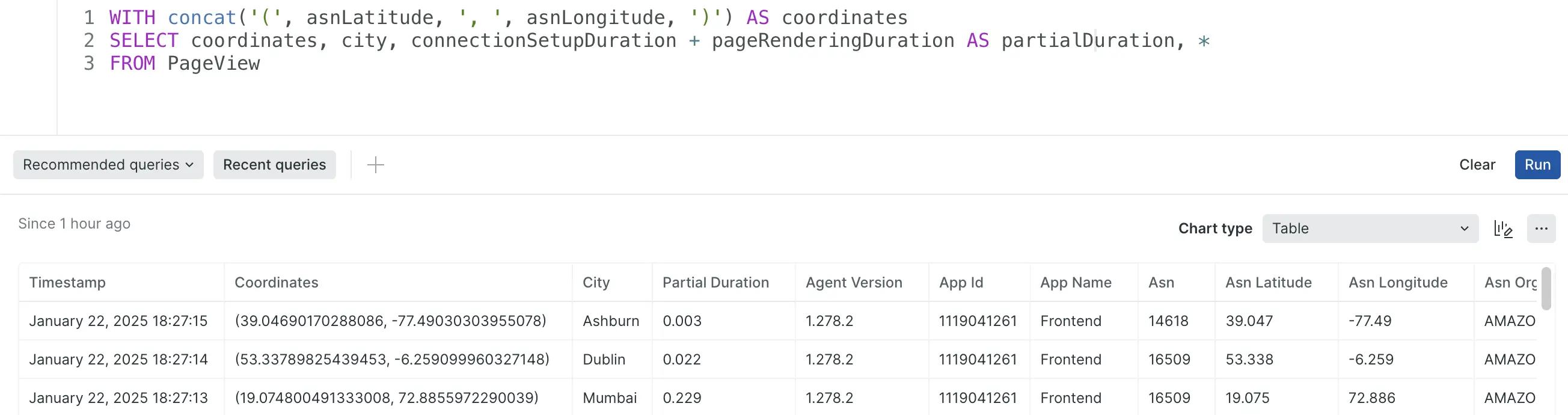
    This query returns all available PageView attributes with additional columns at the beginning.

    ```sql
    WITH concat('(', asnLatitude, ', ', asnLongitude, ')') AS coordinates
    SELECT coordinates, city, connectionSetupDuration + pageRenderingDuration AS partialDuration, *
    FROM PageView
    ```

    <img
      title="select star with additional columns"
      alt="select star with additional columns"
      src="/images/nrql_screenshot-select-star-with-additional-columns.webp"
    />

    <figcaption>
      <InlineCode>SELECT *</InlineCode> with additional columns example
    </figcaption>
  </Collapser>
</CollapserGroup>

<Callout variant="tip">
  Only [non-aggregator functions](#non-aggregator-functions) are supported in the `SELECT` list along with `*`.
</Callout>

````

**Required: `FROM` clause**

````sql
SELECT ...
FROM data type
...
```

Use the `FROM` clause to specify the [data type](/docs/query-data/nrql-new-relic-query-language/getting-started/introduction-nrql#what-you-can-query) you wish to query. You can start your query with `FROM` or with [`SELECT`](#state-select). You can merge values for the same attributes across multiple data types in a comma separated list.

<CollapserGroup>
  <Collapser
    id="one-event"
    title="Query one data type"
  >
    This query returns the count of all [APM transactions](/docs/insights/new-relic-insights/decorating-events/insights-attributes#transaction-defaults) over the last seven days:

    ```sql
    SELECT count(*) FROM Transaction SINCE 7 days ago
    ```
  </Collapser>

  <Collapser
    id="multiple-events"
    title="Query multiple data types"
  >
    This query returns the count of all [APM transactions](/docs/insights/new-relic-insights/decorating-events/insights-attributes#transaction-defaults) and [browser events](/docs/insights/new-relic-insights/decorating-events/browser-default-attributes-insights#browser-attributes-table) over the last three days:

    ```sql
    SELECT count(*) FROM Transaction, PageView SINCE 3 days ago
    ```
  </Collapser>

  <Collapser
    id="from-lookups"
    title="Query data from a lookup table"
  >
    See [`lookup()`](#func-lookup).
  </Collapser>
</CollapserGroup>

````

### Optional clauses [#optional]

**`AS` clause**

````sql
SELECT ...
AS 'label'
...
```

Use the `AS` clause to label an attribute, aggregator, step in a funnel, or the result of a math function with a string delimited by single quotes. The label is used in the resulting chart. Note that `AS` clause labels in time series charts will not be displayed if a `FACET` clause is used.

<CollapserGroup>
  <Collapser
    id="math-as"
    title={<>Query using math function and <InlineCode>AS</InlineCode></>}
  >
    This query returns the number of page views per session:

    ```sql
    SELECT count(*)/uniqueCount(session) AS 'Pageviews per Session'
    FROM PageView
    ```
  </Collapser>

  <Collapser
    id="funnel-as"
    title={<>Query using funnel and <InlineCode>AS</InlineCode></>}
  >
    This query returns a count of people who have visited both the main page and the careers page of a site over the past week:

    ```sql
    SELECT funnel(SESSION,
      WHERE name = 'Controller/about/main' AS 'Step 1',
      WHERE name = 'Controller/about/careers' AS 'Step 2')
    FROM PageView SINCE 1 week ago
    ```
  </Collapser>
</CollapserGroup>

````

**`COMPARE WITH` clause**

````sql
SELECT ... 
(SINCE or UNTIL) (integer units) AGO
COMPARE WITH (integer units) AGO
...
```

Use the `COMPARE WITH` clause to compare the values for two different time ranges.

`COMPARE WITH` requires a `SINCE` or `UNTIL` statement. The time specified by `COMPARE WITH` is relative to the time specified by `SINCE` or `UNTIL`. For example, `SINCE 1 day ago COMPARE WITH 1 day ago` compares yesterday with the day before.

The time range for the`COMPARE WITH` value is always the same as that specified by `SINCE` or `UNTIL`. For example, `SINCE 2 hours ago COMPARE WITH 4 hours ago` might compare 3:00pm through 5:00pm against 11:00am through 1:00pm.

`COMPARE WITH` can be formatted as either a line chart or a billboard:

* With `TIMESERIES`, `COMPARE WITH` creates a line chart with the comparison mapped over time.
* Without `TIMESERIES`, `COMPARE WITH` generates a billboard with the current value and the percent change from the `COMPARE WITH` value.

<DNT>**Example**</DNT>: This query returns data as a line chart showing the 95th percentile for the past week compared to the same range one week ago. First as a single value, then as a line chart.

```sql
SELECT percentile(duration, 95) FROM PageView
SINCE 1 week ago COMPARE WITH 1 week AGO

SELECT percentile(duration, 95) FROM PageView
SINCE 1 week ago COMPARE WITH 1 week AGO TIMESERIES AUTO
```

<Callout variant="important">
  For `FACET` queries using `COMPARE WITH`, the facets in the result are selected based on the time range specified using `SINCE` and `UNTIL` and not the prior time range being compared. The results of a `FACET` query for the prior time range alone may include a different set of facets.
</Callout>

````

**`EXTRAPOLATE` clause**

You can use this clause with these data types:

-   `Transaction`

-   `TransactionError`

-   Custom events reported via APM agent APIs

    The purpose of `EXTRAPOLATE` is to mathematically compensate for the effects of [APM agent sampling of event data](https://docs.newrelic.com/docs/agents/manage-apm-agents/agent-data/new-relic-events-limits-sampling) so that query results more closely represent the total activity in your system.

    This clause will be useful when a APM agent reports so many [events](https://docs.newrelic.com/docs/using-new-relic/metrics/analyze-your-metrics/data-collection-metric-timeslice-event-data#event-data) that it often passes its [harvest cycle](https://docs.newrelic.com/docs/using-new-relic/welcome-new-relic/getting-started/glossary#harvest-cycle) reporting limits. When that occurs, the agent begins to sample events.

    When `EXTRAPOLATE` is used in a NRQL query that supports its use, the ratio between the **reported events** and the **total events** is used to extrapolate a close approximation of the total unsampled data. When it is used in a NRQL query that doesn’t support its use or that hasn’t used sampled data, it has no effect.

    > #### ⚠️ IMPORTANT
    >
    > Note that `EXTRAPOLATE` is most useful for homogenous data (like throughput or error rate). It's not effective when attempting to extrapolate a count of distinct things (like `uniqueCount()` or `uniques()`).

    This clause works only with NRQL queries that use one of the following [aggregator functions](https://docs.newrelic.com/docs/insights/nrql-new-relic-query-language/nrql-reference/nrql-syntax-components-functions#functions):

-   `apdex`

-   `average`

-   `count`

-   `histogram`

-   `sum`

-   `percentage` (if function it takes as an argument supports `EXTRAPOLATE`)

-   `rate` (if function it takes as an argument supports `EXTRAPOLATE`)

-   `stddev`

    **Example of extrapolating throughput**

    A query that will show the extrapolated throughput of a service named `interestingApplication`.

    ````sql
    SELECT count(*) FROM Transaction WHERE appName = 'interestingApplication' 
    SINCE 60 minutes ago EXTRAPOLATE
    ```

    ````

    **Example of extrapolating throughput as a time series**

    A query that will show the extrapolated throughput of a service named `interestingApplication` by transaction name, displayed as a time series.

    ````sql
    SELECT count(*) FROM Transaction WHERE appName = 'interestingApplication'
    SINCE 60 minutes ago FACET name TIMESERIES 1 minute EXTRAPOLATE
    ```

    ````

**`FACET` clause**

````sql
SELECT ...
FACET attribute
...
```

Use `FACET` to separate and group your results by attribute values. For example, you could `FACET` your `PageView` data by `deviceType` to figure out what percentage of your traffic comes from mobile, tablet, and desktop devices.

Use the `LIMIT` clause to specify how many facets appear (default is 10). For more complex grouping, use [`FACET CASES`](#sel-facet-cases). `FACET` clauses support up to five attributes, separated by commas.

The facets are sorted in descending order by the first field you provide in the `SELECT` clause. If you are faceting on attributes with more than 5,000 unique values, a subset of facet values is selected and sorted according to the query type. Note that if a time series chart returns no data (NRQL matches no matching data, invalid NRQL, etc.) then it will only show a flat line with the label matching the first table in the `FROM` clause.

When selecting `min()`, `max()`, `percentile()`, `average()` or `count()`, `FACET` uses those functions to determine how facets are picked and sorted. When selecting any other [function](#functions), `FACET` uses the frequency of the attribute you are faceting on to determine how facets are picked and sorted.

<CollapserGroup>
  <Collapser
    id="faceted-query"
    title={<>Faceted query using <InlineCode>count()</InlineCode></>}
  >
    This query shows cities with the highest pageview counts. This query uses the total number of pageviews per city to determine how facets are picked and ordered.

    ```sql
    SELECT count(*) FROM PageView FACET city
    ```
  </Collapser>

  <Collapser
    id="uniquecount"
    title={<>Faceted query using <InlineCode>uniqueCount()</InlineCode></>}
  >
    This query shows the cities that access the highest number of unique URLs. This query uses the total number of times a particular city appears in the results to determine how facets are picked and ordered.

    ```sql
    SELECT uniqueCount(pageUrl) FROM PageView FACET city
    ```
  </Collapser>

  <Collapser
    id="cohort-analysis"
    title="Grouping results across time"
  >
    [Advanced segmentation](/docs/insights/new-relic-insights/features/advanced-segmentation) and [cohort analysis](/docs/insights/new-relic-insights/features/cohort-analysis-grouping-results-across-time) allow you to facet on bucket functions to more effectively break out your data.

    Cohort analysis is a way to group results together based on timestamps. You can separate them into buckets that cover a specified range of dates and times.
  </Collapser>
</CollapserGroup>

<Callout variant="important">
  When using functions to aggregate attribute values, it's important the attribute being aggregated in the first function of your query contains non-null values. Facets will only be chosen for rows which contain a non-null value for the attribute in the first function.

  Example:

  ```sql
  FROM Event SELECT average(attribute) FACET name
  ```

  Names will only be chosen from rows where attribute is not null.

  To check if the attribute you're using in your function contains non-null values, run the following query:

  ```sql
  FROM Event SELECT attribute, name WHERE attribute IS NOT NULL
  ```
</Callout>

````

**`FACET ... AS` clause**

Use `FACET ... AS` to name facets using the `AS` keyword in queries. This clause is helpful for adding clearer or simplified names for facets in your results. It can also be used to rename facets in [nested aggregation](https://docs.newrelic.com/docs/query-your-data/nrql-new-relic-query-language/nrql-query-tutorials/nested-aggregation-make-ordered-computations-single-query) queries.

`FACET ... AS` queries will change the facet names in results (when they appear as headers in tables, for example), but not the actual facet names themselves.

````sql
FROM Transaction SELECT count(*) FACET response.headers.contentType AS 'content type'
```

````

**`FACET CASES` clause**

````sql
SELECT ...
FACET CASES 
(
  WHERE attribute operator value, 
  WHERE attribute operator value, 
  ...
)
...
```

Use `FACET CASES` to break out your data by more complex conditions than possible with [`FACET`](#sel-facet). Separate multiple conditions with a comma `,`. For example, you could query your `PageView` data and `FACET CASES` into categories like less than 1 second, from 1 to 10 seconds, and greater than 10 seconds. You can combine multiple attributes within your cases, and label the cases with the [`AS`](#sel-as) selector. Data points will be added to at most one facet case, the first facet case that they match.

You may also use a [time function](/docs/query-data/nrql-new-relic-query-language/nrql-query-examples/group-results-across-time) with your attribute, and you can use the `OR` operator to facet results that don't match any of your specified cases.

<CollapserGroup>
  <Collapser
    id="facet-cases-basic"
    title={<>Basic usage with <InlineCode>WHERE</InlineCode></>}
  >
    ```sql
    SELECT count(*) FROM PageView 
    FACET CASES 
    (
      WHERE duration < 1, 
      WHERE duration > 1 AND duration < 10, 
      WHERE duration > 10
    )
    ```
  </Collapser>

  <Collapser
    id="facet-cases-mixnmatch"
    title="Group based on multiple attributes"
  >
    This example groups results into one bucket where the transaction name contains `login`, and another where the URL contains `login` and a custom attribute indicates that the user was a paid user:

    ```sql
    SELECT count(*) FROM Transaction 
    FACET CASES 
    (
      WHERE name LIKE '%login%', 
      WHERE name LIKE '%feature%' AND customer_type = 'Paid'
    )
    ```
  </Collapser>

  <Collapser
    id="facet-cases-as-label"
    title={<>Label groups with <InlineCode>AS</InlineCode></>}
  >
    This example uses the [`AS`](#sel-as) selector to give your results a human-readable name:

    ```sql
    SELECT count(*) FROM Transaction 
    FACET CASES 
    (
      WHERE name LIKE '%login%' AS 'Total Logins', 
      WHERE name LIKE '%feature%' AND customer_type = 'Paid' AS 'Feature Visits from Paid Users'
    )
    ```
  </Collapser>

  <Collapser
    id="facet-cases-with-or"
    title={<>Facet non-matching data with <InlineCode>OR</InlineCode></>}
  >
    This example uses the `OR` operator to facet results that didn't match any of your cases:

    ```sql
    SELECT count(*) FROM Transaction 
    FACET CASES 
    (
      WHERE name LIKE '%login%', 
      WHERE name LIKE '%feature%' AND customer_type = 'Paid'
    ) 
    OR name
    ```
  </Collapser>
</CollapserGroup>

````

**`FACET ... ORDER BY` clause**

In NRQL, the default is for the first aggregation in the `SELECT` clause to guide the selection of facets in a query. `FACET ... ORDER BY` allows you to override this default behavior by adding an aggregate function with the `ORDER BY` modifier to specify how facets are selected. Specifically, the clause will override the priority by which facets are chosen to be in the final result before being limited by the `LIMIT` clause. This clause can be used in querying but not for alerts or streaming.

This example shows how to use `FACET ... ORDER BY` to find the average durations of app transactions, showing the top 10 (default limit) highest durations by apps which have the highest response size. In this case, if `FACET ... ORDER BY` is not used, the query results will instead show the top 10 by highest durations, with response size being irrelevant to the app selection.

````sql
FROM Transaction SELECT average(duration) TIMESERIES 
FACET appName ORDER BY max(responseSize)
```

Keep in mind that if you use the `FACET ... ORDER BY` clause, you can't change the sort order by adding the `ASC` and `DESC` modifiers. By default, this clause uses `DESC`.

<Callout variant="tip">
  Because the operations are performed before the `LIMIT` clause is applied, `FACET ... ORDER BY` does not impact the sort of the final query results, which will be particularly noticeable in the results for non-time series queries.
</Callout>

<Callout variant="important">
  The `ORDER BY` modifier in this case works differently than the `ORDER BY` clause. When parsing queries that follow the format `FACET attribute1 ORDER BY attribute2`, New Relic will read these as `FACET ... ORDER BY` queries, but only if `ORDER BY` appears immediately after `FACET`. Otherwise `ORDER BY` will be interpreted by New Relic as a clause.
</Callout>

````

**`JOIN` clause**

Use the `JOIN` clause to combine data from one event type with the results of a subquery based on a common attribute or key.

````sql
FROM Event [INNER|LEFT] JOIN (SELECT... FROM...) ON [key =] key SELECT ...
```

There are a few simple rules for subquery joins:

* The `JOIN` clause must always follow immediately after the [`FROM`](#sel-from) clause.
* Prefixing a join type (`INNER` or `LEFT`) is optional. When omitted, the join type defaults to `INNER`.
* Parenthesis containing a [subquery](/docs/query-your-data/nrql-new-relic-query-language/get-started/subqueries-in-nrql) must immediately follow `JOIN`.
* The `ON` clause must immediately follow the subquery.

<table id="join-types">
  <thead>
    <tr>
      <th colSpan={2}>
        <DNT>
          **Join types**
        </DNT>
      </th>
    </tr>
  </thead>

  <tbody>
    <tr>
      <td style={{ width: "300px" }}>
        `INNER`
      </td>

      <td>
        The result will only include values from the outer query that have a matching value in the results of the joined subquery.
        This is the default join type.
      </td>
    </tr>

    <tr>
      <td>
        `LEFT`
      </td>

      <td>
        The result will include events from the outer query that do not have a match from the joined subquery.
      </td>
    </tr>
  </tbody>
</table>

<table id="join-on">
  <thead>
    <tr>
      <th colSpan={2}>
        <DNT>
          **Join `ON` clause**
        </DNT>
      </th>
    </tr>
  </thead>

  <tbody>
    <tr>
      <td style={{ width: "300px" }}>
        `ON parentKey = subqueryKey`
      </td>

      <td>
        Defines the key values to compare in the subquery and the outer query. The only comparison
        operator allowed is equality.

        * The left-hand side is always the key used in the parent query and may be an attribute or
          function.
        * The right-hand side is used for the subquery key value, and must be an identifier.
      </td>
    </tr>

    <tr>
      <td>
        `ON key`
      </td>

      <td>
        This is an abbreviated syntax for when the key identifier is the same in both contexts. It is equivalent to `ON key = key`.
      </td>
    </tr>
  </tbody>
</table>

Restrictions and limitations to consider:

* The joined subquery will continue to have a default [`LIMIT`](#sel-limit) of 10, with a
  maximum `LIMIT` of 5,000. Note that the outer query's `LIMIT` does not affect the inner query.
* The use of `TIMESERIES` in the joined subquery is not supported. If your outer query uses
  `TIMESERIES`, keep in mind that the joined subquery will provide a single result for the full
  query timespan.
* Like all subqueries, joined subqueries cannot be used in alert conditions.
* While `SELECT *` is supported in the parent query, it is not supported in the joined subquery.
* The cardinality of the join is limited to 1:100, meaning a single join key cannot map to more
  than one hundred rows in the subquery result.

For an in depth look at the `JOIN` clause, please see the
[NRQL subquery joins](/docs/query-your-data/nrql-new-relic-query-language/nrql-query-tutorials/subquery-joins)
tutorial.

<CollapserGroup>
  <Collapser
    title={<><InlineCode>INNER JOIN</InlineCode> with a faceted subquery</>}
    id="example-faceted-inner-join"
  >
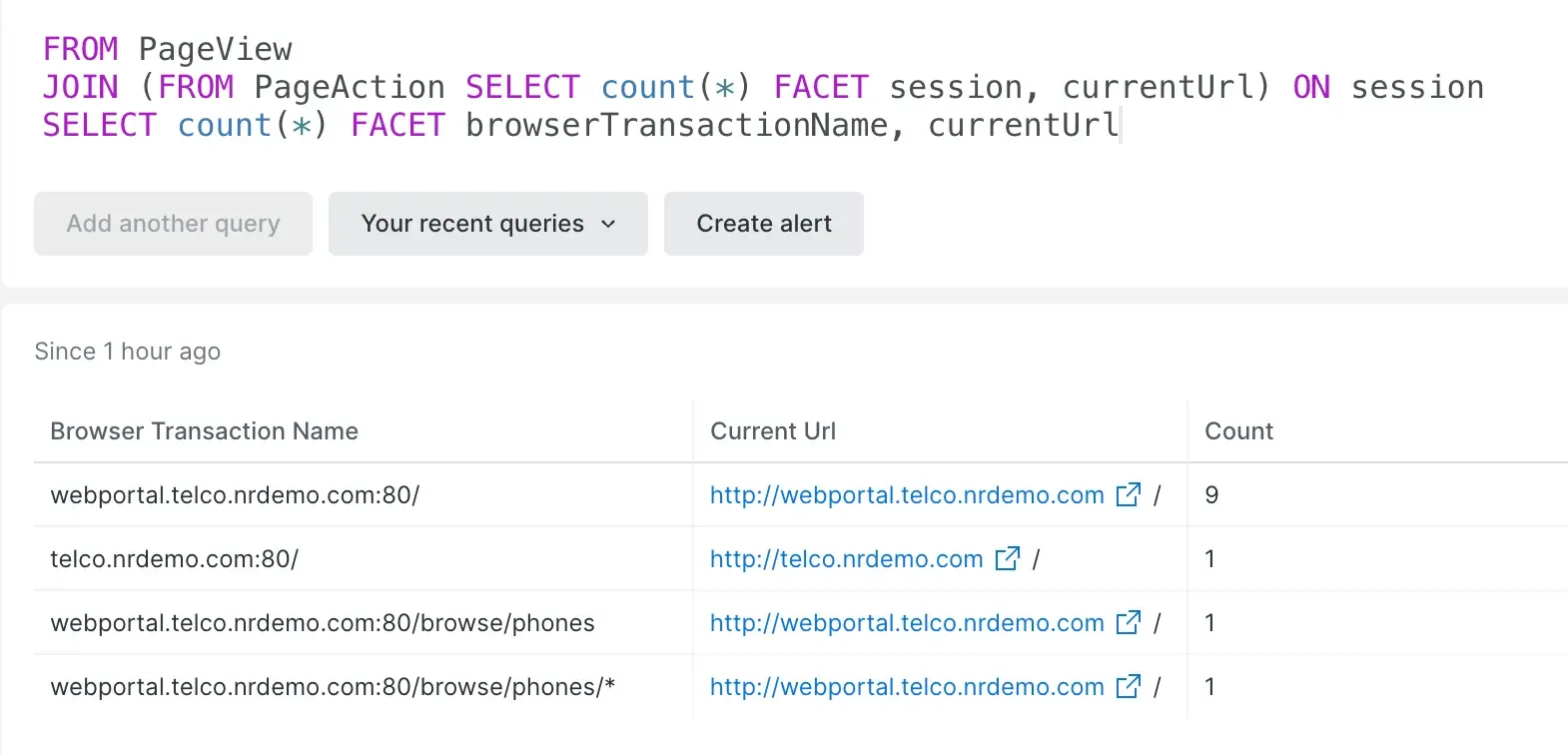
    This query finds the count of events faceted by `browserTransactionName` from the
    `PageView` event type, and then by `currentUrl` from the `PageAction` event type. This joins
    the two event types based on common `session` attribute values.

    ```sql
    FROM PageView
    JOIN 
    (
      FROM PageAction 
      SELECT count(*) 
      FACET session, currentUrl
    ) 
    ON session
    SELECT count(*) FACET browserTransactionName, currentUrl
    ```

    <img
      title="screenshot faceted inner join"
      alt="screenshot faceted inner join"
      src="/images/nrql_screenshot-crop_example-faceted-inner-join.webp"
    />

    <figcaption>
      Faceted <InlineCode>INNER JOIN</InlineCode> example
    </figcaption>
  </Collapser>

  <Collapser title={<><InlineCode>LEFT JOIN</InlineCode> with a faceted subquery</>}>
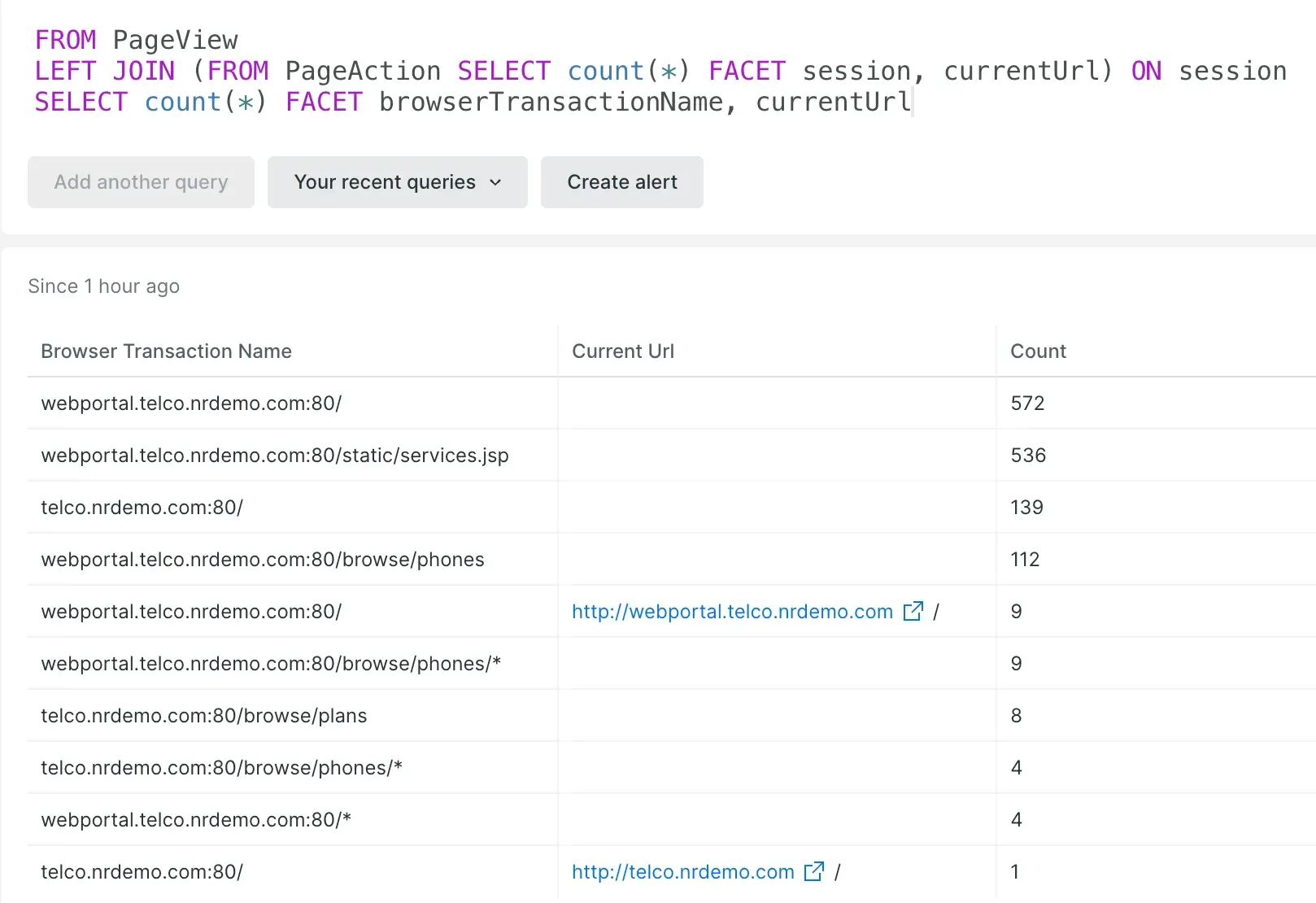
    This example queries the same data as the [faceted `INNER JOIN`
    example](#example-faceted-inner-join), but as a `LEFT JOIN` query, the results include items
    in the `PageView` table that do not have matching `session` values in the results of the
    `PageAction` subquery.

    ```sql
    FROM PageView
    LEFT JOIN 
    (
      FROM PageAction 
      SELECT count(*) 
      FACET session, currentUrl
    ) 
    ON session
    SELECT count(*) FACET browserTransactionName, currentUrl
    ```

    <img
      title="screenshot faceted left join"
      alt="screenshot faceted left join"
      src="/images/nrql_screenshot-crop_example-faceted-left-join.webp"
    />

    <figcaption>
      Faceted <InlineCode>LEFT JOIN</InlineCode> example
    </figcaption>
  </Collapser>

  <Collapser title={<><InlineCode>INNER JOIN</InlineCode> with an unaggregated subquery</>}>
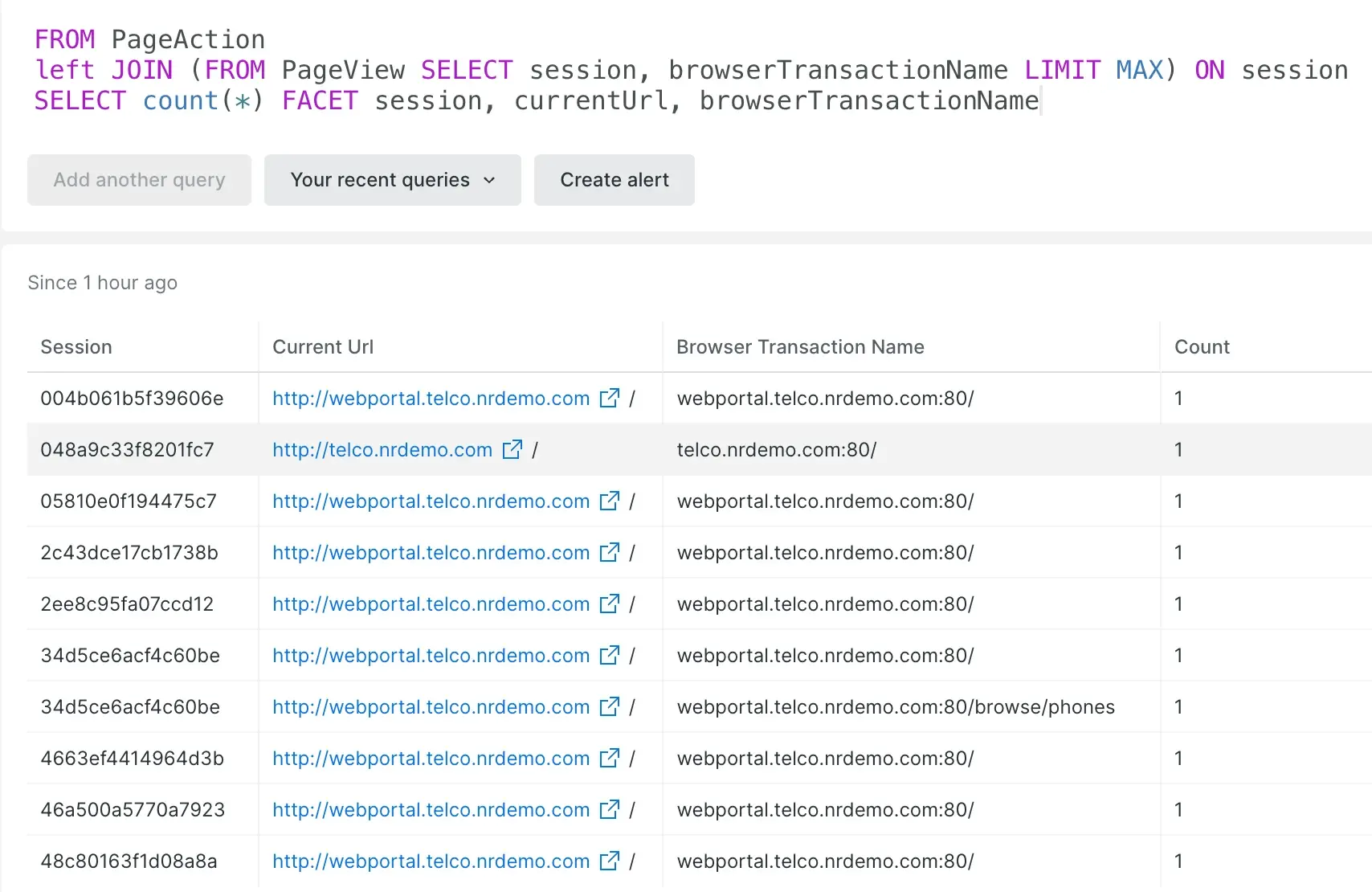
    Here we are performing an unaggregated, row-wise subquery, with the outer
    query finding the count of events faceted by `currentUrl` from the `PageAction`
    event type, and then by `browserTransactionNamed` from the `PageView` event type.
    This joins the two event types based on common `session` attribute values.

    Note that the `session` value `34d5ce6acf4c60be` has two `browserTransactionName` values from
    the subquery's `PageView` event type, adding additional rows to the result.

    ```sql
    FROM PageAction
    LEFT JOIN 
    (
      FROM PageView 
      SELECT session, browserTransactionName 
      LIMIT MAX
    ) 
    ON session
    SELECT count(*) FACET session, currentUrl, browserTransactionName LIMIT MAX
    ```

    <img
      title="screenshot columnar inner join"
      alt="screenshot columnar inner join"
      src="/images/nrql_screenshot-crop_example-columnar-inner-join.webp"
    />

    <figcaption>
      Unaggregated <InlineCode>INNER JOIN</InlineCode> example
    </figcaption>
  </Collapser>
</CollapserGroup>

````

**`LIMIT` clause**

````sql
SELECT ...
LIMIT count
...
```

Use the `LIMIT` clause to control the maximum number of facet values returned by `FACET` queries or the maximum number of items returned by `SELECT *` queries. This clause takes a single integer value as an argument. If the `LIMIT` clause is not specified, or no value is provided, the limit defaults to 10 for `FACET` queries and 100 in the case of `SELECT *` queries.

The maximum allowed value for the `LIMIT` clause is 5,000. Queries can use the `LIMIT MAX` clause instead of a specific value, which automatically defaults to the current maximum value. You can use this if you always want to post the maximum number of results, even if it changes in the future. If you want your query's behavior to remain unchanged, specify an explicit value instead of using `LIMIT MAX`.

<CollapserGroup>
  <Collapser title={<>Query using <InlineCode>LIMIT</InlineCode></>}>
    This query shows the top 20 countries by session count and provides 95th percentile of response time for each country for Windows users only.

    ```sql
    SELECT uniqueCount(session), percentile(duration, 95)
    FROM PageView WHERE userAgentOS = 'Windows'
    FACET countryCode LIMIT 20 SINCE YESTERDAY
    ```
  </Collapser>
</CollapserGroup>

````

**`OFFSET` clause**

````sql
SELECT ...
LIMIT count OFFSET count
...
```

Use the `OFFSET` clause with `LIMIT` to control the portion of rows returned by `SELECT *` or `SELECT column` queries. Like the `LIMIT` clause, `OFFSET` takes a single integer value as an argument. `OFFSET` sets the number of rows to be skipped before the selected rows of your query are returned. This is constrained by `LIMIT`.

`OFFSET` rows are skipped starting from the most recent record.

For example, the query `SELECT interestingValue FROM Minute_Report LIMIT 5 OFFSET 1` returns the last 5 values from `Minute_Report` except for the most recent one.

````

**`ORDER BY` clause**

The `ORDER BY` clause allows you to specify how you want to sort your query results in queries that select event attributes by row.

This query orders two specific transaction attributes by duration.

````sql
FROM Transaction SELECT appName, duration ORDER BY duration
```

The default sort order is ascending, but this can be changed by adding the `ASC` or `DESC` modifiers.

This query orders all transaction attributes by duration in descending order.

```sql
FROM Transaction SELECT * ORDER BY duration DESC
```

<Callout variant="important">
  The `ORDER BY` clause does not apply to `FACET` queries. It should not be confused with the `FACET ... ORDER BY` clause, which guides facet selection. For more information, see [`FACET ... ORDER BY`](#sel-facet-order).
</Callout>

````

**`PREDICT` clause**

````sql
FROM Transaction SELECT count(*) WHERE error IS TRUE TIMESERIES PREDICT
...
```

With the `PREDICT` clause, you can add forecasts of future data trends into line charts based on historical data. Consider the following points when using this clause:

* Applies only to queries with a `TIMESERIES` clause.
* Uses the `TIMESERIES <time period>` as the interval for predicted data points.
* Does not support [metric timeslice data](/docs/data-analysis/metrics/analyze-your-metrics/data-collection-metric-timeslice-event-data#timeslice-data) while in Public Preview.

<Callout variant="important">
  The `PREDICT` clause cannot be used with the [`COMPARE WITH`](/docs/nrql/nrql-syntax-clauses-functions/#sel-compare) clause or [nested aggregations](/docs/nrql/using-nrql/nested-aggregation-make-ordered-computations-single-query) inside [subqueries](/docs/nrql/using-nrql/subqueries-in-nrql/).
</Callout>

To learn more about how and when you can use `PREDICT`, refer to [NRQL Predictions](/docs/query-your-data/explore-query-data/use-charts/nrql-predictions/).

````

**`SHOW EVENT TYPES` clause**

````sql
SHOW EVENT TYPES...
```

`SHOW EVENT TYPES` will return a list of all the data types present in your account for a specific time range. It is used as the first clause in a query instead of `SELECT`.

<Callout variant="important">
  In this context, "event types" refers to the data types you can access with a NRQL query.
</Callout>

<CollapserGroup>
  <Collapser
    id="avg-resp-time-query"
    title="Data types in the last day"
  >
    This query will return all the data types present over the past day:

    ```sql
    SHOW EVENT TYPES SINCE 1 day ago
    ```
  </Collapser>
</CollapserGroup>

````

**`SINCE` clause**

````sql
SELECT ...
SINCE [numerical units AGO | phrase]
...
```

The <DNT>**default**</DNT> value is <DNT>**1 hour ago**</DNT>.

Use the `SINCE` clause to define the inclusive beginning of a time range for the returned data. You can specify a time zone for the query but not for the results. NRQL results are based on your system time.

When using NRQL, you can set a UTC timestamp, a relative time, or a `DateTime` string. See [Specifying a time](/docs/query-your-data/nrql-new-relic-query-language/get-started/query-time-range/#spec-time).

See also:

* [Setting a query's time range](/docs/query-your-data/nrql-new-relic-query-language/get-started/query-time-range/)
* [UNTIL](#sel-until)

````

**`SLIDE BY` clause**

The `SLIDE BY` clause supports a feature known as sliding windows. With sliding windows,`SLIDE BY` data is gathered into "windows" of time that overlap with each other. These windows can help to smooth out line graphs with a lot of variation in cases where the rolling aggregate (such as a rolling mean) is more important than aggregates from narrow windows of time.

To use `SLIDE BY`, place it in a query after the `TIMESERIES` clause. For example, this query pulls data in 5-minute windows with a 1-minute `SLIDE BY` interval, meaning that each window lasts 5 minutes, but window 1 starts at 0 minutes, window 2 starts at 1 minute, window 3 starts at 2 minutes, and so on.

````sql
SELECT average(duration) FROM Transaction TIMESERIES 5 minutes SLIDE BY 1 minute
```

To learn more about how and when you can use `SLIDE BY`, see [Create smoother charts with sliding windows](/docs/query-your-data/nrql-new-relic-query-language/nrql-query-tutorials/create-smoother-charts-sliding-windows). Or, watch this short video (approx. 3:20 minutes).

<Video
  id="b9WVyb1wU6w"
  type="youtube"
/>

<CollapserGroup>
  <Collapser
    id="sliding-window-max-auto"
    title={<>Use <InlineCode>SLIDE BY</InlineCode> with <InlineCode>MAX</InlineCode> or <InlineCode>AUTO</InlineCode> interval</>}
  >
    You can use sliding windows in combination with `MAX` or `AUTO`. However, `MAX` or `AUTO` may not be placed between `TIMESERIES` and `SLIDE BY`.

    This query will automatically decide a `SLIDE BY` window interval.

    ```sql
    SELECT average(duration) FROM Transaction TIMESERIES 5 minutes SLIDE BY AUTO
    ```

    This query will set the `SLIDE BY` window to the maximum interval granularity.

    ```sql
    SELECT average(duration) FROM Transaction TIMESERIES 5 minutes SLIDE BY MAX
    ```

    <Callout variant="important">
      The `SLIDE BY` value as determined by `AUTO` or `MAX` can produce a step interval greater than the window size, which can cause gaps and unexpected results.
    </Callout>
  </Collapser>
</CollapserGroup>

````

**`TIMESERIES` clause**

````sql
SELECT ...
TIMESERIES integer units
...
```

Use the `TIMESERIES` clause to return data as a time series broken out by a specified period of time. Since `TIMESERIES` is used to trigger certain charts, there is no default value.

To indicate the time range, use `integer units`. For example:

* `TIMESERIES 1 minute`
* `TIMESERIES 30 minutes`
* `TIMESERIES 1 hour`
* `TIMESERIES 30 seconds`

`TIMESERIES` can be combined with arguments such as `MAX`, `AUTO`, and `SLIDE BY` to further tailor query results, as shown in the examples below.

<Callout variant="important">
  For functions such as `average()` or `percentile()`, a large aggregation window can have a significant smoothing effect on outliers. This is true whether or not the query makes use of sliding windows.
</Callout>

<CollapserGroup>
  <Collapser
    id="set-interval"
    title="Use a set interval"
  >
    The value provided indicates the units used to break out the graph. For example, to present a one-day graph showing 30 minute increments:

    ```sql
    SELECT ... SINCE 1 day AGO TIMESERIES 30 minutes
    ```
  </Collapser>

  <Collapser
    id="timeseries-auto"
    title="Use an automatically set interval"
  >
    `TIMESERIES` can also be set to `AUTO`, which will divide your graph into a reasonable number of divisions. For example, a daily chart will be divided into 30 minute intervals and a weekly chart will be divided into 6 hour intervals.

    This query returns data as a line chart showing the 50th and 90th percentile of client-side transaction time for one week with a data point every 6 hours.

    ```sql
    SELECT average(duration), percentile(duration, 50, 90)
    FROM PageView SINCE 1 week AGO TIMESERIES AUTO
    ```
  </Collapser>

  <Collapser
    id="timeseries-max"
    title={<>Use <InlineCode>MAX</InlineCode> interval</>}
  >
    You can set `TIMESERIES` to `MAX`, which will automatically adjust your time window to the maximum number of intervals allowed for a given time period. This allows you to update your time windows without having to manually update your `TIMESERIES` buckets and ensures your time window is being split into the peak number of intervals allowed. The maximum number of `TIMESERIES` buckets that will be returned is 366.

    For example, the following query creates 4-minute intervals, which is the ceiling for a daily chart.

    ```sql
    SELECT average(duration) FROM Transaction SINCE 1 day ago TIMESERIES MAX
    ```
  </Collapser>
</CollapserGroup>

````

**`UNTIL` clause**

````sql
SELECT ...
UNTIL integer units AGO
...
```

Use the `UNTIL` clause to define the end of the time range to query. The value is exclusive, meaning the time range will go to the specified instant in time, but not include it.

The <DNT>**default**</DNT> value is <DNT>**NOW**</DNT>. Only use `UNTIL` to specify an end point other than the default.

See also:

* [Setting a query's time range](/docs/query-your-data/nrql-new-relic-query-language/get-started/query-time-range/)
* [SINCE](#sel-since)

````

**`WHERE` clause**

Use the `WHERE` clause to filter results. NRQL returns the results that fulfill the condition(s) you specify in the clause.

````sql
SELECT function(attribute) ...
WHERE attribute [operator 'value' | IN ('value' [, 'value']) | IS [NOT] NULL ]
[AND|OR ...]
...
```

* If you specify more than one condition, separate the conditions by the operators `AND` or `OR`.

<table id="where-operators">
  <thead>
    <tr>
      <th width={150}>
        <DNT>
          **Operators that the `WHERE` clause accepts**
        </DNT>
      </th>

      <th>
        <DNT>
          **Description**
        </DNT>
      </th>
    </tr>
  </thead>

  <tbody>
    <tr>
      <td>
        `=`, `!=`, `<`, `<=`, `>`, `>=`
      </td>

      <td>
        NRQL accepts standard comparison operators. Example: `state = 'WA'`

        For attributes with boolean values, use `IS` and not `=`.
      </td>
    </tr>

    <tr>
      <td>
        `AND`
      </td>

      <td>
        Used to define an intersection of two conditions.
      </td>
    </tr>

    <tr>
      <td>
        `OR`
      </td>

      <td>
        Used to define a union of two conditions.
      </td>
    </tr>

    <tr>
      <td>
        `IS NULL`
      </td>

      <td>
        Determines if an attribute has a null value.
      </td>
    </tr>

    <tr>
      <td>
        `IS NOT NULL`
      </td>

      <td>
        Determines if an attribute does not have a null value.
      </td>
    </tr>

    <tr>
      <td>
        `IS TRUE`
      </td>

      <td>
        Determines if an attribute has a boolean value of `true`.
      </td>
    </tr>

    <tr>
      <td>
        `IS FALSE`
      </td>

      <td>
        Determines if an attribute has a boolean value of `false`.
      </td>
    </tr>

    <tr>
      <td>
        `IN`
      </td>

      <td>
        Determines if the string value of an attribute is in a specified set. Using this method yields better performance than stringing together multiple `WHERE` clauses.

        Example:

        ```sql
        animalType IN ('cat', 'dog', 'fish')
        ```
      </td>
    </tr>

    <tr>
      <td>
        `NOT IN`
      </td>

      <td>
        Determines if the string value of an attribute is not in a specified set. Using this method yields better performance than stringing together multiple `WHERE` clauses.

        Values must be in parentheses, separated by commas. For example:

        ```sql
        SELECT * FROM PageView WHERE countryCode NOT IN ('CA', 'WA')
        ```
      </td>
    </tr>

    <tr>
      <td>
        `LIKE`
      </td>

      <td>
        Determines if an attribute contains a specified sub-string.

        The string argument for the `LIKE` operator accepts the percent sign (`%`) as a wildcard anywhere in the string.

        Keep the following in mind:

        * The `LIKE` operator is case insensitive.
        * If you don't include any wildcards, you'll get upper and lower case matches for your string. For example, this query without wildcards will match `B` and `b`:

          ```sql
          FROM foo
          SELECT *
          WHERE bar LIKE 'B'
          ```

        <DNT>
          **Examples:**
        </DNT>

        `userAgentName LIKE 'IE%'`

        * IE

        * IE Mobile

          `userAgentName LIKE 'o%a%'`

        * Opera

        * Opera Mini

          `userAgentName LIKE 'o%a'`

        * Opera

          `userAgentName LIKE '%o%a%'`

        * Opera

        * Opera Mini

        * Mozilla Gecko
      </td>
    </tr>

    <tr>
      <td>
        `NOT LIKE`
      </td>

      <td>
        Determines if an attribute does not contain a specified sub-string.
      </td>
    </tr>

    <tr>
      <td>
        `RLIKE`
      </td>

      <td>
        Determines if an attribute contains a specified Regex sub-string. Uses [RE2 syntax](https://github.com/google/re2/wiki/Syntax).

        <DNT>
          **Examples:**
        </DNT>

        `appName RLIKE r'z.*|q.*'`

        * `z-app`

        * `q-app`

          `hostname RLIKE r'ip-10-351-[0-2]?[0-9]-.*'`

        * `ip-10-351-19-237`

        * `ip-10-351-2-41`

        * `ip-10-351-24-238`

        * `ip-10-351-14-15`

          <Callout variant="important">
            Regex defaults to full-string matching, therefore `^` and `$` are implicit and you do not need to add them.
          </Callout>
      </td>
    </tr>

    <tr>
      <td>
        `NOT RLIKE`
      </td>

      <td>
        Determines if an attribute does not contain a specified Regex sub-string. Uses [RE2 syntax](https://github.com/google/re2/wiki/Syntax).
      </td>
    </tr>
  </tbody>
</table>

<CollapserGroup>
  <Collapser
    id="query-3-conditions"
    title="Example query with three conditions"
  >
    This query returns the browser response time for pages with `checkout` in the URL for Safari users in the United States and Canada over the past 24 hours.

    ```sql
    SELECT histogram(duration, 50, 20) FROM PageView
    WHERE countryCode IN ('CA', 'US') AND userAgentName = 'Safari' AND pageUrl LIKE '%checkout%'
    SINCE 1 day ago
    ```
  </Collapser>
</CollapserGroup>

````

**`WITH METRIC_FORMAT` clause**

For information on querying metric data, see [Query metrics](#query-metrics).

**`WITH ... AS` clause (NRQL variables)**

````sql
FROM ...
WITH function(attribute) AS var
SELECT var
...
```

Use the `WITH ... AS` clause to define NRQL variables to store values as variables that can be referenced anywhere in the query. Some rules and tips:

* The `WITH ... AS` clause can go before, in between, or directly after the `FROM` or `SELECT` clause
* Only row-wise functions (for example, `capture()`) can be set as a variable. Aggregator functions, such as `average()`, are not supported.
* Only one `WITH` can be used, but you can use multiple NRQL variables as long as they're separated by a comma.
* If a defined NRQL variable uses the same name as an existing attribute, the variable will take precedence.
* Variable names cannot include the `%` symbol.

<Callout variant="important">
  [Events to metrics](/docs/data-apis/convert-to-metrics/analyze-monitor-data-trends-metrics/) rules don't support the `WITH ... AS` clause in [NRQL queries](/docs/query-your-data/nrql-new-relic-query-language/get-started/introduction-nrql-new-relics-query-language/).
</Callout>

Here are some example queries:

<CollapserGroup>
  <Collapser
    id="basic-nrql-var"
    title="Basic use of a variable"
  >
    ```sql
    FROM Transaction
    WITH duration * 1000 AS millisec
    SELECT millisec
    ```
  </Collapser>

  <Collapser
    id="multiple-nrql-var"
    title="Using multiple variables"
  >
    ```sql
    FROM Log
    WITH aparse(message, '%itemId":"*","unitPrice":*}%') AS (itemId, unitPrice)
    SELECT itemId, unitPrice
    ```

    Learn more about [anchor parse](#func-aparse) (`aparse()`).
  </Collapser>

  <Collapser
    id="nrql-var-other-clauses"
    title="Use variable in other clauses"
  >
    In this example a NRQL variable, `unitPrice`, is used to create another variable, `unitPriceNum`, converting the extracted string into a number.
    The variables are then used in the `SELECT`, `WHERE` and `FACET` clauses.

    ```sql
    FROM Log
    WITH aparse(message, '%itemId":"*","unitPrice":*}%') AS (itemId, unitPrice),
      numeric(unitPrice) AS unitPriceNum
    SELECT sum(unitPriceNum)
    FACET itemId
    WHERE unitPriceNum < 100
    ```
  </Collapser>
</CollapserGroup>

````

**`WITH TIMEZONE` clause**

````sql
SELECT ... WITH TIMEZONE (selected zone)
...
```

Use the `WITH TIMEZONE` clause to select a time zone for a date or time in the query that hasn't already had a time zone specified for it.

If you include the `WITH TIMEZONE` clause without specifying a time zone in a date time, the `since` and `until` clauses keep in the provided time zone.

If you don't include the `WITH TIMEZONE` clause, but you include a time zone in a date time string, your date time string time zone keeps.

<Callout variant="important">
  The default time zone is always UTC if one is not specified. The raw timestamp values (as seen in the JSON view) in the results are always UTC. The UI displays the results in the time zone you've specified in your account settings.
  A time zone in a time stamp string always works. It supersedes the `WITH TIMEZONE` zone.
</Callout>

For example, the query clause `SINCE Monday UNTIL Tuesday WITH TIMEZONE 'America/New_York'` returns data recorded from Monday at midnight, America/New York time, until midnight Tuesday, America/New York time.

Here are some examples of query timespan clauses:

* No time zone in date time string using the `WITH TIMEZONE` clause:

  ```sql
  SINCE today UNTIL '2022-05-19T12:00' WITH TIMEZONE 'America/Los_Angeles'
  ```

  This resolves as `"beginTime": "2022-05-19T07:00:00Z"` and `"endTime": "2022-05-19T19:00:00Z"`.

* Time zone in date time string, not using the `WITH TIMEZONE` clause:

  ```sql
  SINCE today UNTIL '2022-05-19T12:00-0500'
  ```

  This resolves as `"beginTime": "2022-05-19T00:00:00Z"` and `"endTime": "2022-05-19T17:00:00Z"`.

* Time zone in date time string, using the `WITH TIMEZONE` clause America/Los Angeles, which is -0700 during daylight saving time:

  ```sql
  SINCE today UNTIL '2022-05-19T12:00-0500' WITH TIMEZONE 'America/Los_Angeles'
  ```

  This resolves as `"beginTime": "2022-05-19T07:00:00Z"` and `"endTime": "2022-05-19T19:00:00Z"`.

See the available [Zone IDs](/docs/query-your-data/nrql-new-relic-query-language/get-started/query-time-range/#timezones-ids) list.

See [Set time range on dashboards and charts](/docs/insights/new-relic-insights/managing-dashboards-data/set-time-range-insights-dashboards-widgets) for detailed information and examples.

````

## Query metric data [#query-metrics]

Metric data is more complex than other types of data. There are specific tips for querying it well. We have two types of metric data, each with their own query guidelines:

-   [Query dimensional metrics](https://docs.newrelic.com/docs/data-ingest-apis/get-data-new-relic/metric-api/view-query-you-metric-data), which are reported by our Metric API and by some of our solutions that use that API (for example, our [Dropwizard integration](https://docs.newrelic.com/docs/more-integrations/open-source-telemetry-integrations/dropwizard/dropwizard-reporter) or [Micrometer integration](https://docs.newrelic.com/docs/more-integrations/open-source-telemetry-integrations/micrometer/micrometer-metrics-registry)).
-   [Query metric timeslice data](https://docs.newrelic.com/docs/query-data/nrql-new-relic-query-language/nrql-query-tutorials/query-metric-timeslice-data-nrql), which is our original metric data type reported by our APM, mobile monitoring, and browser monitoring.

For more details about how we report metric data, see [Metric data types](https://docs.newrelic.com/docs/using-new-relic/data/understand-data/new-relic-data-types#metrics).

## Functions [#functions]

In this section we explain NRQL functions, both [aggregator functions](#aggregator-functions) and [non-aggregator functions](#non-aggregator-functions).

### Aggregator functions [#aggregator-functions]

You can use aggregator functions to filter and aggregate data. Some tips for using these:

-   If you're using an aggregator function multiple times in the same query (for example, `SELECT median(one_metric), median(another_metric)`), it can cause problems in displaying results. To solve this, use the [`AS` function](https://docs.newrelic.com/docs/query-your-data/nrql-new-relic-query-language/get-started/nrql-syntax-clauses-functions/#sel-as). For example:
    ```sql
    SELECT median(one_metric) AS 'med-a', median(another_metric) AS 'med-b'
    ```
-   Data type "coercion" is not supported. Read about [available type conversion functions](#type-conversion).
-   For how to display results over time, see [Group results over time](https://docs.newrelic.com/docs/insights/new-relic-insights/features/cohort-analysis).

Examples:

```sql
SELECT histogram(duration, 10, 20) FROM PageView SINCE 1 week ago
```

**`aggregationendtime()`**

Use the `aggregationendtime()` function to return the time of the relevant aggregation. More specifically, for a given aggregate, the `aggregationendtime()` function provides the timestamp of the end of the time period of that aggregation. For example, in a time series query, for a data point that encompasses an hour’s worth of data, the function would return the timestamp of the end of that hour period.

**`apdex(attribute, t: )`**

Use the `apdex` function to return an [Apdex score](https://docs.newrelic.com/docs/apm/new-relic-apm/apdex/apdex-measuring-user-satisfaction#score) for a single transaction or for all your transactions. The default Apdex score is 0.4 seconds. The [attribute](https://docs.newrelic.com/docs/insights/new-relic-insights/decorating-events/insights-attributes) can be any attribute based on response time, such as [`duration`](https://docs.newrelic.com/docs/insights/insights-data-sources/default-events-attributes/apm-default-event-attributes#txn-duration) or [`backendDuration`](https://docs.newrelic.com/docs/insights/insights-data-sources/default-events-attributes/browser-default-events-attributes-insights#backend-duration). The `t:` argument defines an [`Apdex T`](https://docs.newrelic.com/docs/apm/new-relic-apm/apdex/apdex-measuring-user-satisfaction) threshold in the same unit of time as the chosen attribute. For instance, if the attribute is measured in seconds, `t` will be a threshold in seconds.

The Apdex score returned by the `apdex()` function is based only on execution time. It does not account for APM errors. If a transaction includes an error but completes in [Apdex T](https://docs.newrelic.com/docs/apm/new-relic-apm/getting-started/glossary#apdex_t) or less, that transaction will be rated [satisfying](https://docs.newrelic.com/docs/apm/new-relic-apm/apdex/apdex-measuring-user-satisfaction#bullet-satisfied) by the `apdex()` function.

**Get Apdex for specific customers**

If you have [defined custom attributes](https://docs.newrelic.com/docs/insights/new-relic-insights/decorating-events/insights-custom-attributes), you can filter based on those attributes. For example, you could monitor the Apdex for a particularly important customer:

````sql
SELECT apdex(duration, t: 0.4) FROM Transaction
WHERE customerName = 'ReallyImportantCustomer' SINCE 1 day ago
```

````

**Get Apdex for specific transaction**

Use the `name` attribute to return a score for a specific transaction, or return an overall Apdex by omitting `name`. This query returns an Apdex score for the **Controller/notes/index** transaction over the last hour:

![crop-apdex-function](https://docs.newrelic.com/images/queries-nrql_screenshot-full_apdex-NRQL-query-builder.webp "crop-apdex-function")

The `apdex` function returns an [Apdex score](https://docs.newrelic.com/docs/apm/new-relic-apm/apdex/apdex-measuring-user-satisfaction) that measures user satisfaction with your site. Arguments are a response time attribute and an Apdex T threshold in seconds.

````sql
SELECT apdex(duration, t: 0.5) from Transaction
WHERE name = 'Controller/notes/index' SINCE 1 hour ago
```

````

**Get overall Apdex for your app**

This example query returns an overall Apdex for the application over the last three weeks:

````sql
SELECT apdex(duration, t: 0.08) FROM Transaction SINCE 3 week ago
```

````

**`average(attribute)`**

Use the `average()` function to return the mean average value for an attribute. It takes a single attribute name as an argument. If a value of the attribute is not numeric, it will be ignored when aggregating. If data matching the query's conditions is not found, or there are no numeric values returned by the query, it will return a value of null.

**`bucketPercentile(attribute)`**

The `bucketPercentile()` function is the NRQL equivalent of the [`histogram_quantile`](https://prometheus.io/docs/prometheus/latest/querying/functions/#histogram_quantile) function in Prometheus. It is intended to be used with dimensional metric data. Instead of the quantile, New Relic returns the percentile, which is the quantile \* 100.

Use the `bucketPercentile()` function to calculate the quantile from the histogram data in a Prometheus format.

It takes the bucket name as an argument and reports percentiles along the bucket's boundaries:

````sql
SELECT bucketPercentile(duration_bucket) FROM Metric SINCE 1 day ago
```

Optionally, you can add percentile specifications as an argument:

```sql
SELECT bucketPercentile(duration_bucket, 50, 75, 90) FROM Metric SINCE 1 day ago
```

Because multiple metrics are used to make up Prometheus histogram data, you must query for specific Prometheus metrics in terms of the associated `<basename>`.

For example, to compute percentiles from a Prometheus histogram, with the `<basename>` `prometheus_http_request_duration_seconds` using NRQL, use `bucketPercentile(prometheus_http_request_duration_seconds_bucket, 50)`. Note how `_bucket` is added to the end of the `<basename>` as a suffix.

See [the Prometheus.io documentation](https://prometheus.io/docs/concepts/metric_types/#histogram) for more information.

````

**``cardinality([metric_name, include:{`{attribute_list}`}, exclude:{`{attribute_list}`}])``**

Use the `cardinality()` function to obtain the number of combinations of all the dimensions (attributes) on a [metric](https://docs.newrelic.com/docs/using-new-relic/data/understand-data/new-relic-data-types#metrics).

It takes three arguments, all optional:

-   Metric name: if present, `cardinality()` only computes the metric specified.
-   Include: if present, the include list restricts the cardinality computation to those attributes.
-   Exclude: if present, the exclude list causes those attributes to be ignored in the cardinality computation.

**`cdfPercentage(attribute, threshold [, threshold [, ...]])`**

`cdfPercentage()` is an implementation of the [cumulative distribution function](https://en.wikipedia.org/wiki/Cumulative_distribution_function), returning percentages of `attribute` values whose value is less than or equal to one or more `thresholds`.

`cdfPercentage()` aggregates on its `attribute` argument, which can be either a numeric attribute or a distribution metric attribute. Mixed types in one query are accepted. Other types (such as string) are ignored. Up to 10 thresholds can be specified.

**Get the percentage of first paints faster than certain thresholds**

This query returns the percentage of events where `firstPaint` is less than or equal to 0.5 seconds, and the percentage of events where `firstPaint` is less than or equal to 1 second.

````sql
FROM PageView SELECT cdfPercentage(firstPaint, 0.5, 1.0)
```

````

**`count(*)`**

Use the `count()` function to return a count of available records. It takes a single argument; either `*`, an attribute, or a constant value. Currently, it follows typical SQL behavior and counts all records that have values for its argument.

Since `count(*)` does not name a specific attribute, the results will be formatted in the default ["humanize"](https://docs.newrelic.com/docs/insights/new-relic-insights/managing-dashboards-data/data-formatter-setting-default-formats-numeric-values#format) format.

**`derivative(attribute [,time interval])`**

`derivative()` finds the rate of change for a given dataset. The rate of change is calculated using a linear least-squares regression to approximate the derivative. Since this calculation requires comparing more than one datapoint, if only one datapoint is included in the evaluation range, the calculation is indeterminate and won't work, resulting in a `null` value.

The `time interval` is the period for which the rate of change is calculated. For example, `derivative(attributeName, 1 minute)` will return the rate of change per minute.

**`earliest(attribute)`**

Use the `earliest()` function to return the earliest value for an attribute over the specified time range.

It takes a single argument.

If used in conjunction with a `FACET` it will return the earliest value for an attribute for each of the resulting facets.

> #### 💡 TIP
>
> If multiple events or metrics share the same earliest timestamp, the returned result is random and may vary across different query runs. To achieve more consistent results, facet by an attribute with different values for these events or metrics.

**Get earliest country per user agent from PageView**

This query returns the earliest country code per each user agent from the `PageView` event.

````sql
SELECT earliest(countryCode) FROM PageView FACET userAgentName
```

````

**`filter(function(attribute), WHERE condition)`**

Use the `filter()` function to limit the results for one of the aggregator functions in your `SELECT` statement. You can use `filter()` in conjunction with `FACET` or `TIMESERIES`. Filter is only useful when selecting multiple different aggregations such as:

````sql
SELECT filter(sum(x), WHERE attribute = 'a') AS 'A',
  filter(sum(x), WHERE attribute = 'b') AS 'B' ...
```

Otherwise, it's better to just use the standard `WHERE` clause.

<CollapserGroup>
  <Collapser title="Analyze purchases that used offer codes">
    You could use `filter()` to compare the items bought in a set of transactions for those using an offer code versus those who aren't:

    <img
      title="screenshot insights filter"
      alt="screenshot insights filter"
      src="/images/queries-nrql_screenshot-full_filter-NRQL-query-builder.webp"
    />

    <figcaption>
      Use the `filter()` function to limit the results for one of the aggregator functions in your `SELECT` statement.
    </figcaption>
  </Collapser>
</CollapserGroup>

````

**`funnel(attribute, steps)`**

Use the `funnel()` function to generate a funnel chart. It takes an attribute as its first argument. You then specify steps as [`WHERE`](#sel-where) clauses (with optional [`AS`](#sel-as) clauses for labels) separated by commas.

For details and examples, see the [funnels documentation](https://docs.newrelic.com/docs/insights/nrql-new-relic-query-language/nrql-query-examples/funnels-evaluate-data-series-events).

**`histogram(attribute[, width: n][, buckets: n][, start: n])`**

Use  the `histogram()` function to generate histograms, which are useful for
visualizing the distribution of a dataset. It divides the dataset into a
specified number of buckets and counts the number of data points that fall
into each bucket.

Arguments:

-   `attribute` The first argument is required and specifies the attribute for
    which to count values that fall within each histogram bucket range.
-   `width:` Indicates the width of the sample range. The maximum value of the range is the `start` argument value plus this `width` value.
    -   When using positional (non-labeled) arguments, `width` is the second argument.
    -   _Default:_ `10`
-   `buckets:` Total number of buckets (between `1` and `500`, inclusive).
    -   When using positional (non-labeled) arguments, `buckets` is the third argument.
    -   _Default:_ `40`
-   `start:` The beginning of the histogram range.

    -   When using positional (non-labeled) arguments, `start` is the fourth argument.
    -   _Default:_ `0`

    > #### 💡 NOTE
    >
    > Values that fall outside the defined histogram range are included in the
    > first or last buckets. The first bucket count will include items that
    > are smaller than the histogram range, and the last bucket count will include items
    > that are larger than the histogram range. To exclude these values from the histogram results,
    > include a filter in the query's where clause.
    > (Example: `WHERE attribute >= [start] AND attribute <= [start + width]`)

    **Histogram of response times from PageView events**

    This query results in a histogram of response times ranging up to 10 seconds over 40 buckets.
    This means each bucket covers a 0.25 second range of values. (10 / 40 = 0.25).
    Any duration values larger than 10 seconds are included in the last bucket.
    If duration could be less than zero, those values would be included in the first bucket.

    ````sql
    SELECT histogram(duration) FROM PageView SINCE 1 week ago
    ```

    ````

    **Histogram with a width: 5, buckets: 10**

    These equivalent queries result in a histogram of response times ranging up to 5 seconds over 10 buckets.

    ````sql
    SELECT histogram(duration, 5, 10) FROM PageView SINCE 1 week ago
    ```

    ```sql
    SELECT histogram(duration, width: 5, buckets: 10) FROM PageView SINCE 1 week ago
    ```

    ````

    **Histogram with width: 3, buckets: 3, start: 1**

    These equivalent queries result in a histogram of response times ranging from 1 to 4 seconds over 3 buckets.

    Here is a breakdown of the buckets:

    |                | Bucket 1 | Bucket 2       | Bucket 3 |
    | -------------- | -------- | -------------- | -------- |
    | Bucket range   | 1 to 2   | 2 to 3         | 3 to 4   |
    | Values counted | &lt; 2   | ≥ 2 and &lt; 3 | ≥ 3      |

    ````sql
    SELECT histogram(duration, 3, 3, 1) 
    FROM PageView SINCE 1 week ago
    ```

    ```sql
    SELECT histogram(duration, width: 3, buckets: 3, start: 1) 
    FROM PageView SINCE 1 week ago
    ```

    ````

    **Prometheus histogram buckets**

    `histogram()` accepts Prometheus histogram buckets:

    ````sql
    SELECT histogram(duration_bucket, 10, 20) 
    FROM Metric SINCE 1 week ago
    ```

    ````

    **New Relic distribution metric**

    `histogram()` accepts [Distribution metric](https://docs.newrelic.com/docs/data-ingest-apis/get-data-new-relic/metric-api/events-metrics-service-create-metrics#limits-rules) as an input:

    ````sql
    SELECT histogram(myDistributionMetric, 10, 20) 
    FROM Metric SINCE 1 week ago
    ```

    ````

    **Histogram with a FACET clause**

    Use `histogram()` with a `FACET` clause to generate a heatmap chart:

    ````sql
    SELECT histogram(duration) 
    FROM PageView FACET appName SINCE 1 week ago
    ```

    ````

**`keyset()`**

Using `keyset()` will allow you to see all of the attributes for a given data type over a given time range. It takes no arguments. It returns a JSON structure containing groups of string-typed keys, numeric-typed keys, boolean-typed keys, and all keys.

**See all attributes for a data type**

This query returns the attributes found for `PageView` events from the last day:

````sql
SELECT keyset() FROM PageView SINCE 1 day ago
```

````

**`latest(attribute)`**

Use the `latest()` function to return the most recent value for an attribute over a specified time range.

It takes a single argument.

If used in conjunction with a `FACET` it will return the most recent value for an attribute for each of the resulting facets.

> #### 💡 TIP
>
> If multiple events or metrics have the same latest timestamp, the returned result is random and may vary across query runs. To get more consistent results, facet by an attribute with different values for these events or metrics.

**Get most recent country per user agent from PageView**

This query returns the most recent country code per each user agent from the `PageView` event.

````sql
SELECT latest(countryCode) FROM PageView FACET userAgentName
```

````

**`latestrate(attribute, time interval)`**

Use the `latestrate()` function to return the rate of change of a value based on the last 2 data points. It takes the attribute in question as the first argument and the unit of time for the resulting rate as the second argument. The function returns a result in units of `change in attribute/time interval`.

This function can be useful to provide the most recent rate of change for an attribute in order to see leading-edge trends.

**Get the most recent rate of change of PageView Duration**

This query returns the rate of change of duration based on the last 2 data points. It will be returned in units of `duration/second` because of the `1 SECOND` argument.

````sql
SELECT latestrate(duration, 1 SECOND) FROM PageView
```

````

**`max(attribute)`**

Use the `max()` function to return the maximum recorded value of a numeric attribute over the time range specified. It takes a single attribute name as an argument. If a value of the attribute is not numeric, it will be ignored when aggregating. If data matching the query's conditions is not found, or there are no numeric values returned by the query, it will return a value of null.

**`median(attribute)`**

Use the `median()` function to return an attribute's median, or 50th percentile. For more information about percentile queries, see [`percentile()`](#func-percentile).

**Median query**

This query will generate a line chart for the median value.

````sql
SELECT median(duration) FROM PageView TIMESERIES AUTO
```

````

Median in a [`JOIN`](#sel-join) clause:

-   Because median is simply a shortcut for `percentile(attribute, 50)`, a `median()` result from a
    joined subquery is a compound data type, which maps the 50th percentile to its calculated value.

    To reference the actual median value in the outer query, you can use the
    [`getField()`](#func-getfield) function. Note, the mapped key is a string representation of a
    double value, so for `median()` it is `'50.0'`.

    **Joined median query**

    ````sql
    FROM PageView
    JOIN (FROM PageAction SELECT median(timeSinceLoad) FACET session, currentUrl) ON session
    SELECT latest(getField(median, '50.0')) AS median
    FACET browserTransactionName, currentUrl
    ```

    <img
      title="screenshot joined median"
      alt="screenshot joined median"
      src="/images/nrql_screenshot-crop_example-joined-median.webp"
    />

    ````

**`min(attribute)`**

Use the `min()` function to return the minimum recorded value of a numeric attribute over the time range specified. It takes a single attribute name as an argument. If a value of the attribute is not numeric, it will be ignored when aggregating. If data matching the query's conditions is not found, or there are no numeric values returned by the query, it will return a value of null.

**`percentage(function(attribute), WHERE condition)`**

Use the `percentage()` function to return the percentage of a target data set that matches some condition.

This function expects exactly two arguments (arguments after the first two are ignored). The first argument requires an [aggregator function](#functions) against the desired attribute. If the attribute is not numeric, this function returns a value of 100%. The second argument requires a `WHERE` clause.

````sql
FROM Transaction 
SELECT percentage(count(*), WHERE error IS TRUE) AS 'Error Percent' 
WHERE host LIKE '%west%' EXTRAPOLATE
```

````

**`percentile(attribute [, percentile [, ...]])`**

Use the `percentile()` function to return an attribute's approximate value at a given percentile. It requires an attribute and can take any number of arguments representing percentile points. The `percentile()` function enables percentiles to displays with up to three digits after the decimal point, providing greater precision. Percentile thresholds may be specified as decimal values, but be aware that for most data sets, percentiles closer than 0.1 from each other will not be resolved.

![percentile.png](https://docs.newrelic.com/images/queries-nrql_screenshot-full_percentile-NRQL-query-builder.webp "percentile.png")

Percentile display examples

Use `TIMESERIES` to generate a line chart with percentiles mapped over time.

-   Omit `TIMESERIES` to generate a billboard and attribute sheet showing aggregate values for the percentiles.

    If no percentiles are listed, the default is the 95th percentile. To return only the 50th percentile value, the median, you can also use [`median()`](#func-median).

    **Basic percentile query**

    This query will generate a line chart with lines for the 5th, 50th, and 95th percentile.

    ````sql
    SELECT percentile(duration, 5, 50, 95) FROM PageView TIMESERIES AUTO
    ```

    ````

    Percentile in a [`JOIN`](#sel-join) clause:

-   When using percentiles in a joined subquery, please note the results from the subquery are a
    compound data type, which maps each percentile to its calculated value.

    To reference any of the individual percentile values in the outer query, you can use the
    [`getField()`](#func-getfield) function. Note, the mapped key is a string representation of a
    double value, so you need to add `.0` to integers. For example, the key for the 95th percentile
    is `'95.0'`.

    **Joined percentile query**

    ````sql
    FROM PageView
    JOIN 
    (
      FROM PageAction 
      SELECT percentile(timeSinceLoad, 95, 99.5) AS pctl
      FACET session, currentUrl
    ) 
    ON session
    SELECT latest(getField(pctl, '95.0')) AS `95th`, 
      latest(getField(pctl, '99.5')) AS `99.5th`
    FACET browserTransactionName, currentUrl
    ```

    <img
      title="screenshot joined percentile"
      alt="screenshot joined percentile"
      src="/images/nrql_screenshot-crop_example-joined-percentile.webp"
    />

    ````

**`predictLinear(attribute, [,time interval])`**

`predictLinear()` is an extension of the `derivative()` function. It uses a similar method of least-squares linear regression to predict the future values for a dataset.

-   The `time interval` is how far the query will look into the future. For example, `predictLinear(attributeName, 1 hour)` is a linear prediction 1 hour into the future of the query time window.
-   Generally, `predictLinear()` is helpful for continuously growing values like disk space, or predictions on large trends.
-   Since `predictLinear()` is a linear regression, familiarity with the dataset being queried helps to ensure accurate long-term predictions.
-   Any dataset which grows exponentially, logarithmically, or by other nonlinear means will likely only be successful in very short-term predictions.
-   New Relic recommends against using `predictLinear` in `TIMESERIES` queries. This is because each bucket will be making an individual prediction based on its relative timeframe within the query, meaning that such queries will not show predictions from the end of the time series forward.

**`rate(function(attribute) [,time interval])`**

Use the `rate()` function to visualize the frequency or rate of a given query per time interval. For example, you might want to know the number of pageviews per minute over an hour-long period or the count of unique sessions on your site per hour over a day-long period.

-   Use [`TIMESERIES`](#sel-timeseries) to generate a line chart with rates mapped over time.
-   Omit [`TIMESERIES`](#sel-timeseries) to generate a billboard showing a single rate value averaged over time.

    Here's a basic query that will generate a line chart showing the rate of throughput for APM transactions per 10 minutes over the past 6 hours:

    ```sql
    SELECT rate(count(*), 10 minute) FROM Transaction 
    SINCE 6 hours ago TIMESERIES
    ```

    Here's a short video (3:21 minutes) explaining how to use `rate` to compare data across different time windows:

    [Video](https://www.youtube.com/embed/9UArmB4QiVM)

**`stdvar(attribute)`**

Use the `stdvar()` function to return the [standard variance](https://en.wikipedia.org/wiki/Variance) for a numeric attribute over the time range specified.

It takes a single argument. If the attribute is not numeric, it will return a value of zero.

**`sum(attribute)`**

Use the `sum()` function to return the sum recorded values of a numeric attribute over the time range specified.

It takes a single argument. If the attribute is not numeric, it will return a value of zero.

**`uniqueCount(attribute, [, attribute [, ...]] [, precision: number])`**

Use the `uniqueCount()` function to get the number of unique values recorded for an attribute over a specified time range. To count the unique combinations of multiple attribute values, specify those attributes with the function. You can include up to 32 attributes. This function provides an exact result for up to 256 unique values when you call it without the `precision` argument. For more than 256 unique values, the result is approximate. You can specify a `precision` value within the range of 256 to 50,000 to increase the threshold for exact results. When unique values exceed the set threshold, the function uses the [HyperLogLog probabilistic data structure](https://algo.inria.fr/flajolet/Publications/FlFuGaMe07.pdf) to provide an approximate result.

> #### 💡 NOTE
>
> **How exact counting works under 256 values**: When counting fewer than 256 unique string values, `uniqueCount()` uses a hash-based counting method to determine uniqueness. This method generates a 32-bit integer hash code from the characters in each string. While this approach efficiently distributes hash values for most strings, hash collisions can occasionally occur—meaning two different strings may generate the same hash code. This is more likely to happen when counting strings that are extremely similar to each other. In rare cases where a hash collision occurs, the function may slightly undercount the true number of unique values.

Use the `uniqueCount()` function by specifying the attributes and optionally set the precision argument as follows:

````sql
uniqueCount(attribute, [, attribute [, ...]] [, precision: number])
```
* **Attribute(s)**: Specify an attribute for which you want to count unique values, or specify multiple attributes to count unique combinations of values. You can specify up to 32 attributes.
* **Precision**: Specify a number that sets the threshold for exact results. You can set a value up to 50,000.

Query example without a `precision` argument:

```sql
SELECT uniqueCount(accountId) FROM Transaction SINCE 1 day ago
```

Query example with a `precision` argument:

```sql
SELECT uniqueCount(appName, name, clusterName, precision: 1000) FROM Transaction SINCE 1 day ago
```


````

**`uniques(attribute [,limit]``)`**

Use the `uniques()` function to return a list of unique values recorded for an attribute over the time range specified. When used along with the `facet` clause, a list of unique attribute values will be returned per each facet value.

The `limit` parameter is optional. When it is not provided, the default limit of 1,000 unique attribute values per facet is applied. You may specify a different `limit` value, up to a maximum of 10,000. The `uniques()` function will return the first set of unique attribute values discovered, until the limit is reached. Therefore, if you have 5,000 unique attribute values in your data set, and the limit is set to 1,000, the operator will return the first 1,000 unique values that it discovers, regardless of their frequency.

The maximum number of values that can be returned in a query result is the product of the `uniques()` limit times the `facet` limit. In the following query, the theoretical maximum number of values that can be returned is 5 million (5,000 x 1,000).

Depending on the data set being queried, and the complexity of the query, memory protection limits may prevent a very large query from being executed.

````sql
From Transaction SELECT uniques(host,5000) FACET appName LIMIT 1000
```

<CollapserGroup>
  <Collapser title={<>Using <InlineCode>tuple</InlineCode></>}>
    If you'd like to know the unique combinations of a handful of attributes, you can structure a query in the format ` SELECT uniques(tuple(x, y, ... z)) ...` to get all the unique tuples of values, to maintain their relationship. In the following query, `tuple` is used on `index` and `cellName` together to find uniques where those two values occur in combination.

    ```sql
    FROM NodeStatus SELECT uniques(tuple(index, cellName), 5)
    ```
  </Collapser>
</CollapserGroup>

````

### Non-aggregator functions [#non-aggregator-functions]

Use non-aggregator functions to return values for each data point within NRQL queries.

**`accountId()`**

Use the `accountId()` function to return the [account ID](https://docs.newrelic.com/docs/accounts/accounts-billing/account-structure/account-id) associated with queried data. This function takes no arguments. Here are some example queries:

**Get the account ID for each Transaction event**

This query returns the account ID associated with each `Transaction` event returned:

````sql
SELECT accountId() FROM Transaction SINCE 1 day ago
```

````

**Get the count of Transaction events for each account**

This query returns the number of `Transaction` events in the last day that are associated with each account ID:

````sql
SELECT count(*) FROM Transaction FACET accountId() SINCE 1 day ago
```

````

**Get the count of Transaction events for each account specified in WHERE clause**

This query returns the number of `Transaction` events in the last day where the account ID is specifically one of `1`, `2`, or `3`:

````sql
SELECT count(*) FROM Transaction WHERE accountId() IN (1,2,3) SINCE 1 day ago
```

````

**`aparse(attribute, pattern)`**

Use the anchor parse function, `aparse()` to extract specific values from a string. This is an alternative to `capture()`.

`aparse()` takes two arguments:

-   A string attribute

-   A pattern string with anchor strings and extract characters. For example, you could use `www.*.com` to extract the domain from a URL.

    When using `aparse()`, the pattern string should contain anchors, like `www.` and `.com` above, to identify the location of the intended extracted string, noted by `*`.

    `aparse()` uses the following characters in pattern strings:

-   `%`: Non-capturing wildcard, as you'd see in the `LIKE` clause

-   `*`: Capturing wildcard, similar to using regex capture

    In practice, the anchor strings often occur in the middle of a string attribute, and not at the beginning or end.

    In this case, use the `%` wildcard to ignore unwanted values: for example, `%www.*.com%`.

    Like `capture()`, all results from `aparse()` are strings. To use these results in math functions they must cast with the `numeric()` function.

    Note: `aparse()` is case-insensitive.

    **Basic use**

    ````sql
    FROM PageView
    SELECT aparse(browserTransactionName, 'website.com/*')
    ```

    ````

    **`aparse()` specific values**

    To extract a value from the middle of a string, use the non-capturing wildcard, `%`, at the beginning and end of the pattern string. For example:

    ````sql
    FROM Log
    SELECT count(*)
    FACET aparse(string, '%"itemId":"*"%')
    ```

    ````

    **`aparse()` multiple values**

    When extracting multiple values as variables, note that the order matters. For example:

    ````sql
    FROM Log
    WITH aparse(string, 'POST: * body: {"itemId":"*","unitPrice":*}\n') AS (url, itemId, unitPrice)
    SELECT url, itemId, unitPrice
    ```

    For more on variables, see [NRQL variables](#with-as-nrql-var).

    ````

**`blob(attribute)`**

Use the `blob()` function on a blob type attribute to return a base-64 encoded string of that attribute.

This function has the following restrictions:

-   Queries containing calls to `blob()` have a max `LIMIT` value of 20
-   `blob()` cannot be called in the `WHERE` clause of a query
-   `blob()` cannot be used in faceted queries or time series queries

    For more information about how this is used in Logging, see [Find data in long logs (blobs)](https://docs.newrelic.com/docs/logs/log-management/ui-data/long-logs-blobs).

    To decode a base-64 encoded blob, see the [`decode()` function](#func-decode).

    **Using `blob()` on extended logs**

    ````sql
    SELECT message, blob(`newrelic.ext.message`) 
    FROM Log WHERE newrelic.ext.message IS NOT NULL
    ```

    ````

**`buckets(attribute, ceiling [,number of buckets])`**

Use the `buckets()` function to aggregate data split up by a `FACET` clause into buckets based on ranges. You can bucket by any attribute that is stored as a numerical value in the New Relic database.

It takes three arguments:

-   Attribute name
-   Maximum value of the sample range (any outliers will appear in the final bucket)
-   Total number of buckets

    For more information and examples, see [Split your data into buckets](https://docs.newrelic.com/docs/insights/nrql-new-relic-query-language/nrql-query-examples/segment-your-insights-data-buckets).

**`concat(attribute, [, attribute [, ...]] [, precision: ]))`**

Use the `concat()` function to return the string resulting from concatenating its arguments.

Up to 20 arguments of numeric, boolean, tuple, or array types may be provided. Null arguments and arguments of unsupported types are ignored. If no arguments are provided, the result is the empty string.

The optional precision argument may be provided in order to limit the number of decimal places included when concatenating floating-point numeric values.

The resulting string may have a maximum length of 4096 characters.

**Get multiple duration values from \`PageView\` as a formatted string**

This query returns backend and network durations from the `PageView` event, formatted with two decimal places and labels, as a single string.

````sql
FROM PageView 
SELECT concat('Backend Duration: ', backendDuration, ', Network Duration: ', networkDuration, precision: 2)
```

This would return responses in a format like:

`Backend Duration: 0.69, Network Duration: 0`

````

**Facet query results by a formatted string**

This query returns the average connection setup duration from the `PageView` event, faceted by a string composed of the user's city, region, and country.

````sql
FROM PageView SELECT average(connectionSetupDuration) 
FACET concat(city, ', ', regionCode, ' ', countryCode) 
WHERE countryCode IN ('US', 'CA')
```

````

**`convert(attribute, fromUnits, toUnits)`**

Use the `convert()` function to perform unit conversion between the provided units on the given input value.

Common units and abbreviations for time, length, weight, volume, and data are supported using the [UCUM standards](https://ucum.org/ucum) to align with OpenTelemetry specifications. For convenience, the standardized abbreviations are augmented by some natural language alternatives like `ft` in addition to `ft_us`, `kilobytes`, and `µs`.

The units _are_ case sensitive. All units are lowercase, unless their specification requires them to be uppercase. For example, the data units `'bits'` is valid for bits and `'By'` must have a capital `B` for bytes.

The largest unit of time is the Julian `year`, which is always 365.25 days.

**Convert an attribute from milliseconds to minutes**

````sql
FROM Transaction SELECT convert(duration, 'ms', 'min') AS durationMin
```

````

**Convert the sum of weights from grams to pounds**

````sql
FROM Product SELECT convert(sum(itemWeight), 'grams', 'lbs')
```

````

**Convert between the stored time unit and seconds **

This query assumes you have the unit information stored as a string attribute in the event itself, and that you'd like to standardized the values to seconds.

````sql
FROM Metric 
SELECT average(convert(apm.mobile.external.duration, unit, 's')) 
WHERE appName = 'my-application'
```

````

**`capture(attribute, regular expression)`**

Use `capture()` to extract values from an attribute using a regular expression with [RE2 syntax](https://github.com/google/re2/wiki/Syntax).

It takes two arguments:

-   Attribute name
-   Regular expression with capture syntax (regex expressions in NRQL use Python-like syntax, `r'...'`)

    When capturing, use the RE2 named-capture syntax `...(?P<name> pattern )...` to capture the contained pattern, given the specified name.

    Multiple values can be captured by specifying additional capture groups in a regular expression. For example: `...(?P<name1> pattern1)...(?P<name2> pattern2)...`

    Note: When capturing multiple values, each capture statement can have up to 16 capture groups, and each NRQL query can have up to 5 capture statements.

    Read how to [use regex capture to improve your query results](https://newrelic.com/blog/how-to-relic/using-regex-capture).

    > #### 💡 TIP
    >
    > The regular expression must match its entire input. If a capture expression is not extracting the expected results, check whether it needs `.*` at the beginning or end, which is the pattern for a partial match regex. However, the partial match regex may cause a slower query execution.

    Here's a short video (3:05 minutes) showing how to use `capture()` to improve dashboard readability:

    [Video](https://www.youtube.com/embed/hOPrTWYgPHg)

    For more information, see the examples below:

    **`capture()` within a `SELECT` clause condition**

    The following will select the domain name of the website, removing `https://` and any paths following the `.com`

    ````sql
    SELECT capture(pageUrl, r'https://(?P<baseUrl>.*.com)/.+') 
    FROM PageView SINCE 1 day ago
    ```

    The following will capture only the first word of the error message.

    ```sql
    SELECT capture(errorMessage, r'(?P<firstWord>\S+)\s.+') 
    FROM Transaction 
    WHERE errorMessage IS NOT NULL
    SINCE 1 hour ago 
    ```

    ````

    **`capture()` within a `FACET` clause condition**

    The following will facet by the captured HTTP method.

    ````sql
    SELECT count(*) FROM Log 
    WHERE message LIKE '%HTTP%' 
    FACET capture(message, r'.* "(?P<httpMethod>[A-Z]+) .*')
    ```

    ````

    **`capture()` within a `WHERE` clause condition**

    The following will filter the results based on Log events with `message` attribute that matches the regular expression where the captured job name is `ExampleJob`.

    ````sql
    SELECT message FROM Log 
    WHERE capture(message, r'.*Job Failed: (?P<jobName>[A-Za-z]+),.*') = 'ExampleJob' 
    SINCE 10 minutes ago
    ```

    ````

    **`capture()` with a numeric cast**

    The following will capture sum of CPU Time from log lines. You must explicitly cast to numeric to do mathematical operations.

    ````sql
    SELECT sum(numeric(capture(message, r'.*CpuTime:\s(?P<cpuTime>\d+)'))) 
    FROM Log 
    WHERE message LIKE '%CpuTime:%' SINCE 1 hour ago
    ```

    ````

    **`capture()` multiple values with NRQL Variables**

    In this example NRQL Variables are used to store multiple captured values from a log message.

    ````sql
    FROM Log
    WITH capture(message, r'POST to carts: (?P<URL>.*) body: {"itemId":"(?P<UUID>.*)","unitPrice":(?P<unitPrice>.*)}.*')
      AS (URL, UUID, unitPrice)
    SELECT URL, UUID, unitPrice
    WHERE URL IS NOT NULL
    ```

    See more on NRQL Variables [here](#with-as-nrql-var).

    ````

**`decode(input, encoding)`**

Use `decode()` to perform base-64 conversions on strings and blobs. The input value (the first argument) will be decoded using the base-64 standard specified by the encoding (the second argument).

The following string values are supported encoding parameters:

-   'base64': Uses the [RFC4648 base-64 standard](https://datatracker.ietf.org/doc/html/rfc4648#section-4)
-   'base64mime': Uses the [RFC2045 base-64 standard (MIME)](https://datatracker.ietf.org/doc/html/rfc2045)
-   'base64url': Uses the [RFC4648 base-64 standard with URL and filename safe alphabet](https://datatracker.ietf.org/doc/html/rfc4648#section-5)

    As `blob()` is not allowed in `WHERE` or `FACET` clauses, `decode()` with blob types is not supported in the `WHERE` clause or for faceted queries.

    To encode strings, see the [`encode()` function](#func-encode).

    **Using `decode()` on a string attribute**

    ````sql
    FROM Span SELECT entity.guid, decode(entity.guid, 'base64') 
    WHERE entity.guid IS NOT NULL
    ```

    ````

    **Using `decode()` in a `FACET`**

    ````sql
    FROM Span SELECT count(*) 
    WHERE entity.guid IS NOT NULL 
    FACET entity.guid, decode(entity.guid, 'base64')
    ```

    ````

    **Using `decode()` in a `WHERE` clause**

    ````sql
    FROM Span SELECT count(*) 
    WHERE entity.guid IS NOT NULL 
    AND decode(entity.guid, 'base64') NOT LIKE '%APM%'
    ```

    ````

    **Using `decode()` with a blob type attribute**

    ````sql
    FROM Log
    WITH blob(`newrelic.ext.message`) AS encodedBlob,
    decode(encodedBlob, 'base64') AS decodedBlob
    SELECT encodedBlob, decodedBlob
    WHERE newrelic.ext.message IS NOT NULL
    LIMIT 10
    ```

    ````

**``{`dimensions(include: {attributes}, exclude: {attributes})`}``**

Use the `dimensions()` function to return all the dimensional values on a data type.

You can explicitly include or exclude specific attributes using the optional arguments:

-   `include`: if present, the include list limits `dimensions()` to those attributes.
-   `exclude`: if present, the `dimensions()` calculation ignores those attributes.

    ```sql
    FROM Metric SELECT count(node_filesystem_size) 
    TIMESERIES FACET dimensions()
    ```

    When used with a `FACET` clause, `dimensions()` produces a unique time series for all facets available on the event type, similar to how Prometheus behaves with non-aggregated queries.

**`encode(input, encoding)`**

Use `encode()` to perform base-64 conversions on strings. The input value (the first argument) will be encoded using the base-64 standard specified by the encoding (the second argument).

The following string values are supported encoding parameters:

-   'base64': Uses the [RFC4648 base-64 standard](https://datatracker.ietf.org/doc/html/rfc4648#section-4)
-   'base64mime': Uses the [RFC2045 base-64 standard (MIME)](https://datatracker.ietf.org/doc/html/rfc2045)
-   'base64url': Uses the [RFC4648 base-64 standard with URL and filename safe alphabet](https://datatracker.ietf.org/doc/html/rfc4648#section-5)

    To decode strings or blobs, see the [`decode()` function](#func-decode). `encode()` is not supported for blobs.

    **Using `encode()` on an attribute**

    ````sql
    FROM PageView SELECT session, encode(session, 'base64')
    ```

    ````

**`cidrAddress(attribute [, number [, cidrFormat])`**

Use the `cidrAddress()` function to obtain the base network address from a CIDR IP address.

`cidrAddress()` takes the following arguments:

-   `attribute` - A string value that contains either an IP address on its own or with a prefix length in CIDR notation.
    -   This can be a string attribute or a string literal in quotes.
    -   The IP address must be an IPv4 address.
-   `number` - An integer value which represents the prefix length.
    -   This can be an integer attribute or an integer value.
    -   If the attribute parameter is in CIDR notation this parameter is optional and takes precedence over the prefix
        length provided in the CIDR String.
-   `cidrFormat` - An optional boolean value that is used to determine if the network address output should be formatted
    in CIDR notation. This will default to true.

    The `cidrAddress()` function will return a value as long as the attribute and number parameters contain a valid IP
    address and prefix length. If the parameter input is invalid, `cidrAddress()` will return `null`.

    **Find which subnets are processing the most requests**

    The following query returns the subnets which are processing the
    most requests from the [SyntheticRequest](/attribute-dictionary/?event=SyntheticRequest) event type.

    ````sql
    FROM SyntheticRequest SELECT count(*) FACET cidrAddress(serverIPAddress, 24)
    ```

    This would return responses in a format like:

    <table>
      <thead>
        <tr>
          <th>
            Cidr Address of Server IPAddress
          </th>

          <th>
            Count
          </th>
        </tr>
      </thead>

      <tbody>
        <tr>
          <td>
            10.0.0.0/24
          </td>

          <td>
            6k
          </td>
        </tr>

        <tr>
          <td>
            10.10.1.0/24
          </td>

          <td>
            4k
          </td>
        </tr>

        <tr>
          <td>
            10.0.14.0/24
          </td>

          <td>
            1k
          </td>
        </tr>
      </tbody>
    </table>

    ````

    **Query all IP addresses that exist in a CIDR range**

    This query returns all IP addresses in the [`serverIPAddress`](/attribute-dictionary/?event=SyntheticRequest&attribute=serverIPAddress) attribute that exist within the CIDR range of 10.0.0.0 to
    10.0.0.255.

    ````sql
    FROM SyntheticRequest SELECT uniques(serverIPAddress) 
    WHERE cidrAddress(serverIPAddress, 24) = '10.0.0.0/24'
    ```

    ````

    **Filter IP addresses that exist in a specific CIDR range from query results**

    This query returns a count of all records while excluding records which contain an [`serverIPAddress`](/attribute-dictionary/?event=SyntheticRequest&attribute=serverIPAddress) value that falls
    into the CIDR range of 10.0.0.0/24 or 10.10.1.0/24.

    ````sql
    FROM SyntheticRequest SELECT count(*) 
    WHERE cidrAddress(serverIPAddress, 24) NOT IN ('10.0.0.0/24', '10.10.1.0/24')
    ```

    ````

**`eventType()`**

````sql
...WHERE eventType() = 'EventNameHere'...
...FACET eventType()...
```

Use the `eventType()` function in a [`FACET`](#sel-facet) clause to break out results by the selected data type or in a [`WHERE`](#sel-where) clause to filter results to a specific data type. This is particularly useful for targeting specific data types with the [`filter()`](#func-filter) and [`percentage()`](#func-percentage) functions.

<Callout variant="important">
  In this context, "event type" refers to the types of data you can access with a NRQL query.
</Callout>

<CollapserGroup>
  <Collapser
    id="filter-eventtype"
    title={<>Use <InlineCode>eventType()</InlineCode> in <InlineCode>filter()</InlineCode> function</>}
  >
    This query returns the percentage of total `TransactionError` results out of the total `Transaction` results. You can use the `eventType()` function to target specific types of data with the `filter()` function.

    ```sql
    SELECT 100 * filter(count(*), WHERE eventType() = 'TransactionError') / filter(count(*), WHERE eventType() = 'Transaction') 
    FROM Transaction, TransactionError 
    WHERE appName = 'App.Prod' 
    TIMESERIES 2 Minutes SINCE 6 hours ago
    ```
  </Collapser>

  <Collapser
    id="facet-eventtype"
    title={<>Use <InlineCode>eventType()</InlineCode> with <InlineCode>FACET</InlineCode></>}
  >
    This query displays a count of how many records each data type (`Transaction` and `TransactionError`) returns.

    ```sql
    SELECT count(*) FROM Transaction, TransactionError FACET eventType() TIMESERIES
    ```
  </Collapser>
</CollapserGroup>

````

**`getField(attribute, field)`**

Use the `getField()` function to extract an element from an array or a field from compound data types, such as [dimensional metric data](https://docs.newrelic.com/docs/data-apis/understand-data/metric-data/metric-data-type).

`getField()` takes the following arguments:

-   `attribute` - An array or a compound data type.
-   `field` - The index of the array element or the compound data type's field name.

You can also use square brackets `[ ]` as a shorthand for `getField()`.

**Extracting an element from an array**

> #### ⚠️ IMPORTANT
>
> Array indexing starts with `0`.

**Examples**  
        Consider the array `[100, 110, 90, 100, 105]` stored in the `durations` attribute.
The below query will return `90`:

````sql
SELECT getField(durations, 2) FROM Foo
```

The following query using the `getField()` shorthand notation will also return `90`:

```sql
SELECT durations[2] FROM Foo
```

````

**Extracting a field from a compound data type**

The supported compound data types and their fields are:

| Metric type       | Supported fields                                                 |
| ----------------- | ---------------------------------------------------------------- |
| `summary`         | `count`, `total`, `max`, `min`, `type`                           |
| `gauge`           | `count`, `total`, `max`, `min`, `latest`, `type`                 |
| `distribution`    | `count`, `total`, `max`, `min`, `type`                           |
| `count`           | `count`, `type`                                                  |
| `cumulativeCount` | `count`, `cumulative`, `type`                                    |
| `timeslice`       | `count`, `total`, `totalExclusive`, `min`, `max`, `sumOfSquares` |

**Examples**

````sql
SELECT max(getField(mySummary, count)) FROM Metric
```

```sql
SELECT sum(mySummary) FROM Metric where getField(mySummary, count) > 10
```

Query using the shorthand notation for `getField()`:


```sql
SELECT max(mySummary[count]) FROM Metric
```

````

**`getCdfCount(attribute, threshold)`**

`getCdfCount()` is an implementation of the [cumulative distribution function](https://en.wikipedia.org/wiki/Cumulative_distribution_function), returning the number of values in `attribute` at or below `threshold`.

Only one threshold is allowed. `Attribute` may be either a numeric attribute or a distribution metric attribute. Mixed types in one query are accepted.

For a numeric type, it returns 1 if the attribute is less than or equal to threshold, otherwise it returns 0. For a distribution, it returns the count in the dataset represented by the distribution. For all other types, it returns 0.

**Get the number of first paints faster than a threshold**

This query returns the number of events where `firstPaint` is less than or equal to 1 second.

````sql
FROM PageView SELECT sum(getCdfCount(firstPaint, 1.0))
```

````

**`if(condition, trueValue [, falseValue])`**

Use `if()` to perform if-then-else control flow operations throughout a query.

`if()` takes 3 arguments:

-   `condition` - an expression that can evaluate to `true` or `false`
-   `trueValue` - this value is returned if boolean expression is `true`
-   `falseValue` - this optional value is returned if boolean expression is `false`, or if not provided `NULL`, is returned

    **Basic use**

    ````sql
    FROM Log
    SELECT count(*)
    FACET if(level_name = 'ERROR', 'ERROR', 'NOT_ERROR')
    ```

    ````

    **Use with `AND` and `OR`**

    ````sql
    FROM Log
    SELECT count(*)
    FACET if(level_name = 'INFO' OR level_name = 'WARNING', 'NOT_ERROR', 'ERROR')
    ```

    ````

    **Nested `If()`**

    Use a nested `if()` function to add additional conditional logic.

    ````sql
    FROM Transaction SELECT count(*)
    FACET if(appName LIKE '%java%', 'Java',
        if(appName LIKE '%kafka%', 'Kafka', 'Other'))
    ```

    ````

**`jparse(attribute [, path])`**

Use the JSON parse function, `jparse()`, to parse a string value and produce a map/list of values (or nested structures) which can be handled like any other first-class value type in NRQL.

`jparse()` takes two arguments:

-   `attribute` - A JSON string value.
-   `path` - An optional string value that is used to directly reference a particular piece of the JSON within the `attribute` parameter. See the [JSON Parse Path Syntax Reference](#json-parse-path-syntax-reference) section below.

    The `jparse()` function follows the [RFC 8259 format](https://datatracker.ietf.org/doc/html/rfc8259#section-2) to parse JSON values. When the `jparse()` function is used without the `path` parameter, it will return the deserialized JSON value.

    You can use square brackets to pull out individual values from a `jparse()` result via a key/index, and map JSON keys directly to attributes using the `WITH` clause.

    **Referencing a key/index using the square-bracket syntax**

    **Referencing a key**

    The following query references the key `userNames` within the `jsonString` attribute and will return `['abc', 'xyz']`.

    ````sql
    WITH '{"userNames": ["abc", "xyz"]}' AS jsonString SELECT jparse(jsonString)[userNames]
    ```

    <DNT>
      **Referencing an index**
    </DNT>

    The following query references index `0` within the `jsonString` attribute and will return `'abc'`.

    ```sql
    WITH '["abc", "xyz"]' AS jsonString SELECT jparse(jsonString)[0]
    ```

    ````

    **Mapping JSON keys to attributes**

    The following query uses `jparse()` in the `WITH` clause to map the JSON keys `userName` and `id` into NRQL variables so they can be used in the rest of the query.

    ````sql
    WITH '{"userName": "test", "unused": null, "id": 100}' AS jsonString, jparse(jsonString) AS (userName, id) SELECT userName, id
    ```

    ````

    To parse specific values from the JSON string, you can use the `path` parameter.

    **JSON Parse Path Syntax Reference**

    It's common for JSON data to be nested in several layers in non-trivial shapes. The path syntax allows you to directly reference a particular piece of the JSON data.

    Example data:

    ```json
    {
      "valueA": "test",
      "valueB": {
        "nestedValue1": [1, 2, 3],
        "nestedValue2": 100
      },
      "valueC": [
        { "id": 1, "label": "A", "other": 7 },
        { "id": 2, "label": "B", "other": 9 },
        { "id": 3, "label": "C", "other": 13 }
      ]
    }
    ```

    Path syntax examples using the data above:

    | **Path Syntax Example**       | **Result Description**                                                                                                                                                             | **Result**                                        |
    | ----------------------------- | ---------------------------------------------------------------------------------------------------------------------------------------------------------------------------------- | ------------------------------------------------- |
    | `valueA`                      | Returns value at key                                                                                                                                                               | `"test"`                                          |
    | `["valueA"]`                  | Returns value at key                                                                                                                                                               | `"test"`                                          |
    | `[valueA, valueC]`            | Returns list of key values                                                                                                                                                         | `["test", [{"id": 1…}, {"id": 2…}], {"id": 3…}]]` |
    | `valueB.nestedValue2`         | Returns value at key                                                                                                                                                               | `100`                                             |
    | `valueC[0]`                   | Returns the list value at index `0`                                                                                                                                                | `{"id": 1…}`                                      |
    | `valueC[0,2]`                 | Returns the list values at index `0` and `2`                                                                                                                                       | `[{"id": 1…}, {"id": 3…}]`                        |
    | `valueC[0:2]`                 | Returns the range of list values from the first index to second, excluding the value at the second index. In this case, the list values at index `0` and `1` are returned.         | `[{"id": 1…}, {"id": 2…}]`                        |
    | `valueC[:2]`                  | Returns the range of list values from the beginning to the second index, excluding the value at the second index. In this case, the list values at index `0` and `1` are returned. | `[{"id": 1…}, {"id": 2…}]`                        |
    | `valueC[:-2]`                 | Returns all list values except the last _n_, where _n_ is a negative number after the colon(i.e `[:-n]`). In this case, the list value at index `0` will be returned.              | `[{"id": 1…}]`                                    |
    | `valueC[1:]`                  | Returns the range of list values from the index specified to the end of the list. In this case, the list values at index `1` and `2` are returned.                                 | `[{"id": 2…}, {"id": 3…}]`                        |
    | `valueC[-1:]`                 | Returns the last _n_ list values, where _n_ is a negative number before the colon(for example, `[-n:]`). In this case the list value at index `2` will be returned.                | `[{"id": 3…}]`                                    |
    | `valueC[*]`                   | Returns all list values                                                                                                                                                            | `[{"id": 1…}, {"id": 2…}, {"id": 3…}]`            |
    | `valueC[*].id`                | Returns the specified key value from all list members. In this case, the `id` key value.                                                                                           | `[1, 2, 3]`                                       |
    | `valueC[*]["label", "other"]` | Returns the specified keys from all list members. In this case, the `label` and `other` key values.                                                                                | `[["A", 7],…]`                                    |

    Examples:

    **Basic Example**

    The following query parses the JSON string within the `jsonString` attribute.

    ````sql
    WITH '{"user": {"name": "John", "id": 5}}' AS jsonString SELECT jparse(jsonString)
    ```

    This query will return the deserialized JSON string:

    ```json
    {"user":{"name":"John","id":5}}
    ```

    ````

    **Parse a specific value from a log message**

    A common problem is having rich and structured data hiding within a log message. You can leverage [`aparse()`](#func-aparse) and `jparse()` to trim away noise and find specific values.

    The following query:

    1.  Calls `aparse()` to extract JSON data from the the `logMessage` attribute
    2.  Parses the `user.name` field from the extracted JSON data using `jparse()` and the `user.name` path parameter.

        ```sql
        WITH '1693242121842: value=\'{"user": {"name": "John", "id": 5}}\', useless=stuff' AS logMessage, aparse(logMessage, '%: value=\'*\'%') AS jsonString SELECT jparse(jsonString, 'user.name')
        ```

    **Parse multiple nested values from a JSON string**

    The following query parses each `id` field from the list of objects within the `jsonString` attribute and outputs these values as an array.

    ````sql
    WITH '{"users": [{"name": "A", "id": 5}, {"name": "B", "id": 10}]}' AS jsonString, jparse(jsonString, 'users[*].id') AS ids SELECT ids
    ```

    The above query will return `[5, 10]`.

    ````

    _Related functions:_ [`mapKeys()`](#func-mapKeys), [`mapValues()`](#func-mapValues)

**`length(attribute)`**

Use the `length()` function to return the length of a string value or the number of elements in an array value.

It takes a single argument.

**Get the URL length from PageView**

This query returns the length of each URL string from the `PageView` event.

````sql
SELECT length(pageUrl) FROM PageView
```

````

**Get the length of an array**

Consider the array `["US", "CA", "UK"]` stored in the `countries` attribute.

````sql
SELECT length(countries) FROM Foo
```

length(countries) in the above query will return `3`.

````

**`contains(attribute, element)`**

Use the `contains()` function to check if an element exists within an array.

`contains()` takes the following arguments:

-   `attribute` - An array
-   `element` - The element to check the array for

**Check if an array contains an element**

Consider the array `["9999-1234-9999", "3333-7890-3333", "5555-3456-555"]` stored in the `guids` attribute.

````sql
SELECT contains(guids, '5555-3456-555') FROM Foo
```

`contains(guids, '5555-3456-555')` in the above query will return `TRUE`.

````

**Filter items in count(\*) using contains**

Consider the array `["9999-1234-9999", "3333-7890-3333", "5555-3456-555"]` stored in the `guids` attribute within the `Transaction` event type.

````sql
SELECT count(*) FROM Transaction WHERE contains(guids, '9999-1234-9999')
```

The above query will return a count of transactions which include the `"9999-1234-9999"` guid.

````

**`lookup(table)`**

If you've [uploaded a lookup table](https://docs.newrelic.com/docs/logs/ui-data/lookup-tables-ui), you can use this function with a table name to access that table's data in a query. Here's an example query:

````sql
FROM Log
SELECT count(*)
WHERE hostname IN (FROM lookup(myHosts) SELECT uniques(myHost))
```

For more information, see [How to query lookup table data](/docs/query-your-data/nrql-new-relic-query-language/nrql-query-tutorials/lookups).

````

**`lower(str)`**

Use the `lower()` function to change all alphabetic characters of a string value to lower case.

Arguments:

-   `str` - The string value to be lower-cased

    -   This can be anything that evaluates to a string, including a literal string in quotes, a queried string attribute, a function that returns a string, or even a subquery that returns a single string value.
    -   If this argument evaluates to null, the `lower()` function will return null.

    **Lower-case a string**

    This query demonstrates use of the `lower()` function in various parts of a query.

    ````sql
    FROM PageAction
    SELECT latest(lower(actionName))
    WHERE lower(actionName) = lower('acmePageRenderedEvent') OR lower(actionName) = lower('SubmitLogin')
    FACET concat(actionName, ':', lower(actionName))
    ```

    <img
      title="screenshot lower()"
      alt="screenshot lower()"
      src="/images/lowerExample.webp"
    />

    <figcaption>
      <InlineCode>lower(str)</InlineCode> example
    </figcaption>

    ````

    _Related function: [`upper()`](#func-upper)_

**`mapKeys(attribute)`**

Use the `mapKeys()` function to return a list of keys when provided a map as input within the `attribute` parameter.

**Extract a list of keys within a JSON string**

````sql
WITH '{"userResult1": 100, "userResult2": 200, "userResult3": 4}' AS jsonString SELECT mapKeys(jparse(jsonString)) AS keys
```

The above query:

1. Deserializes the JSON string within the `jsonString` attribute into a map using the `jparse()` function
2. Calls the `mapKeys()` function to extract a list of all the keys within this map
3. Binds this list of keys to the `keys` attribute

After running the above query, `keys` will contain the list `['userResult1', 'userResult2', 'userResult3']`.

````

**Extract a list of keys from a JSON string with nested keys**

````sql
WITH '{"value1": "test", "value2": {"nestedValue1": [1, 2, 3], "nestedValue2": 100}}' AS jsonString SELECT mapKeys(jparse(jsonString)) AS keys
```

The above query will extract only the outermost keys from the JSON string within the `jsonString` attribute. After running the query, `keys` will contain the list `['value1', 'value2']`.

````

**`mapValues(attribute)`**

Use the `mapValues()` function to return a list of values when provided a map as input within the `attribute` parameter.

**Extract a list of values within a JSON string**

````sql
WITH '{"userResult1": 100, "userResult2": 200, "userResult3": 4}' AS jsonString SELECT mapValues(jparse(jsonString)) AS values
```

The above query:

1. Deserializes the JSON string within the `jsonString` attribute into a map using the `jparse()` function
2. Calls the `mapValues()` function to extract a list of all the values within this map
3. Binds this list of values to the `values` attribute

After running the above query, `values` will contain the list `[100, 200, 4]`.

````

**Extract a list of values from a JSON string with nested values**

````sql
WITH '{"value1": "test", "value2": {"nestedValue1": [1, 2, 3], "nestedValue2": 100}}' AS jsonString SELECT mapValues(jparse(jsonString)) AS values
```

The above query extracts the outermost values from the JSON string within the `jsonString` attribute. After running the query, `values` will contain a list of the `"test"` string and nested object.

This can be seen in the JSON view:

```json
"contents": [
  {
    "function": "alias",
    "alias": "values",
    "contents": {
      "constant": [
        "test",
        {
          "nestedValue1": [
            1,
            2,
            3
          ],
          "nestedValue2": 100
        }
      ]
    }
  }
],
```

````

**`minuteOf(attribute), hourOf(attribute), etc.`**

Use the `minuteOf()` function to extract only the minute portion (that is, minutes 0 to 59) of an attribute holding a valid timestamp value. This also works for functions like `hourOf()`, `weekOf()`, and so on. For a full list of time-based functions, see the table in our [group results across time doc](https://docs.newrelic.com/docs/query-your-data/nrql-new-relic-query-language/nrql-query-tutorials/nrql-group-results-across-time/#cohorts)

**`mod(attribute, divisor)`**

Use the `mod()` function to return the floor modulus after dividing the value of the provided numeric attribute (the first argument, or dividend) by a numeric value (the second argument, or divisor). This modulo operation can be used within a `WHERE` clause condition to filter to an arbitrary subset of results or within a `FACET` clause as a way to subdivide the result set.

**`mod()` within a `WHERE` clause condition**

````sql
FROM Transaction SELECT * WHERE mod(port, 2) = 1
```

````

**`mod()` within a `FACET` clause**

````sql
FROM NrConsumption SELECT uniques(hostId, 10000) 
SINCE 1 day AGO FACET mod(hostId, 10)
```

````

**`position(str, substr [, occurrence])`**

Use the `position()` function to find the location of a substring within a string. Matching is case-sensitive.

Arguments:

-   `str` - the string in which to find the substring.
    -   This can be anything that evaluates to a string, including a literal string in quotes, a queried string attribute, a function that returns a string, or even a subquery that returns a single string value.
-   `substr` - the string for which to search within str.
-   `occurrence` - indicates which occurrence of substr of which to return the position.

    -   _Default_: `0`

    -   If positive, find the nth occurrence of the substr from the beginning of str, zero based

    -   If negative, find the nth occurrence of the substr from the end of str. The last occurrence of substr would be the -1 occurrence.

        Alias: `indexOf(str, substr , occurrence)` - `indexOf()` is an alternative name for the `position()` function

        Returns:

    -   The 0-based index of the starting character of the substr within str

    -   Null is returned if str is null, substr is null, or the referenced occurrence of substr is not found

    **Find the positional index of a substring within a URL**

    This query demonstrates the use of the `position()` function to find the positional index of various substrings within a string.
    Use of the `position()` function within the [`substring()`](#func-substring) function arguments is also demonstrated here.

    ````sql
    FROM PageView
    WITH position(pageUrl, ':') AS FirstColon,
      position(pageUrl, '/', 1) + 1 AS DomainBegin, 
      position(pageUrl, '/', 2) AS DomainEnd, 
      DomainEnd - DomainBegin AS DomainLength
    SELECT pageUrl, FirstColon, substring(pageUrl, 0, FirstColon) AS Protocol,
      DomainBegin, DomainEnd, DomainLength, substring(pageUrl, DomainBegin, DomainLength) AS Domain,
      position(pageUrl, '/', -1) AS LastSlash, 
      substring(pageUrl, position(pageUrl, '/', -1)) AS PathEnd
    ```

    <img
      title="screenshot position()"
      alt="screenshot position()"
      src="/images/positionExample.webp"
    />

    <figcaption>
      <InlineCode>position(str, substr [, occurrence])</InlineCode> example
    </figcaption>

    ````

**`round(attribute)`**

Use the `round()` function to return the rounded value of an attribute.

Optionally `round()` can take a second argument, `to_nearest`, to round the first argument to the closest multiple of the second one. `to_nearest` can be fractional.

````sql
SELECT round(n [, to_nearest])
```

````

**`stddev(attribute)`**

Use the `stddev()` function to return one [standard deviation](https://en.wikipedia.org/wiki/Standard_deviation) for a numeric attribute over the time range specified. It takes a single argument. If the attribute is not numeric, it will return a value of zero.

**`abs(attribute)`**

Use the `abs()` function to return the [absolute value](https://en.wikipedia.org/wiki/Absolute_value) of `attribute`.

**`floor(attribute)`**

Use the `floor()` function to return the integer closest to `attribute` by rounding down.

**`ceil(attribute)`**

Use the `ceil()` function to return the integer closest to `attribute` by rounding up.

**`clamp_max(attribute, limit)`**

Use the `clamp_max()` function to impose an upper limit on the value of `attribute`.

`clamp_max()` takes the following arguments:

-   `attribute` - A numeric attribute.
-   `limit` - The upper limit for the `attribute` value.

**Example**  
    You can use `clamp_max()` to ensure outliers don't skew the scale of a timeseries graph:

````sql
  SELECT clamp_max(average(duration), 10) FROM Transaction TIMESERIES
```

The above query returns the `duration` unless it exceeds 10, in which case it will return 10.

````

**`clamp_min(attribute, limit)`**

Use the `clamp_min()` function to impose an lower limit on the value of `attribute`.

`clamp_min()` takes the following arguments:

-   `attribute` - A numeric attribute.
-   `limit` - The lower limit for the `attribute` value.

**Example**  
    You can use `clamp_min()` to ensure outliers don't skew the scale of a timeseries graph:

````sql
  SELECT clamp_min(average(duration), 1) FROM Transaction TIMESERIES
```

The above query returns the `duration` unless it's below 1, in which case it will return 1.

````

**`pow(attribute, exponent)`**

Use the `pow()` function to raise `attribute` to the power of `exponent`.

`pow()` takes the following arguments:

-   `attribute` - A numeric attribute.
-   `exponent` - A numeric attribute to raise `attribute` to the power of.

**Example**  
    The below query will return `duration` raised to the power of 4:

````sql
  SELECT pow(duration, 4) FROM Transaction
```

````

**`sqrt(attribute)`**

Use the `sqrt()` function to return the [square root](https://en.wikipedia.org/wiki/Square_root) of `attribute`.

**`exp(attribute)`**

Use the `exp()` function to return the [natural exponential function](https://en.wikipedia.org/wiki/Exponential_function) of `attribute`.

**`ln(attribute)`**

Use the `ln()` function to return the [natural logarithm](https://en.wikipedia.org/wiki/Natural_logarithm) of `attribute`.

**`log2(attribute)`**

Use the `log2()` function to return the [logarithm base 2](https://en.wikipedia.org/wiki/Binary_logarithm) of `attribute`.

**`log10(attribute)`**

Use the `log10()` function to return the [logarithm base 10](https://en.wikipedia.org/wiki/Common_logarithm) of `attribute`.

**`log(attribute, base)`**

Use the `log()` function to compute the logarithm of `attribute` with a base of `base`.

`log()` takes the following arguments:

-   `attribute` - A numeric attribute.
-   `base` - A numeric attribute to use as the base when computing the logarithm of `attribute`.

**Example**  
    The below query will compute the logarithm of `duration` with a base of 4:

````sql
  SELECT log(duration, 4) FROM Transaction
```

````

**`string(attribute [, precision: ])`**

Use the `string()` function to convert a numeric, boolean, tuple, or array value to a string value.

It takes two arguments, one optional:

-   Attribute name
-   Precision: if present, enforces a limit on the number of decimal places included when converting floating-point numeric values.

    **Get non-string query results as a string value**

    This query returns PageView duration as a string, with two decimal places.

    ````sql
    FROM PageView SELECT string(duration, precision: 2)
    ```

    ````

    **Get non-string aggregator function results as a string value**

    This query returns the average of PageView duration as a string, with two decimal places.

    ````sql
    FROM PageView SELECT string(average(duration), precision: 2)
    ```

    ````

    **Facet query results by a floating-point number without truncation**

    Use `string()` to facet by a floating-point value without losing decimal places.

    ````sql
    FROM PageView SELECT count(*) 
    FACET string(tuple(asnLatitude, asnLongitude), precision: 2)
    ```

    ````

**`substring(str, start [, length])`**

Use the `substring()` function to extract a portion of a string.

Arguments:

-   `str` - the string from which to extract a substring.
    -   This can be anything that evaluates to a string, including a literal string in quotes, a queried string attribute, a function that returns a string, or even a subquery that returns a single string value.
    -   If this argument evaluates to null, the `substring()` function will return null.
-   `start` - the position within str from which to begin the extraction.
    -   The first character in str is position 0.
    -   A negative value will find the position relative to the end of str, with the last character of the string being position -1.
    -   If start is larger or equal to the length of str, the `substring()` function will return an empty string.
    -   If start is negative, and its absolute value is larger than the length of str, the extracted substring will begin at position 0.
-   `length` - the length, or number of characters, of the substring to extract from str.

    -   _Optional_ - if length is not provided, all characters in str after the resolved start position will be included.

    **Extract various parts of a string**

    This query returns parts of the session value.

    ````sql
    FROM PageView
    SELECT session, substring(session, 0, 3) AS First3,
      substring(session, 3) AS After3rd,
      substring(session, -3) AS Last3
    ```

    <img
      title="screenshot substring()"
      alt="screenshot substring()"
      src="/images/substringExample.webp"
    />

    <figcaption>
      <InlineCode>substring(str, start [, length])</InlineCode> example
    </figcaption>

    ````

    _See the [`position()`](#func-position) function for examples of using `substring()` and `position()` together._

**`toDatetime(timestamp[, pattern [, timezone]])`**

Use the `toDatetime()` function to translate a timestamp to a formatted datetime string.

`toDatetime()` takes the following arguments:

-   `timestamp` - A numeric timestamp to be translated into a datetime string. This can be a numeric value or an attribute, and will be converted to a `long` internally.
-   `pattern` - An optional datetime pattern used to format the result. See the _Patterns for Formatting and Parsing_ section in the [DatetimeFormatter documentation](https://docs.oracle.com/javase/8/docs/api/java/time/format/DateTimeFormatter.html) for how to construct a pattern string.
    -   This must be a constant string value and will default to `yyyy-MM-dd'T'HH:mm:ss.SSSXXX` if a pattern is not provided.
-   `timezone` - An optional timezone value that is used to interpret the datetime string(ex. UTC).

    -   This must be a constant string value and will default to UTC, or the value provided in `WITH TIMEZONE` if available.

    As long as the input is a valid numeric, the `toDatetime()` function will always return a value.

    Alias: `fromTimestamp()` is an alternative name for the `toDatetime()` function.

    Examples:

    **Translate a timestamp using the default pattern**

    The following query translates the `timestampValue` attribute using the default pattern of `yyyy-MM-dd'T'HH:mm:ss.SSSXXX`. This will return the datetime string `1970-01-01T00:20:34.567Z`.

    ````sql
    WITH 1234567 AS timestampValue SELECT toDatetime(timestampValue)
    ```

    ````

    **Translate a timestamp using the timezone parameter**

    The following query translates the `timestampValue` attribute using the pattern string `yyyy-MM-dd` with the timezone set to 'America/Los_Angeles'. This will return the datetime string `1969-12-31`.

    ````sql
    WITH 1234567 AS timestampValue SELECT toDatetime(timestampValue, 'yyyy-MM-dd', timezone:'America/Los_Angeles')
    ```

    ````

    **Translate a timestamp using the timezone in the `WITH TIMEZONE` clause**

    The following query translates the `timestampValue` attribute using the timezone provided in the `WITH TIMEZONE` clause. This will return the datetime string `1969-12-31`.

    ````sql
    WITH 1234567 AS timestampValue SELECT toDatetime(timestampValue, 'yyyy-MM-dd') FROM Event WITH TIMEZONE 'America/Los_Angeles'
    ```

    ````

**`toTimestamp(datestring[, pattern [, timezone]])`**

Use the `toTimestamp()` function to parse a timestamp in epoch milliseconds from a datetime string.

`toTimestamp()` takes the following arguments:

-   `datestring` - A datetime string to be translated into a timestamp (epoch milliseconds). This can be a string attribute or a string literal in quotes.
-   `pattern` - An optional datetime pattern used to parse the datestring parameter. See the _Patterns for Formatting and Parsing_ section in the [DatetimeFormatter documentation](https://docs.oracle.com/javase/8/docs/api/java/time/format/DateTimeFormatter.html) for how to construct a pattern string.
    -   This must be a constant string value and will default to `yyyy-MM-dd'T'HH:mm:ss[.SSS][XXX]` if a pattern isn't provided.
-   `timezone` - An optional timezone value that is used to interpret the datestring parameter (ex. PST).

    -   This must be a constant string value and will default to UTC, or the value provided in `WITH TIMEZONE` if available.

    Alias: `fromDatetime()` is an alternative name for the `toTimestamp()` function.

    > #### 💡 TIP
    >
    > If the string found doesn't match the given pattern, it will return `null`. If you happen to have datetime strings in a variety of patterns, you can coalesce results by using `OR` to cascade until one of the values is non-null. You can also use optional pattern segments. The default pattern uses square brackets to make the milliseconds and zone-offset parts optional.

    **Partial datetime interpretation when parsing datetime strings**

    | Scenario               | Detail                                                                                                                                                                                                                                      | Sample pattern             | Sample datetime         | Resolves to                                                    |
    | ---------------------- | ------------------------------------------------------------------------------------------------------------------------------------------------------------------------------------------------------------------------------------------- | -------------------------- | ----------------------- | -------------------------------------------------------------- |
    | Missing time zone      | Will use timezone argument, or `WITH TIMEZONE` value. Defaults to `UTC`.                                                                                                                                                                    | yyyy-MM-dd HH:mm:ss.SSS    | 2023-10-18 15:27:03.123 | 2023-10-18T15:27:03.123Z                                       |
    | Missing datetime field | Any missing time field will be replaced with 0. Any missing date field will be replaced with 1. If a field is present, all higher precedence fields must also be present. Note: The day of year and quarter of year patterns are supported. | yyyy-MM-dd HH:mm:ss        | 2023-10-18 15:27:03     | 2023-10-18T15:27:03.000Z                                       |
    | yyyy-MM-dd HH:mm       | 2023-10-18 15:27                                                                                                                                                                                                                            | 2023-10-18T15:27:00.000Z   |                         |                                                                |
    | yyyy-MM-dd HH          | 2023-10-18 15                                                                                                                                                                                                                               | 2023-10-18T15:00:00.000Z   |                         |                                                                |
    | yyyy-MM-dd             | 2023-10-18                                                                                                                                                                                                                                  | 2023-10-18T00:00:00.000Z   |                         |                                                                |
    | yyyy 'day' D           | 2023 day 291                                                                                                                                                                                                                                | 2023-10-18T00:00:00.000Z   |                         |                                                                |
    | yyyy-MM                | 2023-10                                                                                                                                                                                                                                     | 2023-10-01T00:00:00.000Z   |                         |                                                                |
    | yyyy qqq               | 2023 Q4                                                                                                                                                                                                                                     | 2023-10-01T00:00:00.000Z   |                         |                                                                |
    | yyyy                   | 2023                                                                                                                                                                                                                                        | 2023-01-01T00:00:00.000Z   |                         |                                                                |
    | Time only              | If a time pattern is used without a date, the Unix timestamp in milliseconds will be calculated. Note: The timezone adjustment is still honored.                                                                                            | HH:mm                      | 00:30                   | 1971-01-01T00:30:00.000Z                                       |
    | HH:mm O                | 00:30 GMT-1                                                                                                                                                                                                                                 | 1971-01-01T01:30:00.000Z   |                         |                                                                |
    | HH:mm O                | 00:30 GMT+1                                                                                                                                                                                                                                 | 1969-12-31T23:30:00.000Z   |                         |                                                                |
    | 12 hour time           | If a 12 hour pattern (lower case h) is used, then the am-pm-of-day pattern (a) must also be used. Note: Within the datetime string AM/PM must be upper case.                                                                                | yyyy-MM-dd h:mm a          | 2023-10-18 3:27 PM      | 2023-10-18T15:27:00.000Z                                       |
    | yyyy-MM-dd h:mm        | 2023-10-18 3:27                                                                                                                                                                                                                             | Unsupported pattern        |                         |                                                                |
    | yyyy-MM-dd h:mm a      | 2023-10-18 3:27 pm                                                                                                                                                                                                                          | null (due to lowercase pm) |                         |                                                                |
    | Field precedence       | If a field is present, all higher precedence fields must also be present.                                                                                                                                                                   | yyyy dd                    | 2023 18                 | Unsupported pattern (dd is day-of-month, and month is missing) |

    Examples:

    **Parse a datetime string using the default pattern**

    The following query parses the datetime string '2023-10-18T15:27:03.123Z' using the default pattern of `yyyy-MM-dd'T'HH:mm:ss[.SSS][XXX]`. This returns the timestamp value `1697642823123`.

    ````sql
    SELECT toTimestamp('2023-10-18T15:27:03.123Z') 
    FROM Event
    ```

    ````

    **Parse a datetime string using the timezone parameter**

    The following query parses the datetime string '2023-11-03 11:00:32' with the timezone set to 'America/Los_Angeles'. This returns the timestamp value `1699034432000`.

    ````sql
    SELECT toTimestamp('2023-11-03 11:00:32', 'yyyy-MM-dd HH:mm:ss', timezone:'America/Los_Angeles') 
    FROM Event
    ```

    ````

    **Parse a datetime string using the timezone in the `WITH TIMEZONE` clause**

    The following query parses the datetime string '2023-11-03 11:00:32' with the timezone provided in the `WITH TIMEZONE` clause. This returns the timestamp value `1699034432000`.

    ````sql
    SELECT toTimestamp('2023-11-03 11:00:32', 'yyyy-MM-dd HH:mm:ss') 
    FROM Event WITH TIMEZONE 'America/Los_Angeles'
    ```

    ````

    > #### ⚠️ IMPORTANT
    >
    > The UI will automatically detect the `toTimestamp()` value as a timestamp and format it as a datetime value.  To display the actual numeric timestamp, wrap the `toTimestamp()` function in a `string()` function.

**`upper(str)`**

Use the `upper()` function to change all alphabetic characters of a string value to upper case.

Arguments:

-   `str` - The string value to be upper-cased
-   This can be anything that evaluates to a string, including a literal string in quotes, a queried string attribute, a function that returns a string, or even a subquery that returns a single string value.
-   If this argument evaluates to null, the `upper()` function will return null.

    **Upper-case a string**

    This query demonstrates use of the `upper()` function in various parts of a query.

    ````sql
    FROM PageAction
    SELECT latest(upper(actionName))
    WHERE upper(actionName) = upper('acmePageRenderedEvent') OR upper(actionName) = upper('SubmitLogin')
    FACET concat(actionName, ':', upper(actionName))
    ```

    <img
      title="screenshot upper()"
      alt="screenshot upper()"
      src="/images/upperExample.webp"
    />

    <figcaption>
      <InlineCode>upper(str)</InlineCode> example
    </figcaption>

    ````

    _Related function: [`lower()`](#func-lower)_

## Type conversion [#type-conversion]

NRQL does not support "coercion." This means that a float stored as a string is treated as a string and cannot be operated on by functions expecting float values.

You can convert a string with a numeric value or a boolean with a string value to their numeric and boolean equivalents, or convert a non-string value to a string value, with these functions:

-   Use the `numeric()` function to convert a number with a string format to a numeric value. The function can be built into a query that uses math functions on query results or NRQL aggregator functions, such as `average()`. Please note that if the NRQL value is in the [gauge format](https://docs.newrelic.com/docs/data-apis/understand-data/metric-data/metric-data-type/), then `numeric()` won't work on it. Instead, you must use one of these compatible query functions:
-   `latest()`
-   `min()`
-   `max()`
-   `sum()`
-   `count()`
-   `average()`
-   Use the `boolean()` function to convert a string value of `"true"` or `"false"` to the corresponding boolean value.
-   Use the `string()` function to convert a numeric, boolean, tuple, or array value to a string value.  See [`string()`](#func-string) above for more information.

## Comments [#comments]

When writing a NRQL query, you can add comments, which can help your team members better understand and use the query.

Here are syntax details:

-   `--` Two dashes will comment out all text to the right of this indicator on the same line.
-   `//` Two slashes will comment out all text to the right of this indicator on the same line.
-   `/*  */` Any text in between these character sets will be commented out. This indicator can apply to multiple lines.

Note that comments aren't displayed everywhere. Some views, like "recent queries" and "view query," won't show comments.

Some example queries that include comments:

```sql
FROM Transaction SELECT uniqueCount(appId) -- This will return the number of unique App IDs
```

```sql
FROM TransactionError
SELECT count(*) SINCE 1 day ago // Transaction Error for the past day
```

```sql
FROM TransactionTrace /* This data may be incomplete;
If so, run a query of Transaction */
SELECT count(*)
```

## Related docs [#related-docs]

Other popular resources for understanding NRQL syntax and rules include:

-   [NRQL instructional course](https://learn.newrelic.com/writing-nrql-queries) from New Relic University
-   [Learn how to query the `Metric` data type](https://docs.newrelic.com/docs/telemetry-data-platform/get-data/apis/query-metric-data-type)
-   [Use subqueries](https://docs.newrelic.com/docs/query-your-data/nrql-new-relic-query-language/get-started/subqueries-in-nrql)
-   [Use funnels to evaluate a series of related data](https://docs.newrelic.com/docs/insights/new-relic-insights/features/funnels)