---
title: Use subquery joins to combine queries
source: https://docs.newrelic.com/docs/nrql/using-nrql/subquery-joins
---
Much of the data stored within New Relic relates to other data: `Transaction` and `TransactionError`, `PageView` and `PageAction`, `Log` and infrastructure events, and more. You can perform analysis and calculate correlations between these events using subquery joins.
## How to write a subquery join
A [subquery](https://docs.newrelic.com/docs/query-your-data/nrql-new-relic-query-language/get-started/subqueries-in-nrql) is a query that is nested inside another query. With subquery joins, you can combine the result of a subquery with the result of its outer query based on a key, allowing for analysis and enrichment across datasets.
A subquery join requires three components: two datasets and a primary key to link the two together.
```sql
FROM Event [INNER|LEFT] JOIN (subquery) ON [key =] key SELECT ...
```
Subquery joins contain simple rules to the syntax:
- The `JOIN` clause must always follow immediately after the `FROM` clause.
- You can prefix the `JOIN` with the join type. `INNER` or `LEFT` is optional, and defaults to `INNER` when omitted.
- Parentheses containing a subquery must immediately follow the `JOIN` clause.
- The `ON` clause must immediately follow the subquery and has two forms (more details below).
You can have multiple `JOIN` clauses in one query, too. For example, this query uses two `JOIN`s within subqueries:
```sql
FROM JavaScriptError
JOIN (
FROM PageAction
JOIN (
FROM PageView SELECT count(*) FACET session AS pageViewSession, city
LIMIT MAX
) ON session = pageViewSession
SELECT count(*) FACET city, currentUrl, session AS pageActionSession
) ON session = pageActionSession
SELECT count(*) FACET city, currentUrl, session, errorClass
```
The image below contains two datasets: the average CPU percentage of infrastructure containers (`ProcessSample`) and the average duration of app transactions by container.

Often, data from different sources is correlated. In this case, you can determine if a container's higher CPU usage is causing slower transactions by using the following subquery join:
```sql
FROM Transaction
JOIN (FROM ProcessSample SELECT average(cpuPercent) AS cpu
FACET containerId LIMIT MAX) ON containerId
SELECT average(duration)/latest(cpu) FACET containerId, containerName
```

With this query, you can see the containers that have a higher average transaction duration given their CPU usage, and investigate outliers to see if there is a bug to fix or optimizations to be made.
## Subquery join limitations [#subquery-join-limitations]
Subquery joins have the following limitations:
- The joined subquery will continue to have a default [`LIMIT`](#sel-limit) of 10, with a
maximum `LIMIT` of 5,000. Note that the outer query's `LIMIT` does not affect the inner query.
- The use of `TIMESERIES` in the joined subquery is not supported. If your outer query uses
`TIMESERIES`, keep in mind that the joined subquery will provide a single result for the full
query timespan.
- The use of `COMPARE WITH` in the joined subquery is not supported. If your outer query uses
`COMPARE WITH`, keep in mind that the joined subquery will provide a single result based on the
queries base timespan, and will not provide a separate value for the outer queries compare with
timespan.
- Like all subqueries, joined subqueries cannot be used in alert conditions.
- While `SELECT *` is supported in the parent query, it is not supported in the joined subquery.
- The cardinality of the join is limited to 1:100, meaning a single join key cannot map to more
than one hundred rows in the subquery result.
- The `ON` clause only supports equality conditions.
- The `JOIN` key cannot be a complex attribute, like a metric value.
- We do no coercion of attribute types in the `JOIN` condition. The left side of the `JOIN`'s `ON`
condition needs to be the same type as the right side of the `ON` condition.
- Metric wildcards are not supported in the `JOIN`'s `ON` condition
- The subquery cannot be a metric row-wise query.
- The right-hand side of the `JOIN`'s `ON` condition must be an identifier projected by the query. It
cannot use a function or mathematical operation.
- The joined subquery cannot project a `uniques()` result.
## Subquery join examples [#subquery-join-examples]
Here are some example subquery joins:
**Add missing data**
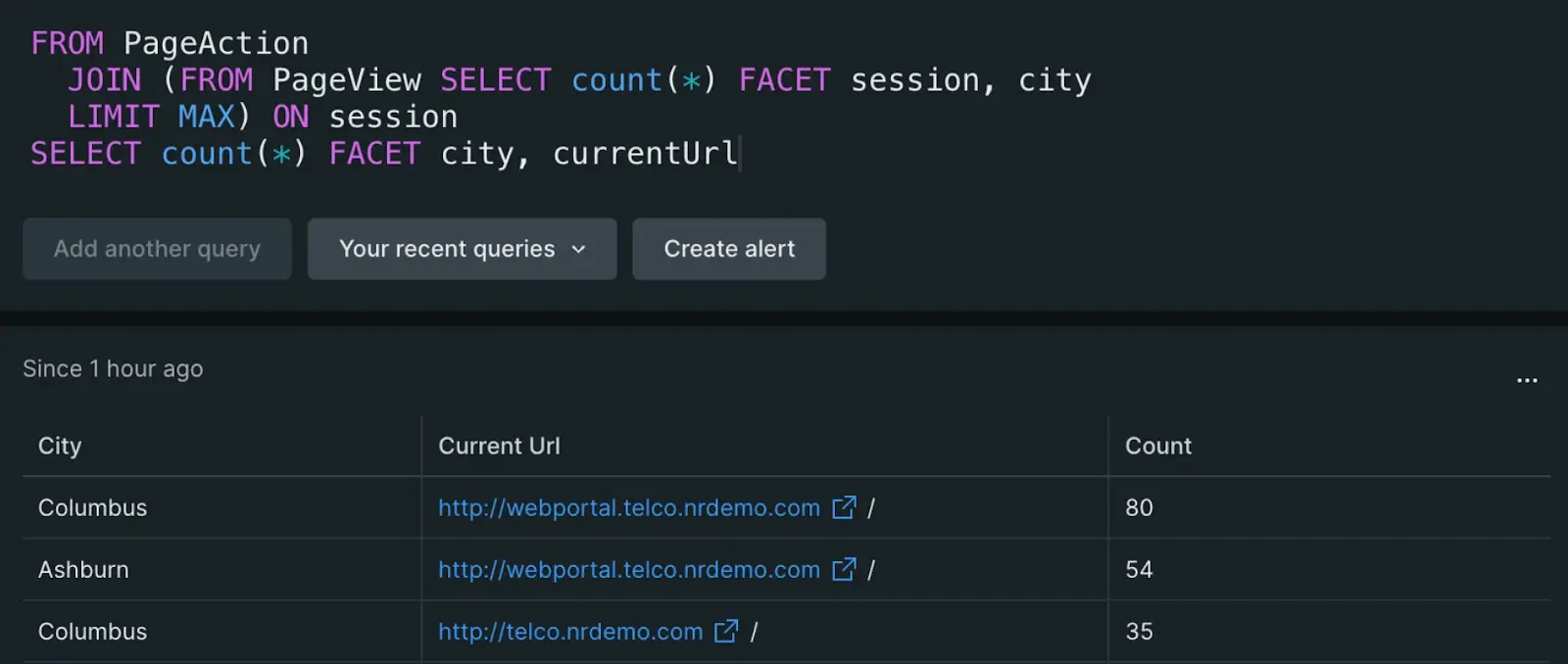
In this example, APM data is in two places: `PageView` provides information on a page visited by an end user, while `PageAction` provides the actions taken on the page. These two events both have session IDs that identify the session of an end user, but some data is contained in one event and not the other.
Here, `city` is an attribute in `PageView` but not `PageAction`, whereas `currentUrl` is an attribute in `PageAction` but not `PageView`.

With subquery joins, you can enrich the `PageAction` dataset with the missing data. By combining the data using the session ID, you can see not only the URL with the most clicks, but also where in the world these actions came from:
````sql
FROM PageAction
JOIN (FROM PageView SELECT count(*) FACET session, city
LIMIT MAX) ON session
SELECT count(*) FACET city, currentUrl
```
 Tip: Include `LIMIT MAX` in the inner subquery to maximize the number of results joined to the outer query. The current max result limit is 5,000 rows.
````
**Calculations across datasets**
In this example, two log datasets will be parsed to match one another, then calculations will be run to find the log error percentage.
Logs can often have data buried within the log message. Using enhanced string parsing functions like `aparse()` you can extract key values. In this case, the primary key application ID is within the log message of both `Log` and `Log_Error`:

In order to find the error percentage by application, a `LEFT JOIN` is required. This is because not all of the applications have errors, and an `INNER JOIN` would exclude these apps.
````sql
WITH numeric(aparse(message, '%applicationId: * %')) AS application_Id
FROM Log
LEFT JOIN (FROM Log_Error SELECT count(*) AS errCnt
FACET numeric(aparse(message, '%appId: * %')) AS app_Id
SINCE 1 day ago LIMIT MAX) ON application_Id=app_Id
SELECT (latest(errorCount) OR 0)/count(*) AS errorPercentage
FACET app_name, application_Id SINCE 1 day ago
```
Tip: Include `LIMIT MAX` in the inner subquery to maximize the number of results joined to the outer query. The current max result limit is 5,000 rows.
````
**Calculations across datasets**
In this example, two log datasets will be parsed to match one another, then calculations will be run to find the log error percentage.
Logs can often have data buried within the log message. Using enhanced string parsing functions like `aparse()` you can extract key values. In this case, the primary key application ID is within the log message of both `Log` and `Log_Error`:

In order to find the error percentage by application, a `LEFT JOIN` is required. This is because not all of the applications have errors, and an `INNER JOIN` would exclude these apps.
````sql
WITH numeric(aparse(message, '%applicationId: * %')) AS application_Id
FROM Log
LEFT JOIN (FROM Log_Error SELECT count(*) AS errCnt
FACET numeric(aparse(message, '%appId: * %')) AS app_Id
SINCE 1 day ago LIMIT MAX) ON application_Id=app_Id
SELECT (latest(errorCount) OR 0)/count(*) AS errorPercentage
FACET app_name, application_Id SINCE 1 day ago
```
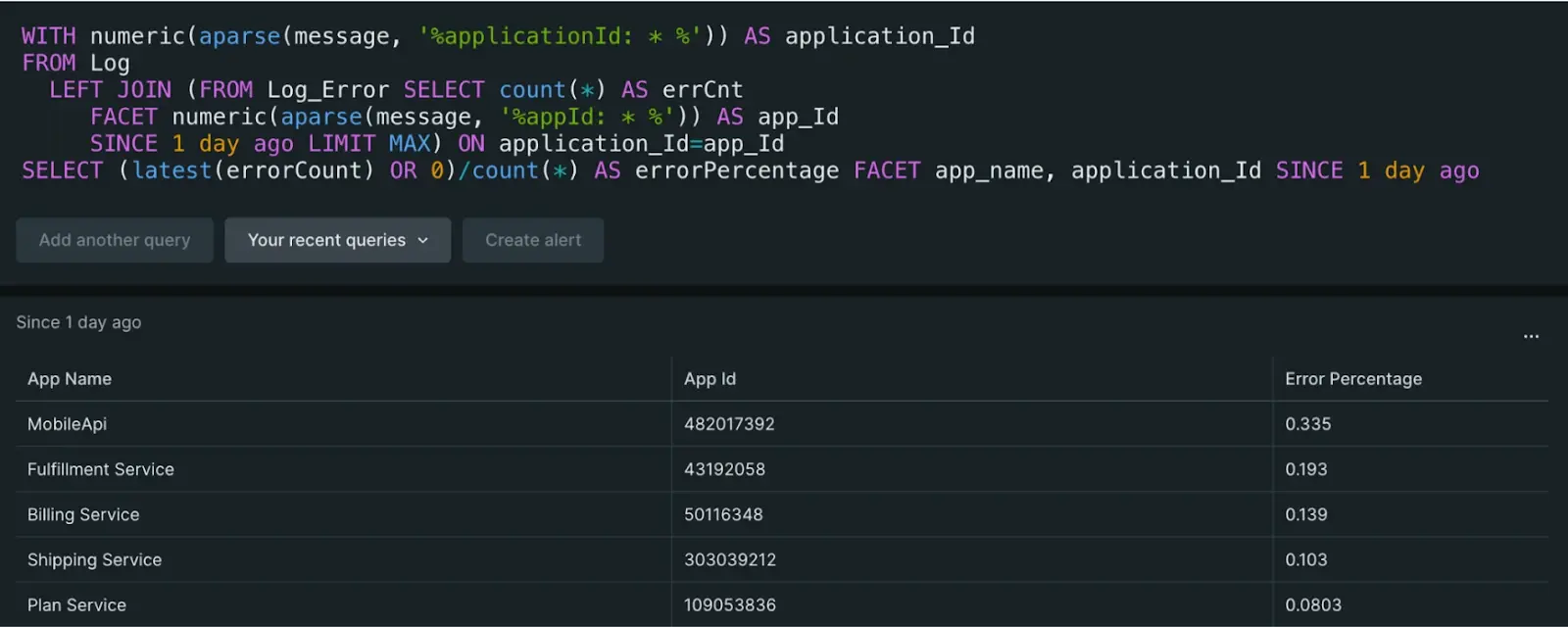 Even though there was data stored in two different log partitions and the application ID was hidden in the log messages, subquery joins allowed parsing out the needed data and calculating the error percentage. Using `latest()` was also helpful to make sure the aggregations of the inner query were calculated correctly with the outer query.
````
Even though there was data stored in two different log partitions and the application ID was hidden in the log messages, subquery joins allowed parsing out the needed data and calculating the error percentage. Using `latest()` was also helpful to make sure the aggregations of the inner query were calculated correctly with the outer query.
````