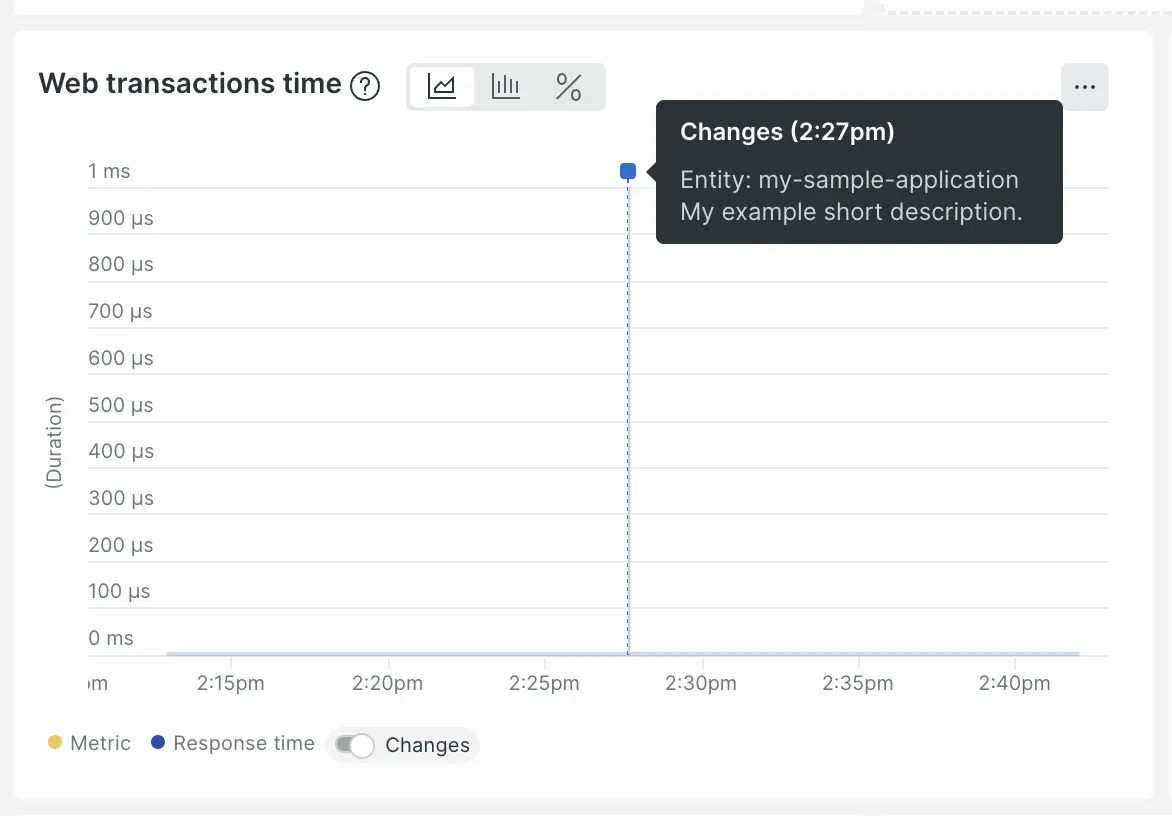
The change tracking feature allows you to track the effect of various changes on your customers and systems. For example, if you make some deployments, you can use the change tracking feature to monitor the results in New Relic UI charts. You'll also get access to features that help you understand the effects of those changes.
Instead of designating which changes you want to monitor by using our CLI or a CI/CD integration, you can do the same thing using GraphQL mutations via our NerdGraph API.
User permissions: Any user type can use NerdGraph to create change events and deployment markers, but only full platform users can access the curated change tracking UI experiences
Use change tracking events to monitor any modification to your system, including deployments, feature flags, business events, operational changes, or custom activities.
This method offers several benefits:
Flexible data: Add custom attributes, categories, and types to your events.
Broad visibility: You get a unified view of changes across all your accounts.
Easy to use: You don't need to know an entity.guid. This feature is powered by New Relic's flexible entity search.
To create an event, use the changeTrackingCreateEvent NerdGraph mutation. The events are stored in NRDB as the ChangeTrackingEvent event type.
Search for an entity with entitySearch
The changeTrackingCreateEvent mutation takes an entitySearch.query argument to attach the change to a specific entity. You don't need to know the entity's GUID up front. You can search by other identifying attributes, including the numeric application ID you may already use with the REST APIs. This makes entitySearch the most direct migration path from the REST API, where you record deployments by application ID.
An entity is a component that New Relic assigns a unique GUID to during instrumentation, such as an application or microservice.
Your query must be specific enough to resolve to exactly one entity. If it matches more than one, the mutation fails; narrow it (for example, add AND accountId = '<account id>').
Migrating from the REST APIs?
You don't need to look up an entity GUID first. Search by the numeric application ID you already use with domainId = '<app id>' AND domain = 'APM'. See the Deployment by application ID example below.
Supported operators
Entity search queries support the =, AND, IN, and LIKE operators.
Special characters
The query string treats special characters — (, ., ,, ;, :, *, -, _, and ) — as whitespace. For example, name LIKE ':aws:' matches entity names containing -aws or foo.aws.
Attributes you can search on
You can filter on default entity properties and on tags (tags can be referenced with or without backticks):
clusterAgentId: for browser applications, links to the associated APM application's cluster agent
aws.accountId: the AWS account ID for infrastructure entities monitored from AWS
Examples
Find an entity by its entity GUID: "id = '<entity guid>'"
Find an entity by its REST v2 API application ID: "domainId = '<app id>' AND domain = 'APM'"
Find an OpenTelemetry service in a specific account: "name = '<service name>' AND domain = 'EXT' AND type = 'SERVICE' AND accountId = '<account id>'"
Argument
Datatype
Description
category
String
Categorize changes using various category and type combinations. You can either use our predefined standard categories and types or define your own custom ones.
You must set the categoryFields argument to Deployment.
This deployment argument must include a version.
If you set category to Feature Flag:
You must set the categoryFields argument to FeatureFlag.
This featureFlag argument must include a featureFlagId.
To use Custom categories or types:
Within the dataHandlingRules argument, set the validationFlags field to ALLOW_CUSTOM_CATEGORY_OR_TYPE.
entitySearch.query
String
The entity to attach the change to, found with an entity search query. The query must resolve to exactly one entity, and supports the =, AND, IN, and LIKE operators. For example, "id = '<entity guid>'" or "domainId = '<app id>' AND domain = 'APM'". For the full syntax, searchable attributes, and more examples, see Search for an entity with entitySearch.
type
String
The type argument provides a further distinction for a change event and is used in conjunction with the category. For example, if an event's category is Deployment, its type might be Rolling.
You can use a predefined standard type typically associated with a standard category or define a custom type.
If you define a custom type, you must also:
Configure the dataHandlingRules argument.
Set the validationFlags field to ALLOW_CUSTOM_CATEGORY_OR_TYPE.
Argument
Datatype
Description
dataHandlingRules
Array of String
The dataHandlingRules field, which includes the validationFlags subfield, defines how the API handles validation failures. The validationFlags field accepts an array of the following values:
ALLOW_CUSTOM_CATEGORY_OR_TYPE: Required for custom or non-standard category and type combinations. Without this flag, New Relic returns an error if values don't exactly match predefined standards. For example, pairing the standard category Deployment with a custom type like Rainbow requires this flag.
FAIL_ON_FIELD_LENGTH: Validates that string fields don't exceed 4096 characters. If a field exceeds this limit, New Relic returns an error and doesn't save the data; otherwise, the data is trimmed and appended with ellipses (...).
FAIL_ON_REST_API_FAILURES: For APM entities, the agent calls the legacy New Relic v2 REST API. If the call fails, New Relic returns an error and doesn't save the data. If this flag is omitted, New Relic returns the failure message but doesn't block the save.
featureFlagId
String
If you select Feature Flag as your category, under the categoryFields argument, you must also select featureFlag and include a featureFlagId. This featureFlagId can be any string you would like to identify your feature flag by.
version
String
If the category argument is set to Deployment, then within the categoryFields, you must define deployment and ensure this deployment argument includes a version.
changelog
String
If the category is set to Deployment, then you can optionally include changelog information.
commit
String
If the category is set to Deployment, then you can optionally include commit information such as a commit SHA.
deepLink
String
If the category is set to Deployment, then you can optionally include deepLink such as a URL.
description
String
A description for the change tracking event. For example: A change event to track the marketing campaign impact.
groupId
String
A groupId attribute lets you organize the related changes across one or more entities. By using the same groupId for each related change, you can easily view these changes together in New Relic interfaces or refine query results. You can also use the same groupId to add changes to an existing group.
TIP
New Relic recommends using the groupId attribute when making multiple updates to one or more entities or implementing various changes across your system.
shortDescription
String
A short description for each change lets you identify the change events sent to New Relic quickly. If left blank, an autogenerated description is created that includes the entity, user, and version. The short description appears in the following areas:
In the marker flag as a tool tip, when you hover over a change marker on the chart.
In the Activity stream panels.
user
String
User identification or a valid email address. For example, user: datanerd@example.com.
You can define your custom attributes as key-value pairs to add additional metadata to change events.
Parameters
Datatype
Description
customAttributes
Object
A customAttributes field is specified as key-value pairs in JavaScript object format, where values can be of string, boolean, or number types. JavaScript numbers are stored as Java long or double values. Unlike JSON, keys in JavaScript objects are not quoted. To add a custom attribute, structure it as follows:
To prevent naming conflicts with default attribute names and NRQL keywords, the following custom attribute names are restricted:
accountId
ago
and
appID
as
auto
begin
begintime
category
categoryType
changeTrackingId
compare
customAttributes
customType
day
days
description
end
endtime
entity.domain
entity.guid
entity.name
entity.type
entityGuid
entityName
explain
eventType
facet
from
fb.input
groupId
hostname
hour
hours
in
is
like
limit
log
minute
minutes
month
months
not
null
offset
or
plugin.type
raw
second
seconds
select
since
timeseries
timestamp
type
until
user
week
weeks
where
with
New Relic automatically sets the timestamp and changeTrackingId attributes. You can provide the timestamp value as long as it is within one day before or after the current time. However, the changeTrackingId must be unique and will always be generated by New Relic.
Parameters
Datatype
Description
changeTrackingId
String
The changeTrackingId is a unique identifier generated when a change is recorded. You can use this ID in NerdGraph and NRQL queries to identify specific changes. For example: changeTrackingId = '8a3a594c-e726-4bc2-8078-26dffec9a3d8'.
timestamp
EpochMilliseconds
The timestamp attribute shows when a NerdGraph call was received. You can provide it by specifying the number of milliseconds since the Unix epoch. For example: timestamp: 1032480000000.
Importante
Timestamps must be applied within +/- 24 hours of the current time when the NerdGraph call is made, or the payload will be rejected.
Sample mutations
The following examples show NerdGraph mutations, with their required and optional attributes, for creating tracking markers:
description:"Launched Black Friday marketing campaign with 30% discount"
groupId:"blackfriday2024"
customAttributes:{
campaignType:"seasonal"
discountPercent:30
targetAudience:"premium_customers"
}
entitySearch:{query:"name = 'ecommerce-app' AND domain = 'APM'"}
}
){
changeTrackingEvent{
category
categoryAndType
changeTrackingId
customAttributes
description
entity{
name
guid
}
groupId
shortDescription
timestamp
user
type
}
messages
}
}
If you're migrating deployment recording from the REST API v2 (/v2/applications/{app_id}/deployments.json) or the Deployments v0 API, you already have the numeric application ID. You don't need to look up the entity GUID first — entitySearch can resolve the entity directly from the application ID using domainId and domain:
mutation{
changeTrackingCreateEvent(
changeTrackingEvent:{
categoryAndTypeData:{
categoryFields:{
deployment:{
version:"1.2.3"
changelog:"Fixed authentication bug"
commit:"abc123def456"
}
}
kind:{category:"deployment",type:"basic"}
}
user:"deployer@example.com"
description:"Production deployment of auth fix"
entitySearch:{
query:"domainId = 'INSERT_YOUR_APPID' AND domain = 'APM'"
}
}
){
changeTrackingEvent{
category
categoryAndType
changeTrackingId
description
entity{
name
guid
}
user
}
messages
}
}
Sugerencia
Your domainId search must resolve to exactly one entity. If more than one application shares an ID across accounts, add AND accountId = 'INSERT_YOUR_ACCOUNTID' to the query.
description:"Rolled out new streamlined checkout process to 25% of users"
entitySearch:{query:"id = 'INSERT_YOUR_GUID'"}
}
){
changeTrackingEvent{
category
categoryAndType
changeTrackingId
customAttributes
description
entity{
name
guid
}
groupId
shortDescription
timestamp
user
type
}
messages
}
}
Standard categories and types
For change tracking events, these are the valid predefined category and type pairs:
Category
Type
Deployment
Basic
Blue Green
Canary
Rolling
Shadow
Deployment Lifecycle
Artifact Copy
Artifact Deletion
Artifact Deployment
Artifact Move
Build Deletion
Build Promotion
Build Upload
Image Deletion
Image Promotion
Image Push
Release Bundle Creation
Release Bundle Deletion
Release Bundle Sign
Feature Flag
Basic
Business Event
Convention
Marketing Campaign
Other
Operational
Crash
Other
Scheduled Maintenance Period
Server Reboot
Feature availability
This feature isn't available in all regions. Refer to the data center and regional availability page to check if it's supported in your region and explore alternative solutions.
Change tracking deployments provide specialized tracking for code deployments and infrastructure changes. This is the legacy method that focuses specifically on deployment events. You can create deployment markers using the changeTrackingCreateDeployment mutation. These markers are stored in NRDB as Deployment event type.
Not affected by the REST API end-of-life
If you're here because of the REST API end-of-life announcement, note that the changeTrackingCreateDeployment NerdGraph mutation on this tab isn't being retired and continues to work.
The REST API v2 deployment endpoints (https://api.newrelic.com/v2/applications/{app_id}/deployments.json)
The legacy Deployments v0 API (deployments.xml), served on both the rpm and api hosts in each region - https://rpm.newrelic.com/deployments.xml and https://api.newrelic.com/deployments.xml (US), plus their .eu. equivalents
If you record deployments through either of those REST APIs, migrate to NerdGraph change tracking before that date. changeTrackingCreateEvent (on the Change tracking events tab) is the recommended mutation for migration. For endpoint-by-endpoint mappings, see the Migrate from REST API v2 to NerdGraph guide.
Sugerencia
New Relic recommends migrating to change tracking events using changeTrackingCreateEvent for better flexibility and feature support. Deployment markers will continue to work but have limited functionality compared to change events.
To track a change, such as a deployment, you must set the following:
Argument
Description
entityGuid
The entityGuid value is the unique identifier assigned by New Relic to your system components during instrumentation and setup processes. For more information on New Relic Entities and finding Entity GUIDs, see this guide.
version
The version attribute value can be anything, although we recommend using the version number set during your build process. To see an example of how this can be done, see our Jenkins deployments plugin documentation. If you already report version numbers to New Relic or by some other means, we recommend using the same here to set yourself up for forthcoming features that will allow you to facet and correlate data by version.
Sugerencia
If you are transitioning away from the legacy REST API, you'll need to start using your application's entity GUID instead of the appID. You can easily find the GUID in NerdGraph with this query:
You can define some optional and useful attributes to add context to the change you are tracking. These attributes can also enable certain change tracking features.
Argument
Description
changelog
You can submit a URL or any string for the changelog attribute. For example: changelog: "Added: /v2/deployments.rb, Removed: None" or changelog: "https://github.com/nodejs/node/blob/v4.2.3/CHANGELOG.md".
commit
You can submit any string for the commit attribute, and we suggest using the commit SHA associated with the deployment or change, for example, commit: "r3ws4sa43f".
description
You can submit any string for the description attribute. For example: description: "Added a deployments resource to the v2 API".
The description attribute may be where you choose to insert codified information from your internal deployment management processes. You can use IDs or tags you assign to each commit or deployment that describes organizational or business aspect of the work, for example, EU_MAINT_DMARK_v101.
deepLink
You can submit any URL for the deepLink attribute. We suggest using one that will help someone evaluating a change on New Relic to quickly get to a place where they can take further action, such as Jenkins, ArgoCD, or GitHub Actions. Here's an example: deepLink: "http://localhost:8080/job/PipelineV2/configure".
deploymentType
You can divide changes related to deployments into different types. These types align with common deployment techniques, but there is also an OTHER type. Types include:
BASIC
BLUE_GREEN
CANARY
ROLLING
SHADOW
OTHER
Assigning a type to each deployment will help you filter results on change tracking interfaces and NerdGraph/NRQL query results.
groupId
You may want to group deployments in cases where you're making a series of changes to one or more entities or releasing many changes across many entities within your system. By setting the same groupId attribute value for each related deployment, you can more easily see these changes together in New Relic interfaces or use the groupId to narrow query results.
The groupId can be any string of your choosing, and you can continue to add deployments to a group after the first use of the groupId (in case you want to relate this deployment to one that happened weeks or even months ago).
Sugerencia
In addition to using the groupId to relate many deployments, you may also use the attribute to define long-running changes. For example, two deployments with the same groupId could bracket a period during which alerts were suppressed or some migration was taking place.
user
Can be any string, for example, user: "datanerd@example.com".
New Relic automatically sets the timestamp and deploymentId attributes. You can provide a timestamp value as an override, but deploymentId will always be generated by New Relic to ensure uniqueness.
Attribute
Description
timestamp
The time at which the NerdGraph call was received. You can provide an override here as the number of milliseconds since the Unix epoch. For example: timestamp: 1032480000000.
Importante
There is a firm limitation applied that all timestamps must be +/- 24 hours of the current time when the NerdGraph call is received or the payload will be rejected.
deploymentId
A unique identifier generated when the deployment is recorded. While you cannot set deploymentId, you can use it in your NerdGraph and NRQL queries to locate specific deployments. Here's an example: deploymentId: "8a3a594c-e726-4bc2-8078-26dffec9a3d8".
Deployment mutation examples
The examples below show how to create deployment markers using the legacy API: