TCP, UDP 등 네트워킹 포트에 대한 포트 모니터링 통합 모니터 상태를 확인하고, 업타임 및 중단 데이터를 뉴렐릭에 보고합니다.
팁
이 통합은 Github에서 오픈 소스 로 공개되었습니다. 최신 업데이트에 대한 변경 로그도 여기에서 확인할 수 있습니다.
통합 설치
통합을 설치하려면 아래 단계를 따르세요.
인프라 에이전트 설치
포트 모니터링 통합을 사용하려면 먼저 동일한 호스트에 인프라 에이전트를 설치 해야 합니다. 모든 온호스트 통합에는 지표를 뉴렐릭에 노출하고 보고하는 데 도움이 되는 베어링 에이전트가 필요합니다.
통합 다운로드 및 준비
GitHub 리포지터리 에서 해당 플랫폼에 대한 릴리스를 선택하고 다운로드하세요. 예를 들어:
bash$wget https://github.com/newrelic/nri-port-monitor/releases/download/1.4/nri-port-monitor_x86_64.tar.gz && tar -zxvf nri-port-monitor_x86_64.tar.gznri-port-monitor실행 파일을/var/db/newrelic-infra/newrelic-integrations로 복사합니다.port-monitor-config.yml복사합니다./etc/newrelic-infra/integrations.dbash$cp nri-port-monitor /var/db/newrelic-infra/newrelic-integrations && cp port-monitor-config.yml /etc/newrelic-infra/integrations.d올바르게 실행될 수 있도록 바이너리 파일
nri-port-monitor에 대한 실행 권한을 설정합니다.bash$chmod +x /var/db/newrelic-infra/newrelic-integrations/nri-port-monitor
통합 구성
port-monitor-config.yml열고 모니터링할 모든 포트 인스턴스를 포함하여 구성을 편집합니다(모니터링할 각 주소/포트에 대해 통합 블록에 여러 스탠자를 추가하세요).통합:
이름: nri-port-모니터 간격: 60초 환경:
네트워크 유형. 알려진 네트워크는 다음과 같습니다.
TCP, TCP4(IPv4 전용), TCP6(IPv6 전용)
udp, udp4(IPv4 전용), udp6(IPv6 전용)
ip, ip4(IPv4 전용), ip6(IPv6 전용)
유닉스, 유닉스그램 및 유닉스패킷
네트워크: tcp
주소는 호스트:포트 형식으로 입력하여 확인하십시오.
주소: localhost:80
타임아웃(초)
타임아웃: 5 레이블: 환경: 프로덕션
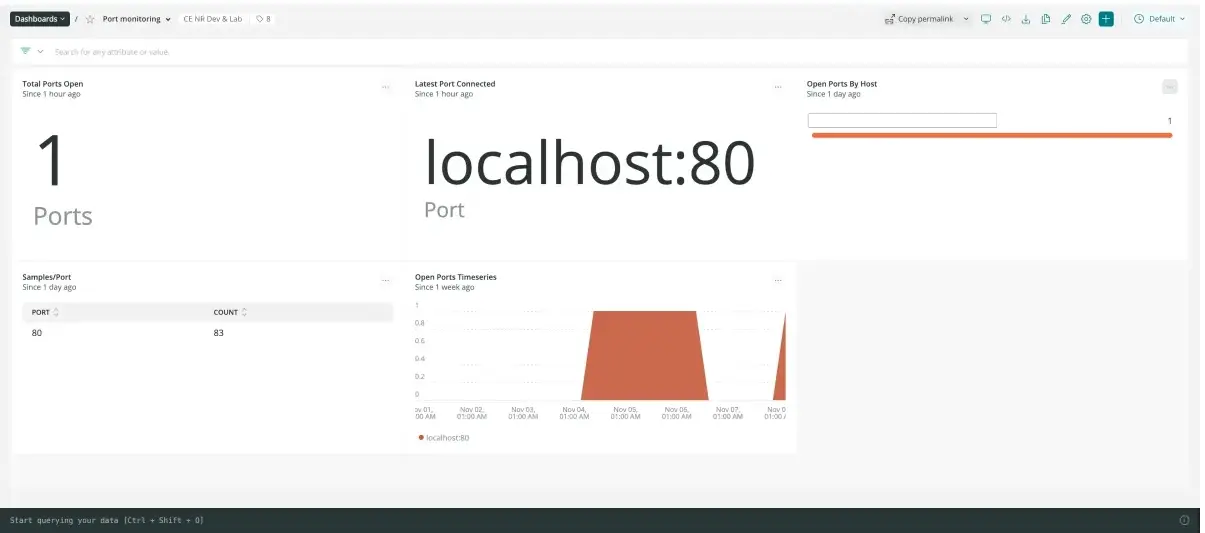
</Step><Step>## Find your data [#find-data]To easily find your Port Monitoring data, download our pre-built dashboard:
Go to one.newrelic.com and click on + Integrations & Agents.
Click on Dashboards tab.
In the search box, search for Port Monitoring.
Click on the Port Monitoring dashboard to install it.
Here's an example NRQL query that returns the status of configured ports:
SELECT latest(status) FROM NetworkPortSample FACET address SINCE 30 MINUTES AGO TIMESERIES