이 페이지는 자동화 작업 카탈로그에서 사용할 수 있는 AWS 시스템 관리자 작업에 대한 포괄적인 참조 정보를 제공합니다. 이러한 조치를 통해 시스템 관리자 자동화 및 문서 운영을 수행할 수 있습니다.
전제 조건
블리자드 자동화에서 AWS 작업을 사용하기 전에 다음 사항이 있는지 확인하세요.
- 적절한 권한이 있는 AWS 계정.
- AWS 자격 증명이 구성되었습니다(IAM 사용자 자격 증명, IAM 역할 ARN 또는 세션 자격 증명).
- 사용하려는 특정 AWS 서비스에 필요한 IAM 권한입니다.
IAM 사용자 및 IAM 역할을 만드는 방법과 펠로우 자동화 AWS 작업과 통합하기 위한 정적 및 세션 AWS 자격 증명을 설정하는 방법에 대한 자세한 내용은 AWS 자격 증명 설정을 참조하세요.
작업 입력에 전달된 AWS 자격 증명을 기반으로 AWS 계정에 SSM 문서를 작성합니다. AWS Systems Manager 설명서를참조하십시오.
입력 필드 | 선택성 | 유형 | 예시 |
|---|---|---|---|
awsRoleArn | 선택 과목 | 문자열 |
|
awsAccessKeyId | 선택 과목 | 문자열 |
|
awsSecretAccessKey | 선택 과목 | 문자열 |
|
awsSessionToken | 선택 과목 | 문자열 |
|
지역 | 필수의 | 문자열 |
|
documentName | 필수의 | 문자열 |
|
documentType | 선택 과목 | 문자열 |
여기 에서 유효한 값을 확인하세요. |
documentFormat | 선택 과목 | 문자열 |
여기 에서 유효한 값을 확인하세요. |
documentContent | 필수의 | 문자열 | 확인 예시 |
override | 선택 과목 | 부울 |
|
선택기 | 선택 과목 | 목록 |
|
출력 필드 | 유형 | 설명 및 예시 |
|---|---|---|
documentName | 문자열 |
|
documentVersion | 문자열 |
|
documentType | 문자열 |
|
documentStatus | 문자열 |
해당 값은 여기 에 있는 상태 중 하나가 될 것입니다. |
성공 | 부울 |
|
오류 메시지 | 문자열 |
|
중요
- 액션 입력에는
awsAccessKeyId과awsSecretAccessKey만 제공할 수 있지만, 이는 IAM 사용자의 정적 자격 증명이어야 합니다. - 세션 자격 증명을 사용하려면
awsAccessKeyId,awsSecretAccessKey및awsSessionToken작업 입력에 전달해야 합니다. - 지정된 유일한 델파이를 출력으로 가져오는 선택기입니다.
- 자세한 내용은 AWS 자격 증명을 참조하십시오.
예시 1: 모든 람다 함수를 나열하는 간단한 SSM 문서
schemaVersion: '0.3' description: List all Lambda function names. mainSteps: - name: ExecuteAwsApi action: aws:executeAwsApi isEnd: true inputs: Service: lambda Api: ListFunctions outputs: - Name: resultFunctionName Selector: $..FunctionName Type: StringList outputs: - ExecuteAwsApi.resultFunctionNameSSM 목록 Lambda 함수를 포함한 완전한 자동 흐름 정의
name: aws-api
  workflowInputs:    key:      type: String      defaultValue: "${{ :secrets:11933347:USERNAME_AWS_ACCESS_KEY_ID }}"    access:      type: String      defaultValue: "${{ :secrets:11933347:USERNAME_AWS_SECRET_ACCESS_KEY }}"    token:      type: String      defaultValue: "${{ :secrets:11933347:USERNAME_AWS_SESSION_TOKEN }}"    region:      type: String      defaultValue: us-east-2
  steps:    - name: createSsmDocument      type: action      action: aws.systemsManager.writeDocument      version: 1      inputs:        awsAccessKeyId: ${{ .workflowInputs.key }}        awsSecretAccessKey: ${{ .workflowInputs.access }}        awsSessionToken: ${{ .workflowInputs.token }}        region: ${{ .workflowInputs.region }}        selectors:          - name: documentName            expression: '.documentName'          - name: documentType            expression: '.documentType'          - name: documentStatus            expression: '.documentStatus'          - name: success            expression: '.success'        documentName: "LambdaListFunctionNames"        documentContent: |          schemaVersion: '0.3'          description: List all Lambda function names.          mainSteps:            - name: ExecuteAwsApi              action: aws:executeAwsApi              isEnd: true              inputs:                Service: lambda                Api: ListFunctions              outputs:                - Name: resultFunctionName                  Selector: $..FunctionName                  Type: StringList          outputs:            - ExecuteAwsApi.resultFunctionName
    - name: generateIdempotencyToken      type: action      action: utils.uuid.generate      version: 1
    - name: start1      type: action      action: aws.systemsManager.startAutomation      version: 1      inputs:        awsAccessKeyId: ${{ .workflowInputs.key }}        awsSecretAccessKey: ${{ .workflowInputs.access }}        awsSessionToken: ${{ .workflowInputs.token }}        region: ${{ .workflowInputs.region }}        documentName: "${{ .steps.createSsmDocument.outputs.documentName }}"        idempotencyToken: ${{ .steps.generateIdempotencyToken.outputs.uuid }}
    - name: waitForCompletion      type: action      action: aws.systemsManager.waitForAutomationStatus      version: 1      inputs:        awsAccessKeyId: ${{ .workflowInputs.key }}        awsSecretAccessKey: ${{ .workflowInputs.access }}        awsSessionToken: ${{ .workflowInputs.token }}        region: ${{ .workflowInputs.region }}        automationExecutionId: ${{ .steps.start1.outputs.automationExecutionId }}        # Optional, default is Success and Failed        automationExecutionStatuses:          - "Success"          - "Failed"        timeout: 60
    - name: hasCompleted      type: switch      switch:        - condition: ${{ .steps.waitForCompletion.outputs.automationExecutionStatus == "Failed" }}          next: displayError        - condition: ${{ .steps.waitForCompletion.outputs.automationExecutionStatus == "Success" }}          next: displaySuccess      next: displayUnexpected
    - name: displayUnexpected      type: action      action: newrelic.instrumentation.log      version: 1      inputs:        message: "Unexpected status ${{ .steps.waitForCompletion.outputs.automationExecutionStatus | tojson }}"      next: cleanupSsmDocument
    - name: displaySuccess      type: action      action: newrelic.instrumentation.log      version: 1      inputs:        message: "This is all the lambda function names on the region ${{ .workflowInputs.region }}:${{ .steps.waitForCompletion.outputs.automationExecutionOutputs.ExecuteAwsApi.resultFunctionName | join(\",\") }}"      next: cleanupSsmDocument
    - name: displayError      type: action      action: newrelic.instrumentation.log      version: 1      inputs:        message: "Error while executing document ${{ .steps.createSsmDocument.outputs.documentName }}, detail: ${{ .steps.waitForCompletion.outputs.errorMessage }}"      next: cleanupSsmDocument
- name: cleanupSsmDocument type: action action: aws.systemsManager.deleteDocument version: 1 inputs: awsAccessKeyId: ${{ .workflowInputs.key }} awsSecretAccessKey: ${{ .workflowInputs.access }} awsSessionToken: ${{ .workflowInputs.token }} region: ${{ .workflowInputs.region }} documentName: ${{ .steps.createSsmDocument.outputs.documentName }}예제 2: 파이썬 스크립트 실행
AWS SystemsManager 자동화 및 문서 작업을 사용하여 Python 펼쳐를 실행하는 플로우 흐름 정의를 정의할 수 있습니다.
다음은 간단한 "Hello World" 애플리케이션을 통해 설명하는 짧은 예시입니다.
schemaVersion: '0.3' description: "Run a Python script that says 'Hello' to the username passed as input and capture the output." parameters: Username: type: String description: "The username to greet." default: "User" mainSteps: - action: aws:executeScript name: pythonStep inputs: Runtime: python3.8 Handler: script_handler Script: | def script_handler(event, context): username = event['username'] return f'Hello {username}' InputPayload: username: "{{ Username }}" outputs: - Name: scriptOutput Type: String Selector: $.Payload outputs: - pythonStep.scriptOutput그러면 이것은 아래의 참조우에서 사용할 수 있습니다.
name: aws-python-script
  workflowInputs:    key:      type: String      defaultValue: "${{ :secrets:11933347:USERNAME_AWS_ACCESS_KEY_ID }}"    access:      type: String      defaultValue: "${{ :secrets:11933347:USERNAME_AWS_SECRET_ACCESS_KEY }}"    token:      type: String      defaultValue: "${{ :secrets:11933347:USERNAME_AWS_SESSION_TOKEN }}"    region:      type: String      defaultValue: us-west-2    name:      type: String      defaultValue: ExecuteHelloPythonScript    username:      type: String      defaultValue: World!
  steps:    - name: generateIdempotencyToken      type: action      action: utils.uuid.generate      version: 1
    - name: createSsmDocument      type: action      action: aws.systemsManager.writeDocument      version: 1      inputs:        awsAccessKeyId: ${{ .workflowInputs.key }}        awsSecretAccessKey: ${{ .workflowInputs.access }}        awsSessionToken: ${{ .workflowInputs.token }}        region: ${{ .workflowInputs.region }}        documentName: ${{ .workflowInputs.name }}        documentContent: |          schemaVersion: '0.3'          description: "Run a Python script that says 'Hello' to the username passed as input and capture the output."          parameters:            Username:              type: String              description: "The username to greet."              default: "User"          mainSteps:            - action: aws:executeScript              name: pythonStep              inputs:                Runtime: python3.8                Handler: script_handler                Script: |                  def script_handler(event, context):                      username = event['username']                      return f'Hello {username}'                InputPayload:                  username: "{{ Username }}"              outputs:                - Name: scriptOutput                  Type: String                  Selector: $.Payload          outputs:            - pythonStep.scriptOutput
    - name: start1      type: action      action: aws.systemsManager.startAutomation      version: 1      inputs:        awsAccessKeyId: ${{ .workflowInputs.key }}        awsSecretAccessKey: ${{ .workflowInputs.access }}        awsSessionToken: ${{ .workflowInputs.token }}        region: ${{ .workflowInputs.region }}        documentName: "${{ .steps.createSsmDocument.outputs.documentName }}"        idempotencyToken: ${{ .steps.generateIdempotencyToken.outputs.uuid }}        parameters:          Username: ${{ .workflowInputs.username }}
    - name: waitForCompletion      type: action      action: aws.systemsManager.waitForAutomationStatus      version: 1      inputs:        awsAccessKeyId: ${{ .workflowInputs.key }}        awsSecretAccessKey: ${{ .workflowInputs.access }}        awsSessionToken: ${{ .workflowInputs.token }}        region: ${{ .workflowInputs.region }}        automationExecutionId: ${{ .steps.start1.outputs.automationExecutionId }}        # Optional, default is Success and Failed        automationExecutionStatuses:          - "Success"          - "Failed"        timeout: 300
    - name: hasCompleted      type: switch      switch:        - condition: ${{ .steps.waitForCompletion.outputs.automationExecutionStatus == "Failed" }}          next: displayError        - condition: ${{ .steps.waitForCompletion.outputs.automationExecutionStatus == "Success" }}          next: displaySuccess      next: displayUnexpected
    - name: displayUnexpected      type: action      action: newrelic.instrumentation.log      version: 1      inputs:        message: "Unexpected status ${{ .steps.waitForCompletion.outputs.automationExecutionStatus | tojson }}"      next: cleanupSsmDocument
    - name: displaySuccess      type: action      action: newrelic.instrumentation.log      version: 1      inputs:        message: "This is the results of the automation that was run on the region ${{ .workflowInputs.region }}:${{ .steps.waitForCompletion.outputs.automationExecutionOutputs.pythonStep.scriptOutput | tojson }}"      next: cleanupSsmDocument
    - name: displayError      type: action      action: newrelic.instrumentation.log      version: 1      inputs:        message: "Error while executing document ${{ .steps.createSsmDocument.outputs.documentName }}, detail: ${{ .steps.waitForCompletion.outputs | tojson }}"      next: cleanupSsmDocument
- name: cleanupSsmDocument type: action action: aws.systemsManager.deleteDocument version: 1 inputs: awsAccessKeyId: ${{ .workflowInputs.key }} awsSecretAccessKey: ${{ .workflowInputs.access }} awsSessionToken: ${{ .workflowInputs.token }} region: ${{ .workflowInputs.region }} documentName: ${{ .steps.createSsmDocument.outputs.documentName }}AWS 임시 비밀 키가 secretsManagementCreateSecretNerdGraph 변형과 함께 이전에 저장되었다고 가정하면 다음 NerdGraph 변형을 사용하여 시작할 수 있습니다.
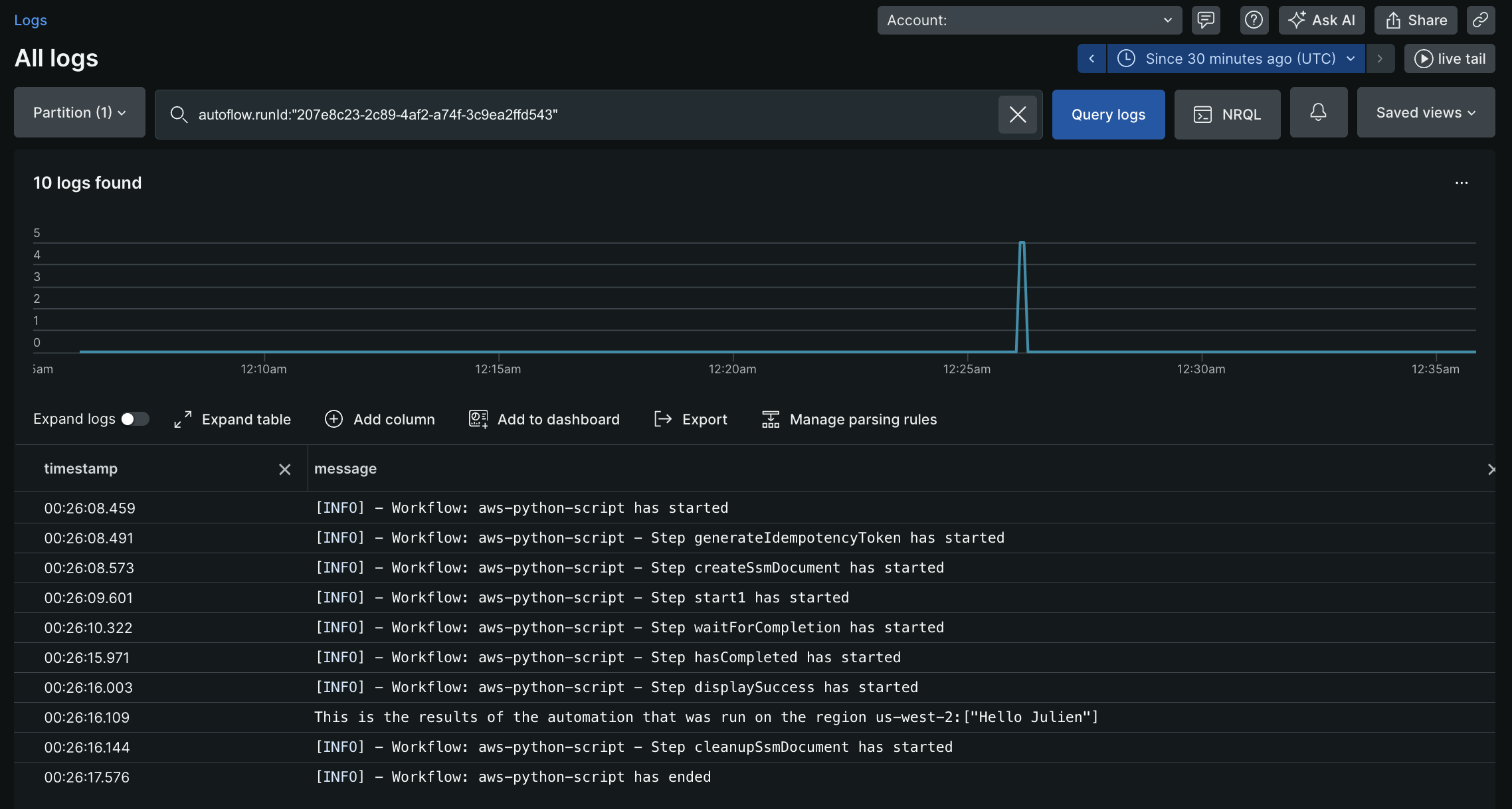
mutation { autoflowsStartWorkflowRun(accountId: 11933347, definition: { name: "aws-python-script", }, workflowInputs: [ {key: "key" value: "${{ :secrets:testUser123_AWS_ACCESS_KEY_ID }}"} {key: "access" value: "${{ :secrets:testUser123_AWS_SECRET_ACCESS_KEY }}"} {key: "token" value: "${{ :secrets:testUser123_AWS_SESSION_TOKEN }}"} {key: "region" value:"us-west-2"} {key: "username" value: "Julien"} ]) { runId } }위의 변경을 실행하면 예를 들어 207e8c23-2c89-4af2-a74f-3c9ea2ffd543 과 같은 runId가 반환됩니다. 이 runId를 사용하여 로그를 쿼리하면 다음과 같은 출력을 볼 수 있습니다.
예시 3: 보다 복잡한 SSM 문서
- API 게이트웨이 REST API 목록을 가져옵니다. 내 API(
Test API)를 필터링하고 나머지 API ID를 가져옵니다. - 내 API(
Test API) 내의 모든 리소스 목록을 가져옵니다. pathPart(/test)를 기준으로 특정 리소스를 필터링하고 resourceID를 가져옵니다. - 내 람다 함수(
ApiGwTestFn)의 버전 목록을 가져옵니다. 원하는 특정 버전(버전: 1)으로 롤백하고 해당 버전의 functionArn을 가져옵니다. - 위 단계에서 얻은 람다 함수Arn을 사용하여 API 게이트웨이 통합을 업데이트합니다.
- 내 Rest API (
Test API)에 대한 새로운 구현 배포를 만듭니다.
schemaVersion: '0.3' description: Test SSM for API gateway rollback mainSteps: - name: ExecuteAwsApi action: aws:executeAwsApi nextStep: ExecuteGetApiResources inputs: Service: apigateway Api: GetRestApis outputs: - Name: resultApiId Selector: $.items[?(@.name=='Test API')].id Type: String - name: ExecuteGetApiResources action: aws:executeAwsApi nextStep: ExecuteListVersionsByFunction inputs: Service: apigateway Api: GetResources restApiId: '{{ ExecuteAwsApi.resultApiId }}' outputs: - Name: resultResourceId Selector: $.items[?(@.pathPart=='test')].id Type: String - name: ExecuteListVersionsByFunction action: aws:executeAwsApi nextStep: ExecuteApiGwUpdateIntg inputs: Service: lambda Api: ListVersionsByFunction FunctionName: ApiGwTestFn outputs: - Name: resultLambdaVersionArn Selector: $.Versions[?(@.Version=='1')].FunctionArn Type: String - name: ExecuteApiGwUpdateIntg action: aws:executeAwsApi nextStep: ExecuteApiGwCreateDeployment inputs: Service: apigateway Api: UpdateIntegration restApiId: '{{ ExecuteAwsApi.resultApiId }}' resourceId: '{{ ExecuteGetApiResources.resultResourceId }}' httpMethod: GET patchOperations: - op: replace path: /uri value: arn:aws:apigateway:us-east-2:lambda:path/2015-03-31/functions/{{ ExecuteListVersionsByFunction.resultLambdaVersionArn }}/invocations - name: ExecuteApiGwCreateDeployment action: aws:executeAwsApi inputs: Service: apigateway Api: CreateDeployment restApiId: '{{ ExecuteAwsApi.resultApiId }}' outputs: - ExecuteGetApiResources.resultResourceId - ExecuteListVersionsByFunction.resultLambdaVersionArn샘플 SSM은 ExecuteGetApiResources.resultResourceId 과 ExecuteListVersionsByFunction.resultLambdaVersionArn 출력합니다. 이러한 출력값은 도표우 정의의 후속 단계에서 사용될 수 있습니다.
이 작업은 작업 입력에 전달된 자격 증명을 기반으로 AWS 계정에서 AWS SSM 문서를 삭제하는 것입니다. AWS Systems Manager 설명서를참조하십시오.
입력 필드 | 선택성 | 유형 | 예시 |
|---|---|---|---|
awsRoleArn | 선택 과목 | 문자열 |
|
awsAccessKeyId | 필수의 | 문자열 |
|
awsSecretAccessKey | 필수의 | 문자열 |
|
awsSessionToken | 선택 과목 | 문자열 |
|
지역 | 필수의 | 문자열 |
|
documentName | 필수의 | 문자열 |
|
선택기 | 선택 과목 | 목록 |
|
출력 필드 | 유형 | 예시 |
|---|---|---|
documentName | 문자열 |
|
성공 | 부울 |
|
오류 메시지 | 문자열 |
|
중요
- 액션 입력에는
awsAccessKeyId과awsSecretAccessKey만 제공할 수 있지만, 이는 IAM 사용자의 정적 자격 증명이어야 합니다. - 세션 자격 증명을 사용하려면
awsAccessKeyId,awsSecretAccessKey및awsSessionToken작업 입력에 전달해야 합니다. - 지정된 유일한 델파이를 출력으로 가져오는 선택기입니다.
모든 람다 함수를 나열하는 간단한 SSM 문서
schemaVersion: '0.3' description: List all Lambda function names. mainSteps: - name: ExecuteAwsApi action: aws:executeAwsApi isEnd: true inputs: Service: lambda Api: ListFunctions outputs: - Name: resultFunctionName Selector: $..FunctionName Type: StringList outputs: - ExecuteAwsApi.resultFunctionNameSSM을 사용한 완전한 정의:
name: aws-api
  workflowInputs:    key:      type: String      defaultValue: "${{ :secrets:11933347:USERNAME_AWS_ACCESS_KEY_ID }}"    access:      type: String      defaultValue: "${{ :secrets:11933347:USERNAME_AWS_SECRET_ACCESS_KEY }}"    token:      type: String      defaultValue: "${{ :secrets:11933347:USERNAME_AWS_SESSION_TOKEN }}"    region:      type: String      defaultValue: us-east-2
  steps:    - name: createSsmDocument      type: action      action: aws.systemsManager.writeDocument      version: 1      inputs:        awsAccessKeyId: ${{ .workflowInputs.key }}        awsSecretAccessKey: ${{ .workflowInputs.access }}        awsSessionToken: ${{ .workflowInputs.token }}        region: ${{ .workflowInputs.region }}        selectors:          - name: documentName            expression: '.documentName'          - name: documentType            expression: '.documentType'          - name: documentStatus            expression: '.documentStatus'          - name: success            expression: '.success'        documentName: "LambdaListFunctionNames"        documentContent: |          schemaVersion: '0.3'          description: List all Lambda function names.          mainSteps:            - name: ExecuteAwsApi              action: aws:executeAwsApi              isEnd: true              inputs:                Service: lambda                Api: ListFunctions              outputs:                - Name: resultFunctionName                  Selector: $..FunctionName                  Type: StringList          outputs:            - ExecuteAwsApi.resultFunctionName
    - name: generateIdempotencyToken      type: action      action: utils.uuid.generate      version: 1
    - name: start1      type: action      action: aws.systemsManager.startAutomation      version: 1      inputs:        awsAccessKeyId: ${{ .workflowInputs.key }}        awsSecretAccessKey: ${{ .workflowInputs.access }}        awsSessionToken: ${{ .workflowInputs.token }}        region: ${{ .workflowInputs.region }}        documentName: "${{ .steps.createSsmDocument.outputs.documentName }}"        idempotencyToken: ${{ .steps.generateIdempotencyToken.outputs.uuid }}
    - name: waitForCompletion      type: action      action: aws.systemsManager.waitForAutomationStatus      version: 1      inputs:        awsAccessKeyId: ${{ .workflowInputs.key }}        awsSecretAccessKey: ${{ .workflowInputs.access }}        awsSessionToken: ${{ .workflowInputs.token }}        region: ${{ .workflowInputs.region }}        automationExecutionId: ${{ .steps.start1.outputs.automationExecutionId }}        # Optional, default is Success and Failed        automationExecutionStatuses:          - "Success"          - "Failed"        timeout: 60
    - name: hasCompleted      type: switch      switch:        - condition: ${{ .steps.waitForCompletion.outputs.automationExecutionStatus == "Failed" }}          next: displayError        - condition: ${{ .steps.waitForCompletion.outputs.automationExecutionStatus == "Success" }}          next: displaySuccess      next: displayUnexpected
    - name: displayUnexpected      type: action      action: newrelic.instrumentation.log      version: 1      inputs:        message: "Unexpected status ${{ .steps.waitForCompletion.outputs.automationExecutionStatus | tojson }}"      next: cleanupSsmDocument
    - name: displaySuccess      type: action      action: newrelic.instrumentation.log      version: 1      inputs:        message: "This is all the lambda function names on the region ${{ .workflowInputs.region }}:${{ .steps.waitForCompletion.outputs.automationExecutionOutputs.ExecuteAwsApi.resultFunctionName | join(\",\") }}"      next: cleanupSsmDocument
    - name: displayError      type: action      action: newrelic.instrumentation.log      version: 1      inputs:        message: "Error while executing document ${{ .steps.createSsmDocument.outputs.documentName }}, detail: ${{ .steps.waitForCompletion.outputs.errorMessage }}"      next: cleanupSsmDocument
- name: cleanupSsmDocument type: action action: aws.systemsManager.deleteDocument version: 1 inputs: awsAccessKeyId: ${{ .workflowInputs.key }} awsSecretAccessKey: ${{ .workflowInputs.access }} awsSessionToken: ${{ .workflowInputs.token }} region: ${{ .workflowInputs.region }} documentName: ${{ .steps.createSsmDocument.outputs.documentName }}AWS SSM 문서를 사용하여 자동화를 시작합니다. AWS Systems Manager 설명서를참조하십시오.
입력 필드 | 선택성 | 유형 | 예시 |
|---|---|---|---|
awsRoleArn | 선택 과목 | 문자열 |
|
awsAccessKeyId | 선택 과목 | 문자열 |
|
awsSecretAccessKey | 선택 과목 | 문자열 |
|
awsSessionToken | 선택 과목 | 문자열 |
|
지역 | 필수의 | 문자열 |
|
documentName | 필수의 | 문자열 |
|
매개변수 | 선택 과목 | 지도 |
|
idempotencyToken | 선택 과목 | UUID |
이것은 AWS SSM 자동화를 시작하기 위한 멱등성 확보를 위해 클라이언트 토큰으로 전달됩니다. |
선택기 | 선택 과목 | 목록 |
|
출력 필드 | 유형 | 예시 |
|---|---|---|
automationExecutionId | 문자열 |
|
성공 | 부울 |
|
오류 메시지 | 문자열 |
|
중요
- 작업 입력에서
awsAccessKeyId및awsSecretAccessKey제공해야 하는 경우 이것이 IAM 사용자의 정적 자격 증명인지 확인하세요. - 세션 자격 증명을 사용하려면
awsAccessKeyId,awsSecretAccessKey및awsSessionToken작업 입력에 전달해야 합니다. - 자세한 내용은 AWS 자격 증명을 참조하십시오.
- 선택기를 사용하여 지정된 프로토콜만 출력으로 가져옵니다.
흐름의 정의 | 입력 | 출력 |
|---|---|---|
| | |
AWS 문서를 사용하여 자동화를 기다립니다. 자세한 내용은 AWS Systems Manager 설명서를 참조하세요.
입력 필드 | 선택성 | 유형 | 예시 |
|---|---|---|---|
awsRoleArn | 선택 과목 | 문자열 |
|
awsAccessKeyId | 선택 과목 | 문자열 |
|
awsSecretAccessKey | 선택 과목 | 문자열 |
|
awsSessionToken | 선택 과목 | 문자열 |
|
지역 | 필수의 | 문자열 |
|
automationExecutionId | 필수의 | 문자열 |
완료될 때까지 기다려야 하는 자동화
입니다. |
automationExecutionStatuses | 선택 과목 | 목록 |
AutomationExecution 에서 대기를 중지할 수 있는 자동화 실행 상태 목록입니다. 기본: |
시간 초과 | 선택 과목 | 정수 |
자동화 상태가 예상되는 타임아웃이 발생한 경우 출력에는 |
선택기 | 선택 과목 | 목록 |
. |
출력 필드 | 유형 | 예시 |
|---|---|---|
automationExecutionId | 문자열 |
|
automationExecutionStatus | 문자열 |
작업이 성공하면 그렇지 않으면 이 값은 null이 됩니다. |
automationExecutionOutputs | 지도 | 출력은 문서의 출력 값 맵이 됩니다. 문서의 모든 출력은 이 출력 필드를 사용하여 수집할 수 있으며 펠로우 자동화 정의의 후속 단계에서 사용할 수 있습니다. |
성공 | 부울 |
|
오류 메시지 | 문자열 |
|
중요
- 작업 입력에서는
awsAccessKeyId및awsSecretAccessKey만 제공할 수 있지만 IAM 사용자의 정적 자격 증명이어야 합니다. - 세션 자격 증명을 사용하려면
awsAccessKeyId,awsSecretAccessKey및awsSessionToken작업 입력에 전달해야 합니다. - AWS 자격 증명을 설정하려면 지침을 참조하세요.
- 선택기를 사용하여 지정된 프로토콜만 출력으로 가져옵니다.
흐름의 정의 | 입력 | 출력 |
|---|---|---|
| | |